

--wal-failover flag to or the COCKROACH_WAL_FAILOVER environment variable.
Failing over the WAL may allow some operations against a store to continue to complete despite temporary unavailability of the underlying storage. For example, if the node’s primary store is stalled, and the node can’t read from or write to it, the node can still write to the WAL on another store. This can allow the node to continue to service requests during momentary unavailability of the underlying storage device.
When WAL failover is enabled, CockroachDB does the following:
- Pairs each primary store with a secondary failover store at node startup.
- Monitors latency of all write operations against the primary WAL. If any operation exceeds the duration of , the node redirects new WAL writes to the secondary store.
- Checks the primary store while failed over by performing a set of filesystem operations against a small internal “probe file” on its volume. This file contains no user data and exists only when WAL failover is enabled.
- Switches back to the primary store once the set of filesystem operations against the probe file on its volume starts consuming less than a latency threshold (order of tens of milliseconds). If a probe
fsyncblocks longer than , CockroachDB emits a log like:disk stall detected: sync on file probe-file has been ongoing for 40.0sand, if the stall persists, the node exits (fatals) to and allow recovery elsewhere. - Exposes status at so you can monitor each store’s health and failover state.
- WAL failover only relocates the WAL. Data files remain on the primary volume. Reads that miss the Pebble block cache and the OS page cache can still stall if the primary disk is stalled. Caches typically limit blast radius, but some reads may see elevated latency.
- How WAL failover works.
- How to enable WAL failover.
- How to disable WAL failover.
- How to test WAL failover.
- How to monitor WAL failover.
- How to configure WAL failover in multi-store configurations.
- Frequently Asked Questions about WAL failover.
Why WAL failover?
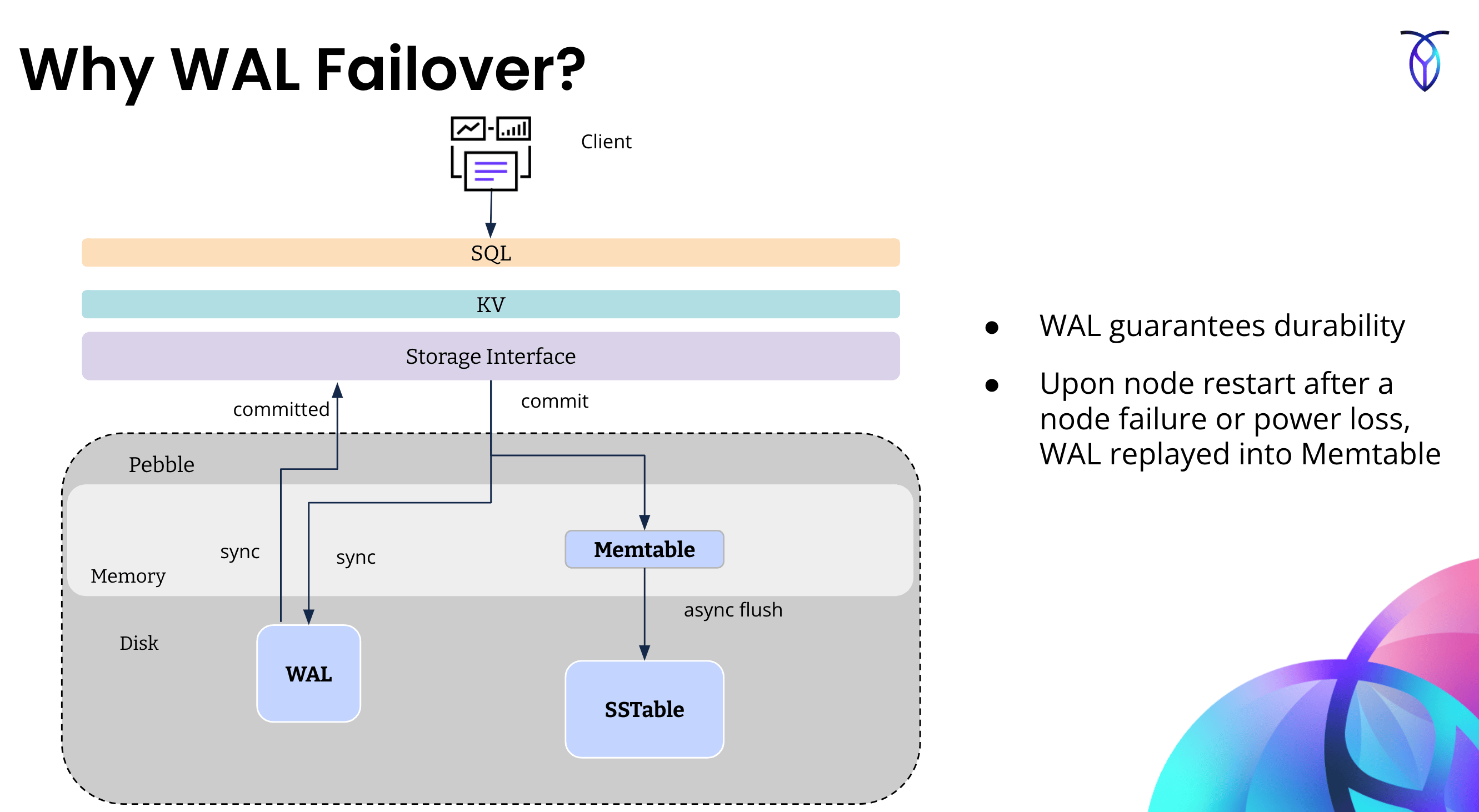
In cloud environments, transient are common, often lasting on the order of several seconds. This will negatively impact latency for the user-facing foreground workload. In the field, Cockroach Labs has observed that stalls while writing to the WAL are the most impactful to foreground latencies. Most other writes, such as flushes and compactions, happen asynchronously in the background, and foreground operations do not need to wait for them. When a disk stalls on a node, it could be due to complete hardware failure or it could be a transient stall. When a disk backing a stalls in CockroachDB, all the writes to for which the node is will be blocked until the disk stall clears, or the node is crashed (after default interval defined byCOCKROACH_ENGINE_MAX_SYNC_DURATION_DEFAULT), moving any leaseholders on this store to other stores.
WAL failover uses a secondary disk to fail over WAL writes to when transient disk stalls occur. This limits the write impact to a few hundreds of milliseconds (the failover threshold, which is configurable). Note that WAL failover only preserves availability of writes. If reads to the underlying storage are also stalled, operations that read and do not find data in the block cache or page cache will stall.
The following diagram shows how WAL failover works at a high level. For more information about the WAL, memtables, and SSTables, refer to the .
Create and configure a cluster to be ready for WAL failover
The steps to provision a cluster that has a single data store versus a multi-store cluster are slightly different. In this section, we will provide high-level instructions for setting up each of these configurations. We will use GCE as the environment. You will need to translate these instructions into the steps used by the deployment tools in your environment.Provision a multi-store cluster for WAL failover
This section explains how to provision a multi-store cluster and configure it for WAL failover.1. Create the cluster
Provision a 3-node cluster with 4 SSDs for each node. Deploy each node to a different region (e.g., in GCE,us-east4-a, us-west2-b, us-central1-c). Be sure to create a separate volume for each SSD.
2. Stage the cluster
on each node.3. Log configuration for WAL failover
If you are logging to a , create alogs.yaml file. Later on, you will pass this file to cockroach start when starting each node in the cluster. Not doing so will negate the positive impact of enabling WAL failover, because writes to the diagnostic logs may block indefinitely during the disk stall, effectively stalling the node.
4. Start the multi-store cluster with WAL failover enabled
To enable WAL failover when you start the cluster, either pass the OR set before starting the cluster. Additionally, you must set the value of the environment variableCOCKROACH_ENGINE_MAX_SYNC_DURATION_DEFAULT to 40s. By default, CockroachDB detects prolonged stalls and crashes the node after 20s. With WAL failover enabled, CockroachDB should be able to survive stalls of up to 40s with minimal impact to the workload.
You must also by passing in the logs.yaml file that you configured in Step 3.
Replicate the shell commands below on each node using your preferred deployment model. Be sure to edit the values of the flags passed to as needed for your environment.
cockroach start:
- Multiple
--storepaths --wal-failover=among-storessince there are multiple stores to choose from for WAL failover--log-config-fileuses thelogs.yamlcreated in Step 3
Provision a single-store cluster and side disk for WAL failover
When you have a cluster with a single data store and you want to configure the cluster with WAL failover, make sure that you have at least two disks on each node of the cluster: one for the data store, and one small side disk to use for WAL failover. The side disk should have the following properties:- Size = minimum 25 GiB
- IOPS = 1/10th of the disk for the “user data” store
- Bandwidth = 1/10th of the disk for the “user data” store
1. Create the cluster
Provision a 3-node cluster with 2 SSDs for each node. Deploy each node to a different region (e.g. in GCE,us-east4-a, us-west2-b, us-central1-c). Be sure to create a separate volume for each SSD.
2. Stage the cluster
on each node.3. Log configuration for WAL failover
If you are logging to a file-based sink, create alogs.yaml file. Later on, you will pass this file to cockroach start when starting each node in the cluster. Not doing so will negate the positive impact of enabling WAL failover, because writes to the diagnostic logs may block indefinitely during the disk stall, effectively stalling the node.
4. Prepare the WAL failover side disk on the cluster
To enable WAL failover on a single data store cluster with a side disk, you need to:- Make sure that each node has an additional disk available for WAL failover before starting the cluster (as described in Step 1 ).
- Know the path to this side disk.
ssh to one of the nodes in the cluster and use the lsblk command to see the path to the data2 volume. The output should look like the following:
data2 volume is /mnt/data2. For each node, create the directory /mnt/data2/cockroach on the side disk volume where the WAL failover data can be written. /mnt/data1 will be used as the single store for the cluster.
5. Start the cluster with WAL failover enabled
To enable WAL failover when you start the cluster, either pass the OR set before starting the cluster. Additionally, you must set the value of the environment variableCOCKROACH_ENGINE_MAX_SYNC_DURATION_DEFAULT to 40s. By default, CockroachDB detects prolonged stalls and crashes the node after 20s. With WAL failover enabled, CockroachDB should be able to survive stalls of up to 40s with minimal impact to the workload.
You must also by passing in the logs.yaml file that you configured in Step 3.
Replicate the shell commands below on each node using your preferred deployment model. Be sure to edit the values of the flags passed to as needed for your environment.
cockroach start:
--wal-failover‘s value ispath=/mnt/data2/cockroachsince that is the single failover disk--log-config-fileislogs.yaml- The data store (store 1) path in
--storeis/mnt/data1/cockroach
WAL failover in action
The instructions in this section show how to trigger WAL failover by introducing disk stalls on one of the nodes in the cluster. Note that the steps are the same for single-store or multi-store clusters.1. Set up a node with scripts to trigger WAL Failover
Trigger WAL failover on a node by slowing down the read bytes per second (rbps) and write bytes per second (wbps) for a disk.
ssh into the node whose disk you want to stall and unstall.
Run the lsblk command, and look for MAJ:MIN values for /mnt/data1 in lsblk output. In this case it is 259:0; you will use this for the disk stall/unstall scripts.
/sys/fs/cgroup/system.slice/cockroach-system.service/io.max to change the cgroup settings “read bytes per second” (rbps) and “write bytes per second” (wbps) of the disk to a very low value for stalling, and a max value for unstalling.
Create a shell script that will invoke the commands to stall and unstall alternately. Call this script wal-flip.sh with the content shown below:
2. WAL failover during transient disk stalls
Cause transient disk stall
Before triggering a WAL failover, open the so that you can observe WAL failover metrics. Trigger WAL failover by introducing a transient disk stall that is shorter in duration than the value ofCOCKROACH_ENGINE_MAX_SYNC_DURATION_DEFAULT. To do so, run the wal-flip.sh script that you created in Step 1.
WAL failover metrics
You can monitor WAL failover occurrences using the following metrics:storage.wal.failover.secondary.duration: Cumulative time spent (in nanoseconds) writing to the secondary WAL directory. Only populated when WAL failover is configured.storage.wal.failover.primary.duration: Cumulative time spent (in nanoseconds) writing to the primary WAL directory. Only populated when WAL failover is configured.storage.wal.failover.switch.count: Count of the number of times WAL writing has switched from primary to secondary store, and vice versa.storage.wal.fsync.latencymonitors the latencies of WAL files. If you have WAL failover enabled and are failing over,storage.wal.fsync.latencywill include the latency of the stalled primary.storage.wal.failover.write_and_sync.latency: When WAL failover is configured in a cluster, the operator should monitor this metric which shows the effective latency observed by the higher layer writing to the WAL. This metric is expected to stay low in a healthy system, regardless of whether WAL files are being written to the primary or secondary.
storage.wal.failover.secondary.duration is the primary metric to monitor. You should expect this metric to be 0 unless a WAL failover occurs. If a WAL failover occurs, the rate at which it increases provides an indication of the health of the primary store.
You can access these metrics via the following methods:
- The in .
- By .
wal.failover.switch.count for the associated store will increment by 1.
In , click on Custom Time series chart. On the custom chart page, add three charts: one for each of the preceding metrics.
Set the source of these metrics to be the node where you are running the disk stall/unstall script.
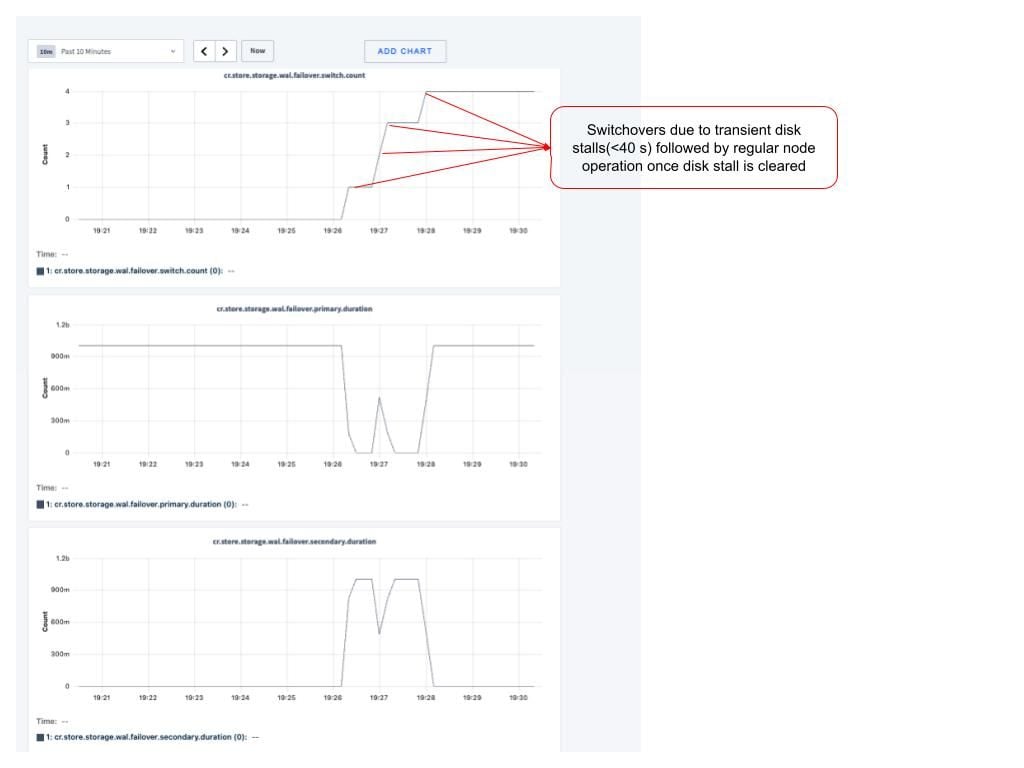
COCKROACH_ENGINE_MAX_SYNC_DURATION_DEFAULT.
You can confirm that the node is still live and available using .
3. WAL failover during long disk stalls
Cause long disk stall
Before triggering a WAL failover, open the so that you can observe WAL failover metrics. Trigger WAL failover by introducing a transient disk stall that is100s in duration (longer than the value of COCKROACH_ENGINE_MAX_SYNC_DURATION_DEFAULT).
Create a file named long-stall.sh with the following content, which will cause long disk stalls:
WAL failover metrics
You can monitor WAL failover occurrences using the following metrics:storage.wal.failover.secondary.duration: Cumulative time spent (in nanoseconds) writing to the secondary WAL directory. Only populated when WAL failover is configured.storage.wal.failover.primary.duration: Cumulative time spent (in nanoseconds) writing to the primary WAL directory. Only populated when WAL failover is configured.storage.wal.failover.switch.count: Count of the number of times WAL writing has switched from primary to secondary store, and vice versa.storage.wal.fsync.latencymonitors the latencies of WAL files. If you have WAL failover enabled and are failing over,storage.wal.fsync.latencywill include the latency of the stalled primary.storage.wal.failover.write_and_sync.latency: When WAL failover is configured in a cluster, the operator should monitor this metric which shows the effective latency observed by the higher layer writing to the WAL. This metric is expected to stay low in a healthy system, regardless of whether WAL files are being written to the primary or secondary.
storage.wal.failover.secondary.duration is the primary metric to monitor. You should expect this metric to be 0 unless a WAL failover occurs. If a WAL failover occurs, the rate at which it increases provides an indication of the health of the primary store.
You can access these metrics via the following methods:
- The in .
- By .
wal.failover.switch.count for the associated store will increment by 1.
When the disk continues to be stalled for longer than the duration of COCKROACH_ENGINE_MAX_SYNC_DURATION_DEFAULT, the node goes down, and there is no more metrics data coming from that node.
You can confirm that the node is down (no longer live and available) using .
Summary
Important environment variables
| Variable | Description | Default | Recommended value with WAL failover enabled |
|---|---|---|---|
COCKROACH\_ENGINE\_MAX\_SYNC\_DURATION\_DEFAULT | The threshold above which an observed engine sync duration triggers a fatal error. This environment variable is the default for the cluster setting. If that cluster setting is explicitly set, it takes precedence over this environment variable. | 20s | 40s |
COCKROACH\_LOG\_MAX\_SYNC\_DURATION | The maximum duration the file sink is allowed to take to write a log entry before the cockroach process is killed due to a disk stall. | 20s | 40s |
To enable WAL Failover
Set up your cluster for WAL failover with either multiple stores or a side disk. For multiple stores, pass--wal-failover=among-stores to .
For a side disk on a single-store config, pass --wal-failover={ path-to-my-side-disk-for-wal-failover } to .
Use remote log sinks, or if you use file-based logging, enable asynchronous buffering of file-groups log sinks:
COCKROACH_ENGINE_MAX_SYNC_DURATION_DEFAULT by setting it as follows:
- Before starting the cluster, set it using the
COCKROACH_ENGINE_MAX_SYNC_DURATION_DEFAULTenvironment variable. - After starting the cluster, set it by changing the cluster setting. When WAL failover is enabled, Cockroach Labs recommends using
40sfor this setting. If WAL failover is not enabled, do not change the default value of this setting.
To monitor WAL failover
You can monitor WAL failover occurrences using the following metrics:storage.wal.failover.secondary.duration: Cumulative time spent (in nanoseconds) writing to the secondary WAL directory. Only populated when WAL failover is configured.storage.wal.failover.primary.duration: Cumulative time spent (in nanoseconds) writing to the primary WAL directory. Only populated when WAL failover is configured.storage.wal.failover.switch.count: Count of the number of times WAL writing has switched from primary to secondary store, and vice versa.storage.wal.fsync.latencymonitors the latencies of WAL files. If you have WAL failover enabled and are failing over,storage.wal.fsync.latencywill include the latency of the stalled primary.storage.wal.failover.write_and_sync.latency: When WAL failover is configured in a cluster, the operator should monitor this metric which shows the effective latency observed by the higher layer writing to the WAL. This metric is expected to stay low in a healthy system, regardless of whether WAL files are being written to the primary or secondary.
storage.wal.failover.secondary.duration is the primary metric to monitor. You should expect this metric to be 0 unless a WAL failover occurs. If a WAL failover occurs, the rate at which it increases provides an indication of the health of the primary store.
You can access these metrics via the following methods:
- The in .
- By .
WAL failover behavior
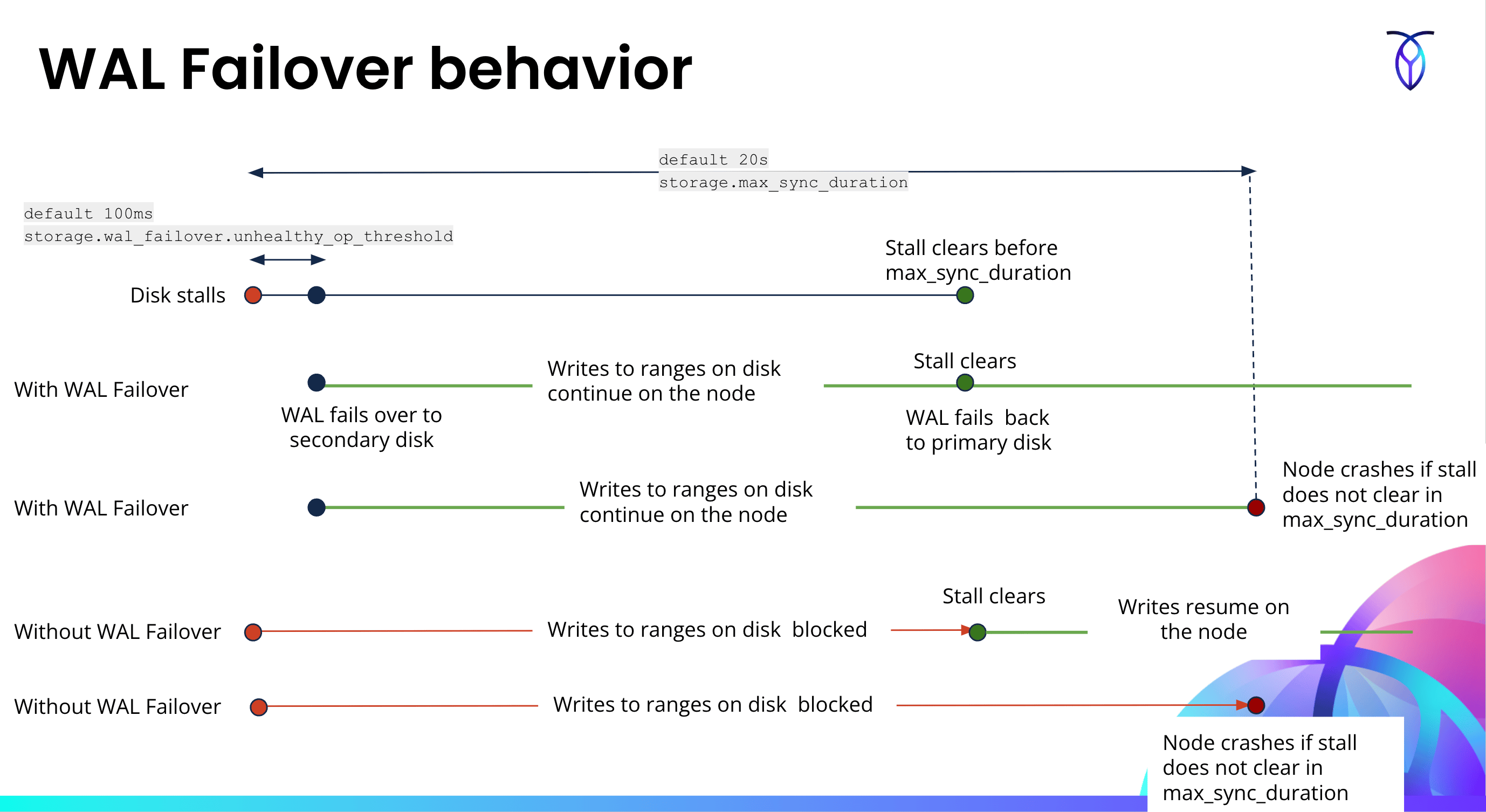
If a disk stalls for less than the duration ofCOCKROACH_ENGINE_MAX_SYNC_DURATION_DEFAULT, WAL failover will trigger and the node will continue to operate normally.
If a disk stalls for longer than the duration of COCKROACH_ENGINE_MAX_SYNC_DURATION_DEFAULT, a WAL failover will trigger. Following that, since the duration of COCKROACH_ENGINE_MAX_SYNC_DURATION_DEFAULT has been exceeded, the node will go down.
In a multi-store cluster, if a disk for a store has a transient stall, WAL will failover to the second store’s disk. When the stall on the first disk clears, the WAL will failback to the first disk. WAL failover will daisy-chain from store A to store B to store C.
The following diagram shows the behavior of WAL writes during a disk stall with and without WAL failover enabled.
FAQs
WAL failover provides the following benefits:- Improves resiliency against transient .
- Minimizes the impact of disk stalls on write latency. Bounds latencies to about
100msin the event of a stall, which helps reduce the stall’s impact on query tail latencies.
- Size = minimum 25 GiB
- IOPS = 1/10th of the disk for the “user data” store
- Bandwidth = 1/10th of the disk for the “user data” store
COCKROACH_ENGINE_MAX_SYNC_DURATION_DEFAULT environment variable) to a lower setting will do more harm than good. Therefore, it is recommended to set it to 40s for handling disk stalls that don’t abate in a reasonable time.
If you are not using WAL failover, you will want to configure the cluster setting (or the COCKROACH_ENGINE_MAX_SYNC_DURATION_DEFAULT environment variable before startup) reasonably low so that it will crash the node if you experience a reasonably long stall. This will allow other nodes to take over the so the workload can continue.
You can monitor WAL failover occurrences using the following metrics:
storage.wal.failover.secondary.duration: Cumulative time spent (in nanoseconds) writing to the secondary WAL directory. Only populated when WAL failover is configured.storage.wal.failover.primary.duration: Cumulative time spent (in nanoseconds) writing to the primary WAL directory. Only populated when WAL failover is configured.storage.wal.failover.switch.count: Count of the number of times WAL writing has switched from primary to secondary store, and vice versa.storage.wal.fsync.latencymonitors the latencies of WAL files. If you have WAL failover enabled and are failing over,storage.wal.fsync.latencywill include the latency of the stalled primary.storage.wal.failover.write_and_sync.latency: When WAL failover is configured in a cluster, the operator should monitor this metric which shows the effective latency observed by the higher layer writing to the WAL. This metric is expected to stay low in a healthy system, regardless of whether WAL files are being written to the primary or secondary.
storage.wal.failover.secondary.duration is the primary metric to monitor. You should expect this metric to be 0 unless a WAL failover occurs. If a WAL failover occurs, the rate at which it increases provides an indication of the health of the primary store.
You can access these metrics via the following methods:
- The in .
- By .
- For a multi-store cluster, pass
--wal-failover=disabledto . - For a single-store cluster with a side disk for failover, pass
--wal-failover=disabled,prev_path={ path-to-failover-disk }to .
100ms.
Yes: If the side disk for WAL failover was configured before the cluster was started, set the cluster setting to a value less than the cluster setting to enable WAL failover.
No: If the side disk for WAL failover was not pre-configured before the cluster was started, changing the value of the cluster setting to something less than the cluster setting will not have any effect, and when the disk stalls, WAL failover will not trigger. In other words, you cannot enable WAL failover at runtime for a single-store cluster if you did not pre-configure a side disk.
The recommended default value of the cluster setting is 100ms.
Yes.
Yes. To change , issue a statement like the following:
--wal-failover path.
Instead, to change the WAL directory path, you must first , , and then .
Using filesystem indirection such as symlinks or mount-point changes is not supported or tested by Cockroach Labs.