

Window definitions
Window frames are defined in or .Syntax
- Basic
- Expanded

Parameters
| Parameter | Description |
|---|---|
window\_name | The name of the new window frame. |
opt\_existing\_window\_name | An optional name of an existing window frame, defined in a different window definition. |
opt\_partition\_clause | An optional PARTITION BY clause. |
opt\_sort\_clause | An optional ORDER BY clause. See for details. |
opt\_frame\_clause | An optional frame clause, which contains a frame boundary and/or an EXCLUDE clause. |

How window functions work
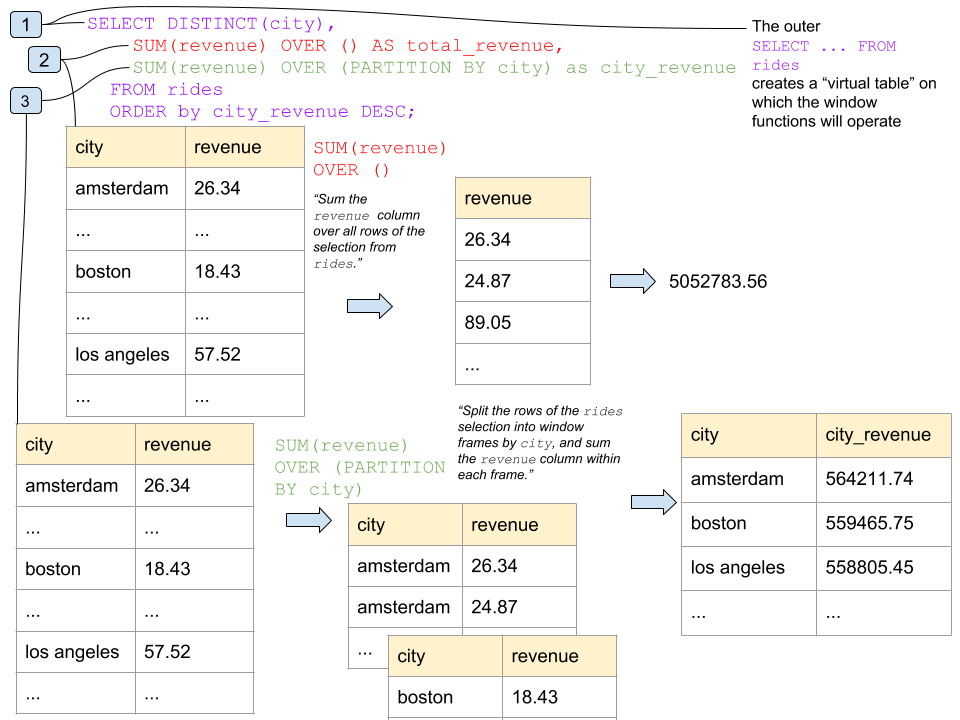
At a high level, window functions work by:- Creating a “virtual table” using a .
- Splitting that table into window frames with window definitions. You can define window frames in an , directly after the window function, or in a , as a part of the selection query.
- Applying the window function to each of the window frames.
- The outer
SELECT DISTINCT(city)... FROM ridescreates a “virtual table” on which the window functions will operate. - The window function
SUM(revenue) OVER ()operates on a window frame containing all rows of the query output. - The window function
SUM(revenue) OVER (PARTITION BY city)operates on several window frames in turn; each frame contains therevenuecolumns for a different city (Amsterdam, Boston, L.A., etc.).
Caveats
The most important part of working with window functions is understanding what data will be in the frame that the window function will be operating on. By default, the window frame includes all of the rows of the partition. If you order the partition, the default frame includes all rows from the first row in the partition to the current row. In other words, adding anORDER BY clause when you create the window frame (e.g., PARTITION BY x ORDER by y) has the following effects:
- It makes the rows inside the window frame ordered.
- It changes what rows the function is called on - no longer all of the rows in the window frame, but a subset between the “first” row and the current row.
- All rows in the window frame created by the
PARTITION BYclause, e.g.,SELECT f(x) OVER () FROM z. - A subset of the rows in the window frame if the frame is created with
SELECT f(x) OVER (PARTITION BY x ORDER BY y) FROM z.
Examples
Setup
The following examples use MovR, a fictional vehicle-sharing application, to demonstrate CockroachDB SQL statements. For more information about the MovR example application and dataset, see . To follow along, run with the--geo-partitioned-replicas flag. This command opens an interactive SQL shell to a temporary, 9-node in-memory cluster with the movr database.
Customers taking the most rides
To see which customers have taken the most rides, run:Customers generating the most revenue
To see which customers have generated the most revenue, run:Add row numbers to query output
To add row numbers to the output, kick the previous query down into a subquery and run therow_number() window function.
Customers taking the most rides and generating the most revenue
To see which customers have taken the most rides while generating the most revenue, run:WINDOW clause defines the window frame, and the OVER clauses reuse the window frame.