

format=avro).
This page describes the format and behavior of changefeed messages. You will find the following information on this page:
- Responses: The general format of changefeed messages.
- Message envelopes: The structure of the changefeed message.
- Ordering and delivery guarantees: CockroachDB’s guarantees for a changefeed’s message ordering and delivery.
- Delete messages: The format of messages when a row is deleted.
- Resolved messages: The resolved timestamp option and how to configure it.
- Duplicate messages: The causes of duplicate messages from a changefeed.
- Schema changes: The effect of schema changes on a changefeed.
- Garbage collection: How protected timestamps and garbage collection interacts with running changefeeds.
- Message formats: The limitations and type mapping when creating a changefeed with different message formats.
Responses
By default, changefeed messages emitted to a contain keys and values of the watched table rows that have changed. The message will contain the following fields depending on the type of emitted change and the you specified to create the changefeed:- Key: An array composed of the row’s
PRIMARY KEYfield(s) (e.g.,[1]for JSON or{"id":{"long":1}}for Avro). - Value:
- One of four possible top-level fields:
after, which contains the state of the row after the update (ornullforDELETEs).updated, which contains the timestamp.resolved, which is emitted for records representing resolved timestamps. These records do not include anaftervalue since they only function as checkpoints.before, which contains the state of the row before an update. Changefeeds must use the with the defaultwrappedenvelope to emit thebeforefield. When a row did not previously have any data, thebeforefield will emitnull.
- For and , the current state of the row inserted or updated.
- For ,
null.
- One of four possible top-level fields:
If you use the
envelope option to alter the changefeed message fields, your messages may not contain one or more of the values noted in the preceding list. As an example, when emitting to a Kafka sink, you can limit messages to just the changed key value by using the envelope option set to key_only. For more detail, refer to Message envelopes.| Statement | Response |
|---|---|
INSERT INTO office_dogs VALUES (1, 'Petee'); | JSON: [1] {"after": {"id": 1, "name": "Petee"}} </br>Avro: {"id":{"long":1}} {"after":{"office_dogs":{"id":{"long":1},"name":{"string":"Petee"}}}} |
DELETE FROM office_dogs WHERE name = 'Petee' | JSON: [1] {"after": null} </br>Avro: {"id":{"long":1}} {"after":null} |
payload and length.
Message envelopes
The envelope defines the structure of a changefeed message. You can use the option to manipulate the changefeed envelope. The values that theenvelope option accepts are compatible with different , and the structure of the message will vary depending on the sink.
Changefeeds created with or with no sink specified (sinkless changefeeds) produce messages without the envelope metadata fields of changefeeds emitting to sinks.
envelope options. Other can affect the message envelope and what messages are emitted. Therefore, the examples are a guide for what you can expect when only the envelope option is specified.
wrapped
wrapped is the default envelope structure for changefeed messages. This envelope contains an array of the primary key (or the key as part of the message metadata), a top-level field for the type of message, and the current state of the row (or null for deleted rows).
The message envelope contains a primary key array when your changefeed is emitting to a sink that does not have a message key as part of its protocol, (e.g., cloud storage, webhook sinks, or Google Pub/Sub). By default, messages emitted to Kafka sinks do not have the primary key array, because the key is part of the message metadata. If you would like messages emitted to Kafka sinks to contain a primary key array, you can use the option. Refer to the following message outputs for examples of this.
-
Cloud storage sink:
-
Kafka sink:
-
Default when
envelope=wrappedorenvelopeis not specified: -
Kafka sink message with
key_in_valueprovided:
-
Default when
wrapped and diff
To include a before field in the changefeed message that contains the state of a row before an update in the changefeed message, use the diff option with wrapped:
bare
bare removes the after key from the changefeed message and stores any metadata in a crdb field. When used with avro format, record will replace the after key.
-
Cloud storage sink:
bare message envelope places the output of the SELECT clause at the top level of the message instead of under an "after" key. When there is additional information that the changefeed is sending, such as or timestamps, the messages will include a crdb field containing this information.
-
In CDC queries:
-
A changefeed containing a
SELECTclause without any additional options: -
A changefeed containing a
SELECTclause with the option specified:
-
A changefeed containing a
key_only
key_only emits only the key and no value, which is faster if you only need to know the key of the changed row. This envelope option is only supported for or sinkless changefeeds.
-
Kafka sink:
It is necessary to set up a Kafka consumer to display the key because the key is part of the metadata in Kafka messages, rather than in its own field. When you start a Kafka consumer, you can use
--property print.key=true to have the key print in the changefeed message.-
Sinkless changefeeds:
row
row emits the row without any additional metadata fields in the message. This envelope option is only supported for or sinkless changefeeds. row does not support avro format—if you are using avro, refer to the bare envelope option.
-
Kafka sink:
Ordering and delivery guarantees
Changefeeds provide the following guarantees for message delivery to changefeed sinks:- Per-key ordering for the first emission of an event’s message.
- At-least-once delivery per event message.
Changefeeds do not support total message ordering or transactional ordering of messages.
Per-key ordering
Changefeeds provide a per-key ordering guarantee for the first emission of a message to the sink. Once the changefeed has emitted a row with a timestamp, the changefeed will not emit any previously unseen versions of that row with a lower timestamp. Therefore, you will never receive a new change for that row at an earlier timestamp. For example, a changefeed can emit updates to rowsA at timestamp T1, B at T2, and C at T3 in any order.
When there are updates to rows A at T1, B at T2, and A at T3, the changefeed will always emit A at T3 (for the first time) after emitting A at T1 (for the first time). However, A at T3 could precede or follow B at T2, because there is no timestamp ordering between keys.
Under some circumstances, a changefeed will emit duplicate messages of row updates. Changefeeds can emit duplicate messages in any order.
As an example, you run the following sequence of SQL statements to create a changefeed:
-
Create a table:
-
Create a changefeed targeting the
employeestable: -
Insert and update values in
employees:
In a , if a row is modified more than once in the same transaction, the changefeed will only emit the last change.
-
The sink will receive messages of the inserted rows emitted per timestamp:
The messages received at the sink are in order by timestamp for each key. Here, the update for key
[1]is emitted before the insertion of key[2]even though the timestamp for the update to key[1]is higher. That is, if you follow the sequence of updates for a particular key at the sink, they will be in the correct timestamp order. However, if a changefeed starts to re-emit messages after the last , it may not emit all duplicate messages between the first duplicate message and new updates to the table. For details on when changefeeds might re-emit messages, refer to Duplicate messages. Theupdatedoption adds anupdatedtimestamp to each emitted row. You can also use theresolvedoption to emit aresolvedtimestamp message to each Kafka partition, or to a separate file at a cloud storage sink. Aresolvedtimestamp guarantees that no (previously unseen) rows with a lower update timestamp will be emitted on that partition.
Depending on the workload, you can use resolved timestamp notifications on every Kafka partition to provide strong ordering and global consistency guarantees by buffering records in between timestamp closures. Use the
resolved timestamp to see every row that changed at a certain time.Define a key column
Typically, changefeeds that emit to Kafka sinks shard rows between Kafka partitions using the row’s primary key, which is hashed. The resulting hash remains the same and ensures a row will always emit to the same Kafka partition. In some cases, you may want to specify another column in a table as the key by using the option, which will determine the partition your messages will emit to. However, if you implementkey_column with a changefeed, consider that other columns may have arbitrary values that change. As a result, the same row (i.e., by primary key) may emit to any partition at the sink based upon the column value. A changefeed with a key_column specified will still maintain per-key and at-least-once delivery guarantees.
To confirm that messages may emit the same row to different partitions when an arbitrary column is used, you must include the option:
At-least-once delivery
Changefeeds also provide an at-least-once delivery guarantee, which means that each version of a row will be emitted once. Under some infrequent conditions a changefeed will emit duplicate messages. This happens when the changefeed was not able to emit all messages before reaching a checkpoint. As a result, it may re-emit some or all of the messages starting from the previous checkpoint to ensure that every message is delivered at least once, which could lead to some messages being delivered more than once. Refer to Duplicate messages for causes of messages repeating at the sink. For example, the checkpoints and changefeed pauses marked in this output show how messages may be duplicated, but always delivered:The first time a message is delivered, it will be in the correct timestamp order, which follows the per-key ordering guarantee. However, when there are duplicate messages, the changefeed may not re-emit every row update. As a result, there may be gaps in a sequence of duplicate messages for a key.
updated timestamp. This works across anything in the same cluster (tables, nodes, etc.).
The complexity with timestamps is necessary because CockroachDB supports transactions that can affect any part of the cluster, and it is not possible to horizontally divide the transaction log into independent changefeeds. For more information about this, read our blog post on CDC.
When changes happen to a column that is part of a composite , the changefeed will produce a delete message and then an insert message.
Delete messages
Deleting a row will result in a changefeed outputting the primary key of the deleted row and a null value. For example, with default options, deleting the row with primary key5 will output:
Resolved messages
When you create a changefeed with the , the changefeed will emit resolved timestamp messages in a format dependent on the connected . The resolved timestamp is the high-water mark that guarantees that no previously unseen rows with an earlier update timestamp will be emitted to the sink. That is, resolved timestamp messages do not emit until the changefeed job has reached a . When you specify theresolved option at changefeed creation, the will send the resolved timestamp to each endpoint at the sink. For example, each partition will receive a resolved timestamp message, or a will receive a resolved timestamp file.
There are three different ways to configure resolved timestamp messages:
-
If you do not specify the
resolvedoption at all, then the changefeed coordinator node will not send resolved timestamp messages. -
If you include
WITH resolvedin your changefeed creation statement without specifying a value, the coordinator node will emit resolved timestamps as the changefeed job checkpoints and the high-water mark advances. Note that new Kafka partitions may not receive resolved messages right away. -
If you specify a duration like
WITH resolved={duration}, the coordinator node will use the duration as the minimum amount of time that the changefeed’s high-water mark (overall resolved timestamp) must advance by before another resolved timestamp is emitted. The changefeed will only emit a resolved timestamp message if the timestamp has advanced (and by at least the optional duration, if set). For example:
Resolved timestamp frequency
The changefeed job’s coordinating node will emit resolved timestamp messages once the changefeed has reached a checkpoint. The frequency of the checkpoints determine how often the resolved timestamp messages emit to the sink. To configure how often the changefeed checkpoints, you can set the option and (if flushing is configurable for your sink). Themin_checkpoint_frequency option controls how often nodes flush their progress to the coordinating node. If you need resolved timestamp messages to emit from the changefeed more frequently than the 30s default, then you must set min_checkpoint_frequency to at least the desired resolved timestamp frequency. For example:
min_checkpoint_frequency and resolved options, there can be a tradeoff between changefeed message latency and cluster CPU usage.
- Lowering these options will cause the changefeed to checkpoint and send resolved timestamp messages more frequently, which can add overhead to CPU usage in the cluster.
- Raising these options will result in the changefeed checkpointing and sending resolved timestamp messages less frequently, which can cause latency in message delivery to the sink.
min_checkpoint_frequency and resolved to 0s so that the changefeed job checkpoints as frequently as possible and messages are sent immediately followed by the resolved timestamp. However, the frequent checkpointing will increase CPU usage in the cluster. If your application can tolerate a longer duration than 0s between checkpoints, this will help to reduce the overhead on the cluster.
Duplicate messages
Under some circumstances, changefeeds will emit duplicate messages to ensure the sink is receiving each message at least once. The following can cause or increase duplicate messages:- The changefeed job encounters an error and pauses, or is manually paused.
- A node in the cluster restarts or fails.
- The changefeed job has the
min_checkpoint_frequencyoption set, which can potentially increase duplicate messages. - A target table undergoes a schema change. Schema changes may also cause the changefeed to emit the whole target table. Refer to Schema changes for detail on duplicates in this case.
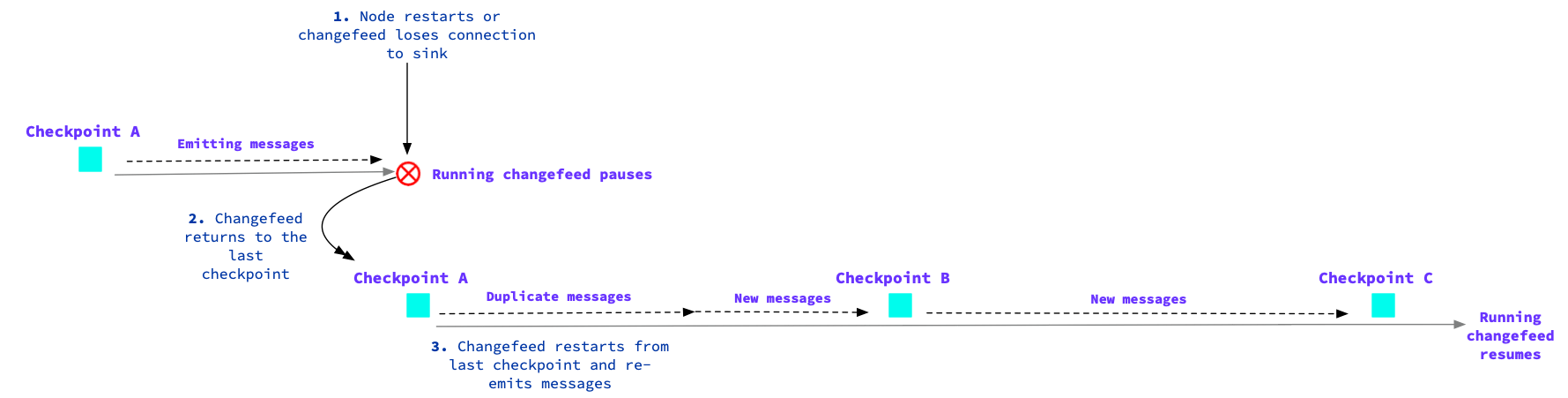
Changefeed encounters an error
By default, changefeeds treat errors as . When a changefeed encounters a retryable or non-retryable error, the job will pause until a successful retry or you resume the job once the error is solved. This can cause duplicate messages at the sink as the changefeed returns to the last checkpoint. We recommend monitoring for changefeed retry errors and failures. Refer to the page.A sink’s batching behavior can increase the number of duplicate messages. For example, if Kafka receives a batch of
N messages and successfully saves N-1 of them, the changefeed job only knows that the batch failed, not which message failed to commit. As a result, the changefeed job will resend the full batch of messages, which means all but one of the messages are duplicates. For Kafka sinks, reducing the batch size with may help to reduce the number of duplicate messages at the sink.Refer to the page for details on sink batching configuration.Node restarts
When a node restarts, the changefeed will emit duplicates since the last checkpoint. During a rolling restart of nodes, a changefeed can fall behind as it tries to catch up during each node restart. For example, as part of a rolling upgrade or cluster maintenance, a node may every 5 minutes and the changefeed job checkpoints every 5 minutes. To prevent the changefeed from falling too far behind, changefeed jobs before performing rolling node restarts.min_checkpoint_frequency option
The min_checkpoint_frequency option controls how often nodes flush their progress to the coordinating changefeed node. Therefore, changefeeds will wait for at least the min_checkpoint_frequency duration before flushing to the sink. If a changefeed pauses and then resumes, the min_checkpoint_frequency duration is the amount of time that the changefeed will need to catch up since its previous checkpoint. During this catch-up time, you could receive duplicate messages.
Schema Changes
For some schema changes, changefeeds will not emit duplicate records for the table that is being altered. Instead, the changefeed will only emit a copy of the table using the new schema. Refer to Schema changes with column backfill for examples of this.Avro schema changes
To ensure that the Avro schemas that CockroachDB publishes will work with the schema compatibility rules used by the Confluent schema registry, CockroachDB emits all fields in Avro as nullable unions. This ensures that Avro and Confluent consider the schemas to be both backward- and forward-compatible, because the Confluent Schema Registry has a different set of rules than Avro for schemas to be backward- and forward-compatible. The original CockroachDB column definition is also included within a doc field__crdb__ in the schema. This allows CockroachDB to distinguish between a NOT NULL CockroachDB column and a NULL CockroachDB column.
Schema validation tools should ignore the
__crdb__ field. This is an internal CockroachDB schema type description that may change between CockroachDB versions.Schema changes with column backfill
When schema changes with column backfill (e.g., adding a column with a default, adding a , adding aNOT NULL column, dropping a column) are made to watched rows, CockroachDB emits a copy of the table using the new schema.
The following example demonstrates the messages you will receive after creating a changefeed and then applying a schema change to the watched table:
schema_change_policy = nobackfill option. In the preceding two output blocks, the new schema messages that include the "likes_treats" column will not emit.
Refer to the for detail on the schema_change_policy option. You can also use the schema_change_events option to define the type of schema change event that triggers the behavior specified in schema_change_policy.
As of v22.1, changefeeds filter out from events by default. This is a . To maintain the changefeed behavior in previous versions where values are emitted for virtual computed columns, see the option for more detail.
Garbage collection and changefeeds
By default, will protect changefeed data from up to the time of the . Protected timestamps will protect changefeed data from garbage collection in the following scenarios:- The downstream is unavailable. Protected timestamps will protect changes until you either the changefeed or the sink becomes available once again.
- You a changefeed with the option enabled. Or, a changefeed with
protect_data_from_gc_on_pausepauses from a . Protected timestamps will protect changes until you the changefeed.
- the changefeed job.
- a paused changefeed job.
-
New in v23.1: Set the option, which will automatically expire the protected timestamp records that are older than your defined duration and cancel the changefeed job.
For example, if the following changefeed is paused or runs into an error and then pauses, protected timestamps will protect changes for up to 24 hours. After this point, if the changefeed does not resume, the protected timestamp records will expire and the changefeed job will be cancelled. This releases the protected timestamp records and allows garbage collection to resume:
protect_data_from_gc_on_pause is unset, pausing the changefeed will release the existing protected timestamp record. As a result, you could lose the changes if the changefeed remains paused longer than the window.
The only ways for changefeeds to not protect data are:
- You pause the changefeed without
protect_data_from_gc_on_pauseset. - You cancel the changefeed.
- The changefeed fails without set.
Message formats
By default, changefeeds emit messages in JSON format. You can use a different format by with the option and specifying one of the following:jsoncsvavroparquet(in )
Avro
The following sections provide information on Avro usage with CockroachDB changefeeds. Creating a changefeed using Avro is available in Core and Enterprise changefeeds with the option.Avro limitations
Below are clarifications for particular SQL types and values for Avro changefeeds:- must have precision specified.
-
(or its aliases
BYTEAandBLOB) are often used to store machine-readable data. When you stream these types through a changefeed with , CockroachDB does not encode or change the data. However, Avro clients can often include escape sequences to present the data in a printable format, which can interfere with deserialization. A potential solution is to hex-encodeBYTESvalues when initially inserting them into CockroachDB. This will ensure that Avro clients can consistently decode the hexadecimal. Note that hex-encoding values at insertion will increase record size. -
and types are encoded as arrays of 64-bit integers.
For efficiency, CockroachDB encodes
BITandVARBITbitfield types as arrays of 64-bit integers. That is, base-2 (binary format)BITandVARBITdata types are converted to base 10 and stored in arrays. Encoding in CockroachDB is big-endian, therefore the last value may have many trailing zeroes. For this reason, the first value of each array is the number of bits that are used in the last value of the array. For instance, if the bitfield is 129 bits long, there will be 4 integers in the array. The first integer will be1; representing the number of bits in the last value, the second integer will be the first 64 bits, the third integer will be bits 65–128, and the last integer will either be0or9223372036854775808(i.e., the integer with only the first bit set, or1000000000000000000000000000000000000000000000000000000000000000when base 2). This example is base-10 encoded into an array as follows:For downstream processing, it is necessary to base-2 encode every element in the array (except for the first element). The first number in the array gives you the number of bits to take from the last base-2 number — that is, the most significant bits. So, in the example above this would be1. Finally, all the base-2 numbers can be appended together, which will result in the original number of bits, 129. In a different example of this process where the bitfield is 136 bits long, the array would be similar to the following when base-10 encoded:To then work with this data, you would convert each of the elements in the array to base-2 numbers, besides the first element. For the above array, this would convert to:Next, you use the first element in the array to take the number of bits from the last base-2 element,10111110. Finally, you append each of the base-2 numbers together — in the above array, the second, third, and truncated last element. This results in 136 bits, the original number of bits. - A changefeed in will not be able to serialize .
Avro types
Below is a mapping of CockroachDB types to Avro types:The
DECIMAL type is a union between Avro STRING and Avro DECIMAL types.CSV
You can use the option to emit CSV format messages from your changefeed. However, there are the following limitations with this option:- It only works in combination with the option.
- It does not work when used with the or options.
- A changefeed emitting will include
ASlabels in the message format when the changefeed serializes a .
EXPORT statement.
See for detail on using changefeeds to export data from CockroachDB.
The following shows example CSV format output: