

Prerequisites
- for full compatibility with the .
- Install TypeScript, and install a TypeScript-compatible IDE (for example, VS Code).
- Download the userscript type definitions file and the tsconfig.json file. Place these files in your working directory to enable autocomplete, inline documentation, and real-time error detection directly in your IDE.
How it works
Userscripts act as a customizable processing layer within MOLT Replicator’s live replication lifecycle. They are used to intercept, inspect, and modify the flow of data as it moves from the source database to the target database, enabling full control over how rows are transformed, filtered, or written; as well as providing the ability to run custom transactional logic against the target database. Userscripts are comparable to MOLT Fetch’s , which are used during the initial bulk load phase of a migration. However, userscripts provide much greater customizability. When performing an , apply equivalent transformations in both the Fetch command and Replicator userscript to ensure data consistency. The following diagram illustrates how userscripts fit into the replication pipeline: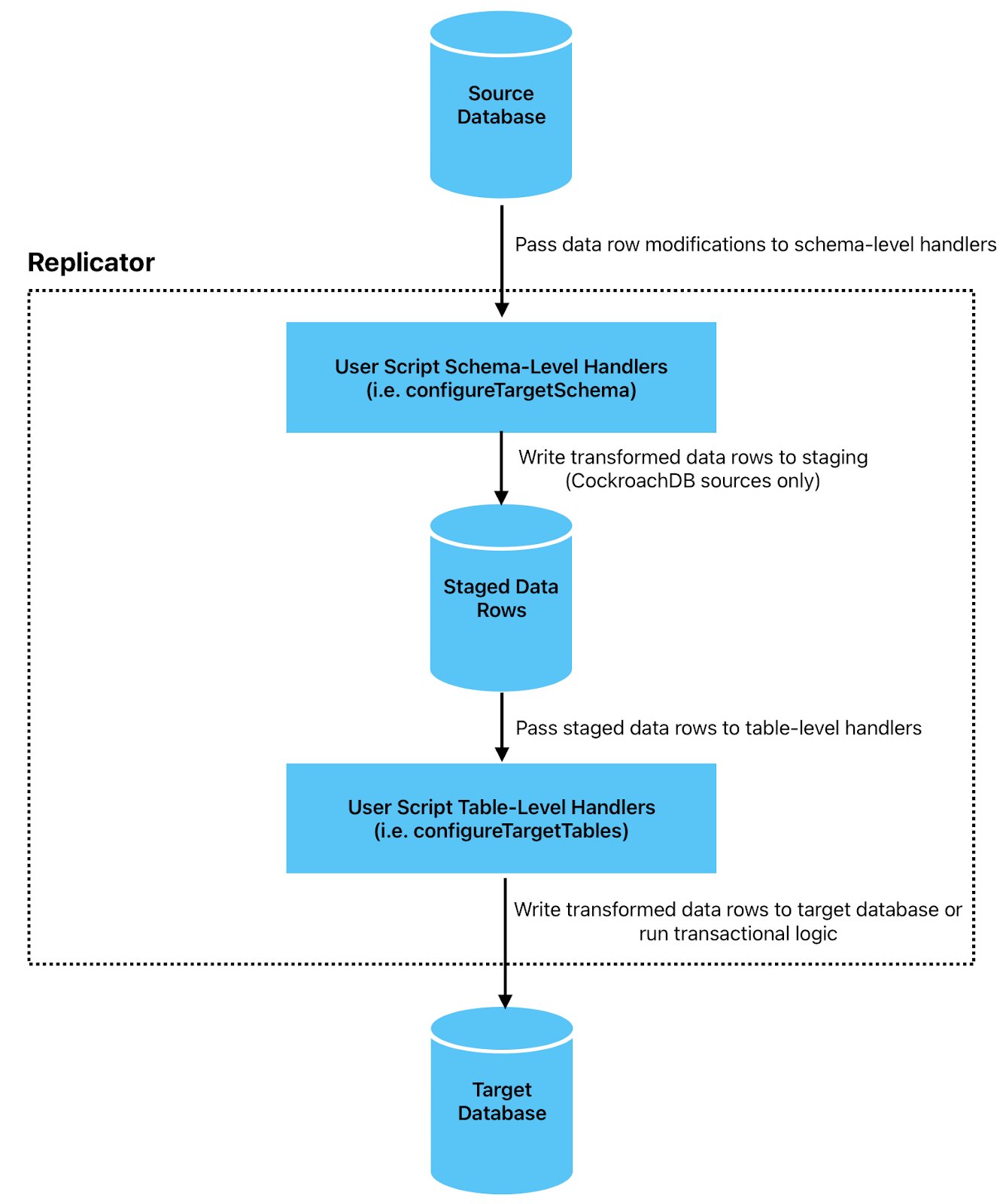
- Source changefeed: Replicator continuously listens to the source database’s changefeed for row modification events.
-
Userscript processing: When Replicator receives change events from the source database, it passes them through the userscript in two phases, in the following sequence:
- Schema-level handlers (, ) are invoked to transform, filter, or route rows before buffering them in a for ordered processing.
- After rows are retrieved from the staging database, table-level handlers ( and , followed by ) are invoked to apply final transformations and custom write logic.
-
Commit to target database: Replicator commits the transformed rows to the target database in a single transactional write. Target database writes and logic will only be scheduled to be committed after
onWritereturns, or all table-level handlers are run.
Usage
To have MOLT Replicator apply a userscript, include the flag with any . The flag accepts a path to a TypeScript filename.table_filter.ts during PostgreSQL replication:
Common uses
Userscripts customize the standard behavior of the source change data capture (CDC) stream consumed by Replicator. Common use cases include:- : Map source table names to different names on the target.
- : Map source column names to different names on the target.
- : Filter out specific rows based on conditions, such as excluding soft-deleted records or test data.
- : Exclude specific tables from replication.
- : Remove sensitive or unnecessary columns from replicated data.
- : Transform column values, compute new columns, or change data types during replication.
- : Distribute rows from a single source table across multiple target tables based on partitioning rules.
- : Route failed operations to a separate (DLQ) table for offline inspection and recovery.
Unsupported TypeScript features
Userscripts are TypeScript files that support ECMAScript 5.1, with partial ES6 support. The JavaScript execution environment in which userscripts run is intentionally minimal. It implements the core ECMAScript language but does not include the extended standard library APIs found in Node.js or web browsers. This ensures that userscripts remain lightweight, deterministic, and focused solely on processing data and executing transactional logic. The following capabilities are not available within userscripts:- Filesystem: No file reading or writing, directory listing, file streams, or
fsmodule. - Networking: No HTTP/HTTPS requests, sockets, WebSockets or
fetch. - Process and operating system: No
processobject, environment variables, subprocess execution, or OS-level access. - Timers and scheduling: No
setTimeout/setInterval. - Cryptography and binary utilities: No hashing or HMAC, secure random generation, WebCrypto, or compression or binary buffers.
- Workers and parallelism: No Web Workers, threads, or shared memory.
- Persistent storage: No local/session storage, filesystem-backed persistence, built-in key–value store.