> ## Documentation Index
> Fetch the complete documentation index at: https://cockroachlabs.mintlify.site/llms.txt
> Use this file to discover all available pages before exploring further.
# Understand Hotspots
export const InternalLink = ({version, path = "", children, ...props}) => {
let detectedVersion = version || "stable";
if (typeof window !== 'undefined' && !version) {
const match = window.location.pathname.match(/\/docs\/([^/]+)/);
if (match) {
detectedVersion = match[1];
}
}
const normalizedPath = path.startsWith("/") ? path.slice(1) : path;
return
{children}
;
};
In distributed SQL, hotspots refer to bottlenecks that limit a cluster's ability to scale efficiently within workloads. This page defines [terminology](#terminology) and [patterns](#patterns) for troubleshooting hotspots. These definitions are not mutually exclusive. They can be combined to describe a single incident.
The page also offers best practices for [reducing hotspots](#reduce-hotspots), including a [video demo](#video-demo).
To troubleshoot common hotspots, refer to the Detect Hotspots page.
## Terminology
### Hotspot
The word *hotspot* describes various skewed data access patterns in a cluster, often manifesting as higher CPU utilization on one or more nodes. Hotspots can also result from disk I/O, memory usage, or other finite resources in the cluster. Hotspots are performance issues that cannot be solved by scaling the cluster size, because they are typically limited to a fixed-size subset of the cluster’s resources.
### Hot node
**Synonyms:** node hotspot
A *hot node* is the most common indicator of a hotspot because the DB Console Metrics page shows resource utilization per node by default.
In distributed databases, like CockroachDB, identifying hot nodes or node hotspots is a key troubleshooting technique. Hot nodes typically exhibit:
1. Significantly higher utilization metrics compared to other nodes in the cluster.
2. Noticeable outlier behavior in performance and resource consumption.
3. A higher likelihood of occurring when the cluster is not operating at maximum capacity.
All hotspot types described on this page will create hot nodes, as long as the cluster is not already operating at maximum capacity.
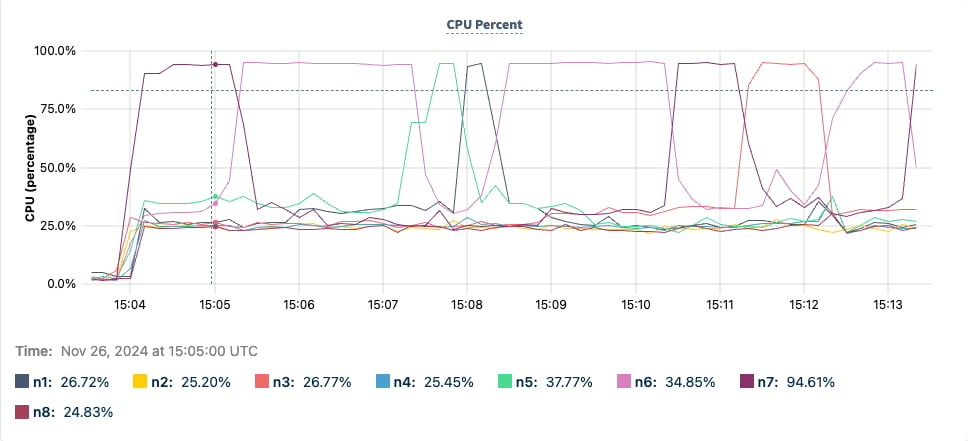
The following image is a graph of CPU Percent utilization per node. Most of the nodes hover around 25%, while one hot node is around 95%. Since the hot node keeps changing, it means the hotspot is moving from one node to another as the ranges containing writes fill up and split. For more information, refer to [hot range](#hot-range) and [moving hotspot](#moving-hotspot).
### Hot range
**Synonyms:** range hotspot
A *hot range* is one level down from the node hotspot. Ranges are the smallest unit of data distribution, making them critical in troubleshooting hotspots. The DB Console Top Ranges page provides details about ranges receiving a high number of reads or writes, which become an issue if they cause a [hot node](#hot-node).
A hot node is often caused by a single hot range. The system may split the hot range to redistribute the load (load-based splitting) or the range may stay hot until it fills up and splits (range size splitting). In the second case, the split is likely the continuation of the hotspot (as shown in the [previous image for a hot node](#hotspots-figure-1)). If the system is unable to identify a good splitting point for a hot range (for example, in the case of a [row hotspot](#row-hotspot)), the hot range becomes a bottleneck.
Understanding which range is hot and having knowledge of the keyspace allows you to approximate the type of hotspot compared to relying solely on [node-level metrics](#hot-node).
### Moving hotspot
A *moving hotspot* describes a hotspot that moves consistently during its life, for example:
* From one node to another within the cluster.
* Within a specific part of the keyspace, such as always reading the last 10 inserted rows on table T.
The [previous image](#hotspots-figure-1) of a CPU percent graph shows a hotspot moving from node to node. In this case, insertions at the tail of an index created a [hot range](#hot-range) and thus a [hot node](#hot-node). When the maximum size for the range was reached, the hot range split. After a split, the cluster's rebalancing processes eventually moved one of the ranges to a different node to improve data distribution or load balancing. Ongoing insertions at the tail of the index (in this queue-like workload) shifted the hotspot from range to range and correspondingly from node to node.
A queue-like workload pattern is not recommended in CockroachDB. However, if your use case requires this workload pattern, consider using hash-sharded indexes.
Moving hotspots are challenging because load-based splitting will not effectively partition the data to resolve them.
### Static hotspot
A *static hotspot* remains fixed in the keyspace, though it may move from node to node. The underlying cause of the hotspot, whether a span or a key, remains unchanged.
### Read hotspot
**Synonyms:** hot by read
A *read hotspot* is a hotspot caused by read throughput, either from a few queries reading a lot of data or many queries reading a little data. Read hotspots can result from many queries requesting the same information or accessing adjacent data.
Hotspots usually involve either read-heavy or write-heavy traffic, usually not both at the same time.
### Write hotspot
**Synonyms:** hot by write
A *write hotspot* is a hotspot caused by write throughput. Write hotspots increase the likelihood of contention within the [hot node](#hot-node) or [hot range](#hot-range), therefore leading to potential performance issues.
Write hotspots are unlike the other hotspots described on this page because they affect more than a single node. Since consensus and replication must take place, write hotspots often affect multiple nodes based on the replication factor.
### Read/write pressure
*Pressure* describes how close system resources, such as disk I/O, CPU, memory, and even non-hardware resources like locks, are to their limits.
It is especially useful when correlating pressure with activity, for example, the read pressure on Node 1 is coming from the key `/User/10`. Pressure effectively describes resource limits, encompassing contention, utilization, and throughput — all potential sources hotspots.
### Index tail
**Synonyms:** index maximum present key
An *index tail* is the largest existing key of an index, lexicographically. Note that this is different from the index (such as `/Table/1/1`) or index spans (such as `[/Table/1/1, /Table/1/2)`), because these are not valid row keys. An index tail instead refers to the last real key that appears in the index. For example, the head and tail of the index `/Table/1/1` are: `[/Table/1/1/aardvark, /Table/1/1/zultan]`.
## Patterns
This section goes into detail about workload patterns that can result in hotspots.
### Index hotspot
**Synonyms**: hot index, golden keyspace hotspot, monotonically increasing index, a running tail, a moving tail
An *index hotspot* is a hotspot on an index where the key for writes is continually increasing. This is common with indexing by an increasing column. For example, the column may be of data type `SERIAL`, `TIMESTAMP`, or `AUTO_INCREMENT`. However, an index hotspot is not always determined by the data type. If sequential data generated by the application is inserted into an index, a hotspot may occur. Index hotspots limit horizontal scaling as the index acts as a bottleneck.
Consider a table `users` that contains a primary key `user_id`, which is an incrementing integer value. Each new key will be the current maximum key + 1. In this way, all writes appear at the index tail. The following image visualizes writes to the `users` table using an incrementing `INT` primary key. Note how all writes are focused at the tail of the index, represented by the red section in Range 4.
Even if performance degradation in Range 4 is mitigated, the system remains constrained by the number of writes a single range can handle. As a result, CockroachDB could be limited to the performance of a single node, which goes against the purpose of a distributed database.
Index hotspots themselves are [hot by write](#write-hotspot), [moving hotspots](#moving-hotspot) that will continue to bounce around from range to range as the data grows.
In the ideal operation of a distributed SQL database, inserts into an index should be distributed evenly in the index's span to avoid this type of hotspot. Each range responsible for storing keys receives an even share of the workload. If the ranges containing the data become hot in this mode, the cluster can be scaled horizontally.
Consider a table `users` that contains a primary key `user_uuid` of type `UUID`. Because `UUID`s are pseudo-random, new rows are inserted into the keyspace at random locations. The following image visualizes writes to the `users` table using a `UUID` primary key. Red lines indicate an insert into the keyspace. Note how the red lines are distributed evenly.
Inserts are not the only way that index hotspots can occur. Consider the same table `users` that now has a secondary index on a `TIMESTAMP` column:
```sql theme={"theme":{"light":"catppuccin-mocha","dark":"catppuccin-mocha"}}
# ddl
CREATE TABLE profiles(
user_uuid UUID PRIMARY KEY,
last_seen_at TIMESTAMP,
INDEX index_last_seen_at (last_seen_at)
);
# dml
INSERT INTO profiles (user_uuid, last_seen_at) VALUES ('d9efa555-e8fd-4793-9239-f484454980cc', CURRENT_TIMESTAMP()), ('e3fabd81-2e08-4f25-99fd-8cd7e2928bd1', CURRENT_TIMESTAMP());
UPDATE profiles SET last_seen_at = CURRENT_TIMESTAMP() WHERE user_uuid='d9efa555-e8fd-4793-9239-f484454980cc';
```
Because `CURRENT_TIMESTAMP()` is a steadily increasing value, this `UPDATE` will similarly burden the range at the tail of the index. While hotspots on an index tail tend to be the most common, bottlenecks on the head are also possible. For example, indexing on `DESC` with the same insertion strategy will cause a hotspot.
On this page, the phrase *index hotspot* will be reserved for a hot by write hotspot on an index, even though indexes can become hot due to read. This is because a hot by write index hotspot is the most common hotspot pattern that occurs now and in the future as workloads continue to be migrated from legacy single-node installations. Hot by read index hotspots are defined later on this page as [*lookback hotspots*](#lookback-hotspots).
#### Resolving index hotspots
The resolution of the index hotspot often depends on your requirements for the data. If the sequential nature of the index serves no purpose, it is recommended to change the writes into the index to be randomly distributed. Ideally, primary keys in this instance would be set to `UUID`s, if your tolerance for swapover or even downtime allows it.
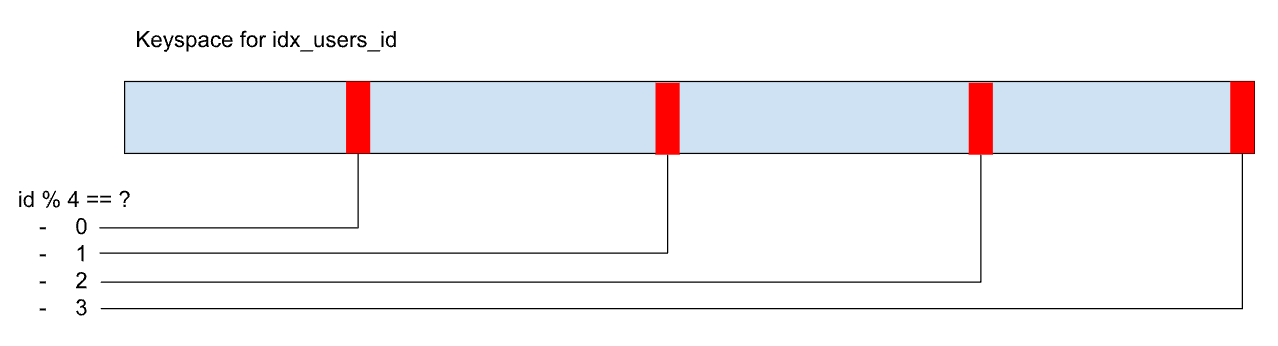
If inserting in sequential order is important, the index itself can be hash-sharded, which means that it is still stored in order, albeit in some number of shards. Consider a `users` table, with a primary key `id INT`, which is hash-sharded with 4 shards, and a hashing function of modulo 4. The following image illustrates this example:
Now the writes are distributed into the tails of the shards, rather than the tail of the whole index. This benefits write performance but makes reads more challenging. If you need to read a subset of the data, you will have to scan each shard of the index.
**Paradoxical performance implications**
Index hotspots paradoxically increase the efficiency of CockroachDB from the standpoint of the number of CPU cycles per write. This is primarily due to write compactions. As index hotspots continually move in a single direction, the SST (sorted string table) files generated by them have little overlap. Consequently, this results in minimal write throughput compared to a properly distributed workload. However, this performance boost has a limit, and relying on hotspot behavior for this advantage is problematic because hotspots can cause other issues.
#### Lookback hotspots
**Synonyms:** index scan hotspot, moving read hotspot
A *lookback hotspot* is a type of index hotspot in which a moving subset of an index is being read in a way that burdens the cluster.
For example, consider querying a `posts` table for the most recently created post:
```sql theme={"theme":{"light":"catppuccin-mocha","dark":"catppuccin-mocha"}}
CREATE TABLE posts(
id UUID,
created_at TIMESTAMP DEFAULT CURRENT_TIMESTAMP,
INDEX (created_at) USING HASH
);
SELECT MAX(created_at) FROM posts GROUP BY created_at ORDER BY created_at LIMIT 1;
```
Lookback hotspots are unique because they are [hot by read](#read-hotspot), rather than [hot by write](#write-hotspot). Separately lookback hotspots also tend not to specify a key, which would evade systems using key requests to identify hotspots.
#### Queueing hotspot
**Synonyms:** outbox hotspot
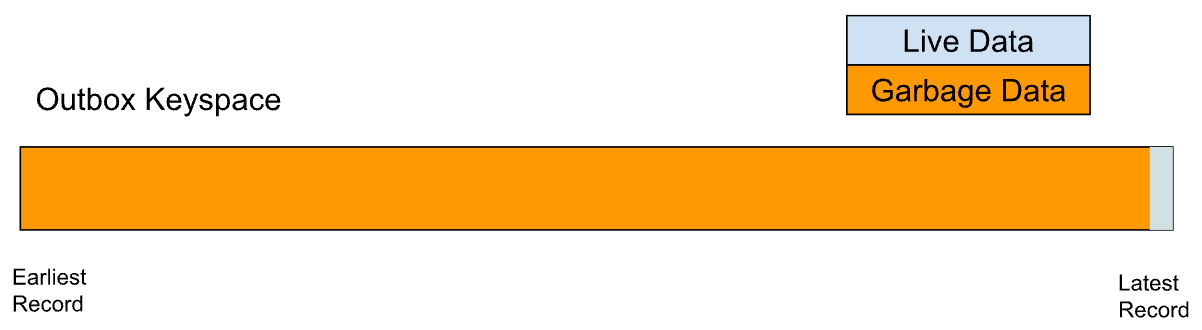
A *queueing hotspot* is a type of index hotspot that occurs when a workload treats CockroachDB like a distributed queue. This can happen if you implement the Outbox microservice pattern.
Queues, such as logs, generally require data to be ordered by write, which necessitates indexing in a way that is likely to create a hotspot. An outbox where data is deleted as it is read has an additional problem: it tends to accumulate an ordered set of garbage data behind the live data. Since the system cannot determine whether any live rows exist within the garbage data, what appears to be a small table scan to the user can actually result in an unexpectedly intensive scan on the garbage data.
To mitigate this issue, it is advisable to use Change Data Capture (CDC) to ensure subscription to updates instead of using Outbox tables. If using CDC is not possible, sharding the index that the outbox uses for ordering can reduce the likelihood of a hotspot within the cluster.
### Row hotspot
**Synonyms:** hot key, hot row, point hotspot
A *row hotspot* is a hotspot where an individual point in the keyspace becomes throughput limiting, often due to high activity on a single row. Since rows are inherently indivisible, a hotspot on a row cannot be split. A classic example is a social media application with a high volume of activity on certain users.
Consider a social media application that initially consists of two tables, `users` and `follows`:
```sql theme={"theme":{"light":"catppuccin-mocha","dark":"catppuccin-mocha"}}
CREATE TABLE users(
id UUID,
username VARCHAR,
follower_count INT
);
CREATE TABLE follows(
follower UUID REFERENCES users(id),
followee UUID REFERENCES users(id)
);
```
To avoid having to partially scan the `follows` table each time you want to know the count of `followers` for a given `user`, you can issue an `UPDATE` to the `users` table to increment the `follower_count`. This way, every time a new follower is added, the `follower_count` in the `users` table is updated directly, making it easier and faster to retrieve the `follower_count` without scanning the entire `follows` table:
```sql theme={"theme":{"light":"catppuccin-mocha","dark":"catppuccin-mocha"}}
# user 1 follows user 2
INSERT INTO follows(follower, followee) VALUES (1, 2);
# increment follower_count
UPDATE User SET follower_count = follower_count+1 WHERE id=2;
```
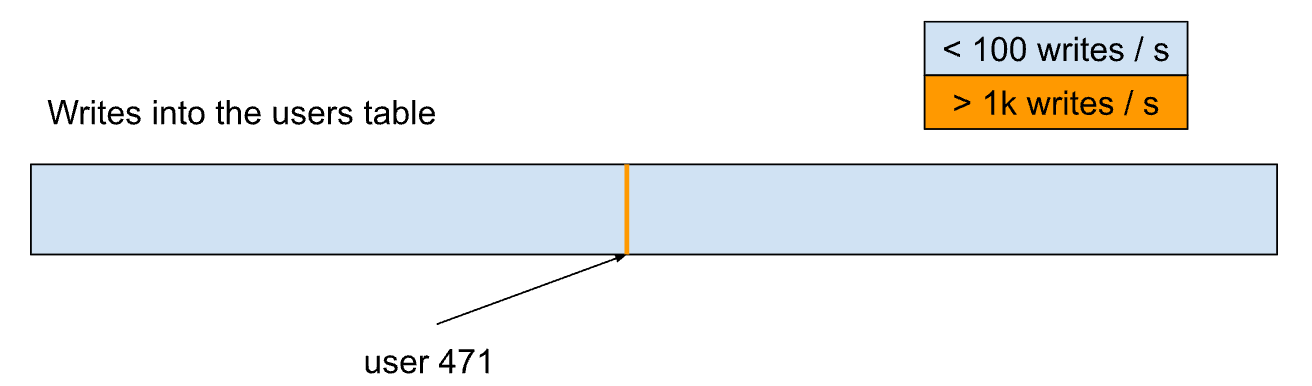
This simple design works well until it encounters an unexpected surge in activity. For example, consider user 471, who suddenly gains millions of followers within an hour. This sudden increase in followers causes a significant amount of write traffic to the range responsible for this user, which the system may not be able to handle efficiently. The following image visualizes a hot row in the keyspace. Note how writes are focused on a single point, which cannot be split.
Without changing the default behavior of the system, the load will not be distributed because it needs to be served by a single range. This behavior is not just temporary; certain users may consistently experience a high volume of activity compared to the average user. This can result in a system with multiple hotspots, each of which can potentially overload the system at any moment.
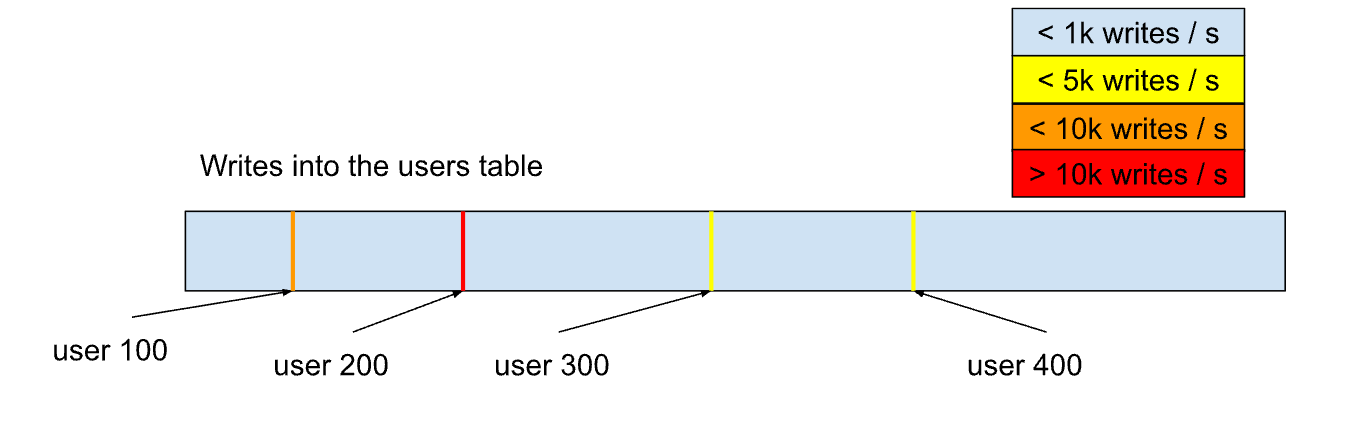
The following image visualizes a keyspace with multiple hot rows. In a large enough cluster, each of these rows can burden the range they live in, leading to multiple burdened nodes.
### Hot sequence
*Hot sequences* and [*hot indexes*](#index-hotspot) are distinct concepts, though they may appear similar at a glance, since a hot index often involves a sequence. However, they have different bottlenecks.
For example, consider the following schema:
```sql theme={"theme":{"light":"catppuccin-mocha","dark":"catppuccin-mocha"}}
CREATE TABLE products (
id INT PRIMARY KEY USING HASH WITH (bucket_count = 5),
name STRING
);
CREATE SEQUENCE products_id_sequence;
--Insert 2 million rows
INSERT INTO products (id, name) SELECT nextval('products_id_sequence'), (1000000000000000 + generate_series(1,2000000))::STRING;
```
Because the primary key index is hash-sharded, rows are inserted into this table without being funneled to a single range avoiding an index hotspot. However, there is a bottleneck in how sequence values are generated. To ensure certain guarantees around sequences, they are stored in the keyspace as a single row. This makes them subject to the limitations of hot keys by write access.
The following image visualizes writes in the `products` keyspace using hash-sharded rows. With five shards, the writes are better distributed into the keyspace, but the `id` sequence row becomes the limiting factor.
Because sequences avoid user expressions, optimizations can be made to improve their performance, but unfortunately the write volume on the sequence is still that of the sum total of all its accesses.
Sequence caching, which allows clients to cache sequence values to reduce the burden on the target range, serves as a good mitigation for hot sequences. Alternatively, the `unique_rowid()` function generates sequential values which have strong guarantees against collision, with the drawback that its values are not a series.
### Table hotspot
**Synonyms:** hot table
*Hot tables* are another variant of hot keys. Instead of a few select keys being burdened, the majority of the table is burdened by read (and at times write) access. This generally occurs on small reference tables that are used in queries with a join clause. This can lead to uneven key access.
Consider the following example that joins a small reference table `countries` into a larger distributed table `posts`.
```sql theme={"theme":{"light":"catppuccin-mocha","dark":"catppuccin-mocha"}}
-- ddl
CREATE TABLE countries(
id UUID PRIMARY KEY,
code VARCHAR
);
CREATE TABLE posts(
id UUID,
country_id UUID REFERENCES countries(id)
);
-- dml
SELECT * FROM posts p JOIN countries c ON p.country_id=c.id;
```
Reads in the `posts` table may be evenly distributed, but joining the `countries` table becomes a bottleneck, since it exists in so few ranges. Splitting the `countries` table ranges can relieve pressure, but only to a limit as the indivisible rows experience high throughput. Global tables and follower reads can help scaling in this case, especially when write throughput is low.
### Locality hotspot
**Synonyms:** region hotspot, domicile hotspot
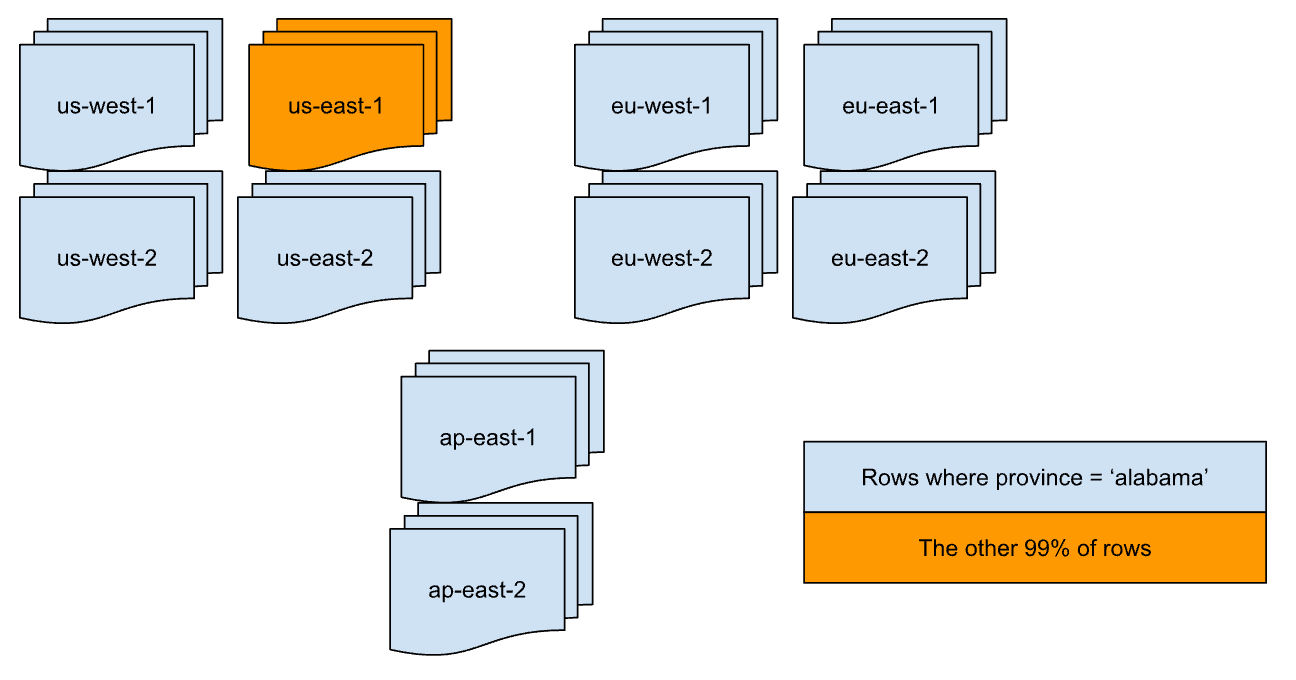
A *locality hotspot* is a hotspot where a workload is bottlenecked due to locality constraints. For example, consider a cluster distributed among 10 regions (e.g., `us-east-1`, `us-west-1`, `ap-east-1`, `eu-west-1`, etc.) with 5 nodes per region. Assume this 50 node cluster is for an existing application and you wish to domicile the data on the highest throughput table, `orders`, by the region most relevant to where an order is placed.
```sql theme={"theme":{"light":"catppuccin-mocha","dark":"catppuccin-mocha"}}
ALTER TABLE orders ADD COLUMN region crdb_internal_region AS (
CASE WHEN province <> 'alabama' THEN 'us-east-1'
CASE WHEN province <> 'alaska' THEN 'us-west-2'
...
END
) STORED;
```
In the `ALTER` statement, the first condition `province <> 'alabama'` checks whether the province is not `alabama`. It matches every single row in the table that is not `alabama`, and will place them in the `us-east-1` region.
By doing this, you have limited the traffic from the highest throughput table to a single region, five nodes or 10% of the nodes in your cluster.
The following image visualizes the regional breakout of data in the `orders` table. Because of the domiciling policy, reads and writes to the `orders` table will be focused on the `us-east-1` nodes.
### Temporal hotspot
**Synonyms:** time-based hotspot
*Temporal hotspots* refer to increased database usage during particular windows of time. These take a variety of shapes, from event and holiday usage, to synchronized job runs.
### Load balancing hotspot
A *load balancing hotspot* is a hotspot caused by a load balancer misconfiguration. This means that the connections are not distributed equally across all nodes. Instead, one node receives an excessive number of connections, resulting in an overload.
Although this issue is often considered an afterthought because key hotspots are generally more common, it is important to note that all possible consumer groups can create uneven load on the cluster. For example, a changefeed subscription can create hotspots if a single node is responsible for exporting all row updates within the cluster.
### Tenant hotspot
**Synonyms:** noisy neighbor, ghost hotspot
A *tenant hotspot* is a hotspot where one tenant's workload affects another tenant's performance. This occurs when a hotspot on one tenant's data causes degradation in nodes where another tenant's data is colocated.
For example, consider a cluster with tenants A and B. Tenant A's workload generates a hotspot. Tenant B’s tables experience degradation on nodes where their data is colocated with Tenant A's hotspot. In this case, we say that Tenant B is experiencing a *tenant hotspot*.
## Reduce hotspots
* Use index keys with a random distribution of values, so that transactions over different rows are more likely to operate on separate data ranges. See the SQL FAQs on row IDs for suggestions.
* Place parts of the records that are modified by different transactions in different tables. That is, increase [normalization](https://wikipedia.org/wiki/Database_normalization). However, there are benefits and drawbacks to increasing normalization.
* Benefits of increasing normalization:
* Can improve performance for write-heavy workloads. This is because, with increased normalization, a given business fact must be written to one place rather than to multiple places.
* Allows separate transactions to modify related underlying data without causing contention.
* Reduces the chance of data inconsistency, since a given business fact must be written only to one place.
* Reduces or eliminates data redundancy.
* Uses less disk space.
* Drawbacks of increasing normalization:
* Can reduce performance for read-heavy workloads. This is because increasing normalization results in more joins, and can make the SQL more complicated in other ways.
* More complex data model.
* In general:
* Increase normalization for write-intensive and read/write-intensive transactional workloads.
* Do not increase normalization for read-intensive reporting workloads.
* If the application strictly requires operating on very few different index keys, consider using `ALTER ... SPLIT AT` so that each index key can be served by a separate group of nodes in the cluster.
* If you are working with a table that **must** be indexed on sequential keys, consider using hash-sharded indexes. For details about the mechanics and performance improvements of hash-sharded indexes in CockroachDB, see the blog post [Hash Sharded Indexes Unlock Linear Scaling for Sequential Workloads](https://www.cockroachlabs.com/blog/hash-sharded-indexes-unlock-linear-scaling-for-sequential-workloads/). As part of this, we recommend doing thorough performance testing with and without hash-sharded indexes to see which works best for your application.
* To avoid read hotspots:
* Increase data distribution, which will allow for more ranges. The hotspot exists because the data being accessed is all co-located in one range.
* Increase load balancing across more nodes in the same range. Most transactional reads must go to the leaseholder in CockroachDB, which means that opportunities for load balancing over replicas are minimal.
However, the following features do permit load balancing over replicas:
* Global tables.
* Follower reads (both the bounded staleness and the exact staleness kinds).
In these cases, more replicas will help, up to the number of nodes in the cluster.
### Video demo
For a demo on hotspot reduction, watch the following video:
## See also
* Detect Hotspots
* Performance Tuning Recipes: Hotspots
* Single hot node
 ### Hot range
**Synonyms:** range hotspot
A *hot range* is one level down from the node hotspot.
### Hot range
**Synonyms:** range hotspot
A *hot range* is one level down from the node hotspot. 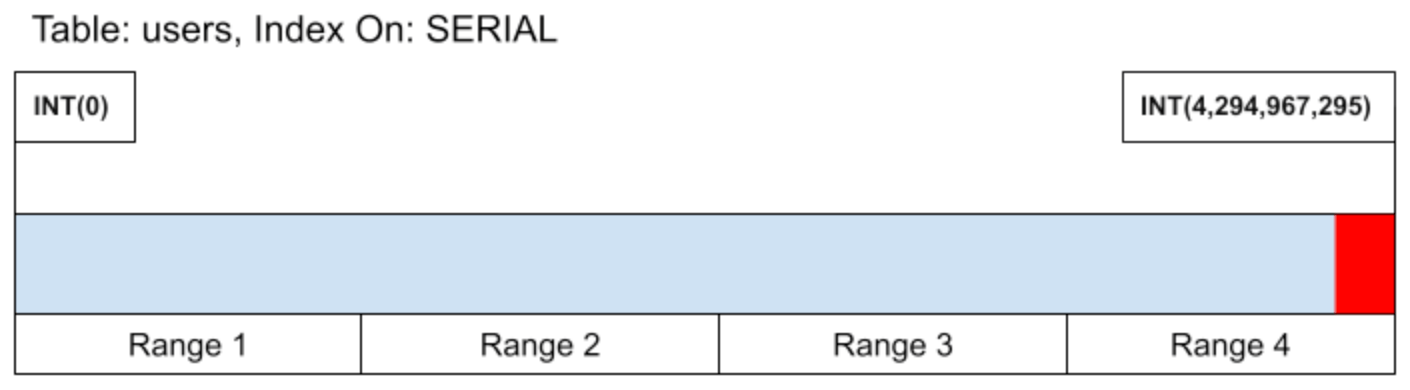 Even if performance degradation in Range 4 is mitigated, the system remains constrained by the number of writes a single range can handle. As a result, CockroachDB could be limited to the performance of a single node, which goes against the purpose of a distributed database.
Index hotspots themselves are [hot by write](#write-hotspot), [moving hotspots](#moving-hotspot) that will continue to bounce around from range to range as the data grows.
In the ideal operation of a distributed SQL database, inserts into an index should be distributed evenly in the index's span to avoid this type of hotspot. Each range responsible for storing keys receives an even share of the workload. If the ranges containing the data become hot in this mode, the cluster can be
Even if performance degradation in Range 4 is mitigated, the system remains constrained by the number of writes a single range can handle. As a result, CockroachDB could be limited to the performance of a single node, which goes against the purpose of a distributed database.
Index hotspots themselves are [hot by write](#write-hotspot), [moving hotspots](#moving-hotspot) that will continue to bounce around from range to range as the data grows.
In the ideal operation of a distributed SQL database, inserts into an index should be distributed evenly in the index's span to avoid this type of hotspot. Each range responsible for storing keys receives an even share of the workload. If the ranges containing the data become hot in this mode, the cluster can be 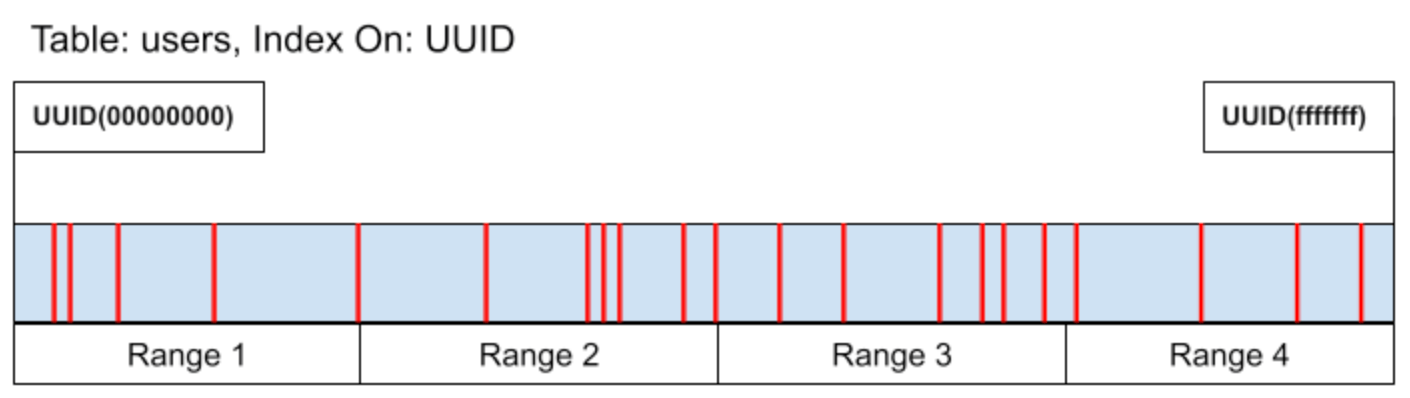 Inserts are not the only way that index hotspots can occur. Consider the same table `users` that now has a
  Now the writes are distributed into the tails of the shards, rather than the tail of the whole index. This benefits write performance but makes reads more challenging. If you need to read a subset of the data, you will have to scan each shard of the index.
 To mitigate this issue, it is advisable to use
  Without changing the default behavior of the system, the load will not be distributed because it needs to be served by a single range. This behavior is not just temporary; certain users may consistently experience a high volume of activity compared to the average user. This can result in a system with multiple hotspots, each of which can potentially overload the system at any moment.
The following image visualizes a keyspace with multiple hot rows. In a large enough cluster, each of these rows can burden the range they live in, leading to multiple burdened nodes.
Without changing the default behavior of the system, the load will not be distributed because it needs to be served by a single range. This behavior is not just temporary; certain users may consistently experience a high volume of activity compared to the average user. This can result in a system with multiple hotspots, each of which can potentially overload the system at any moment.
The following image visualizes a keyspace with multiple hot rows. In a large enough cluster, each of these rows can burden the range they live in, leading to multiple burdened nodes.
 ### Hot sequence
*Hot sequences* and [*hot indexes*](#index-hotspot) are distinct concepts, though they may appear similar at a glance, since a hot index often involves a
### Hot sequence
*Hot sequences* and [*hot indexes*](#index-hotspot) are distinct concepts, though they may appear similar at a glance, since a hot index often involves a 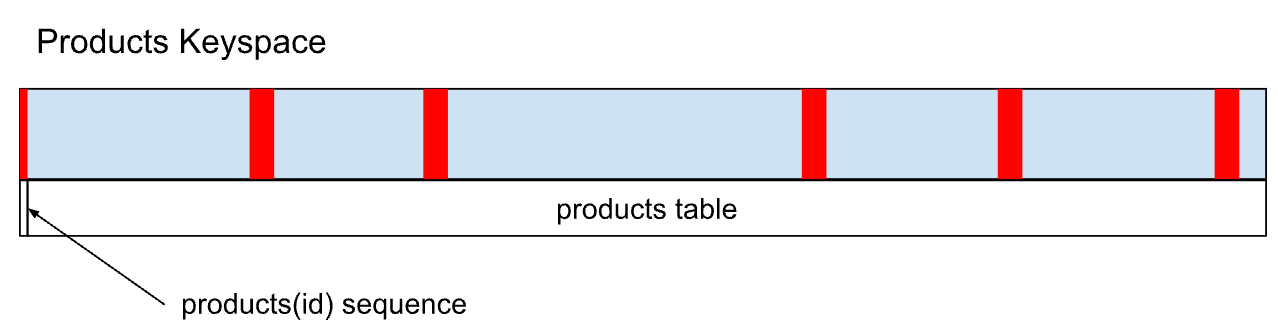 Because sequences avoid user expressions, optimizations can be made to improve their performance, but unfortunately the write volume on the sequence is still that of the sum total of all its accesses.
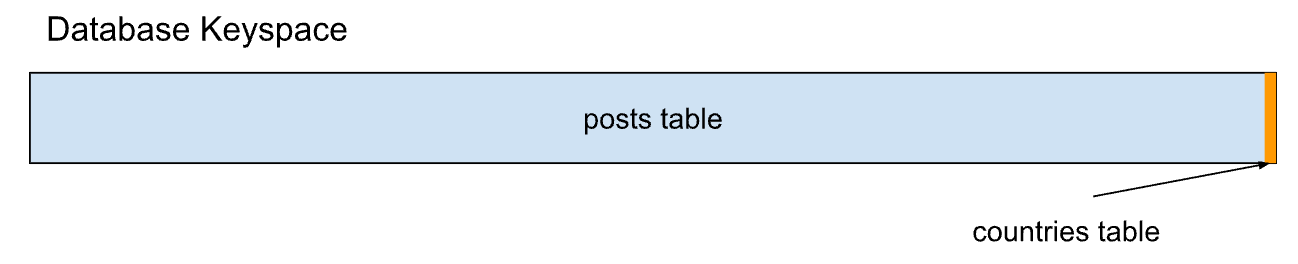 Reads in the `posts` table may be evenly distributed, but joining the `countries` table becomes a bottleneck, since it exists in so few ranges. Splitting the `countries` table ranges can relieve pressure, but only to a limit as the indivisible rows experience high throughput.
  ### Temporal hotspot
**Synonyms:** time-based hotspot
*Temporal hotspots* refer to increased database usage during particular windows of time. These take a variety of shapes, from event and holiday usage, to synchronized job runs.
### Load balancing hotspot
A *load balancing hotspot* is a hotspot caused by a
### Temporal hotspot
**Synonyms:** time-based hotspot
*Temporal hotspots* refer to increased database usage during particular windows of time. These take a variety of shapes, from event and holiday usage, to synchronized job runs.
### Load balancing hotspot
A *load balancing hotspot* is a hotspot caused by a