> ## Documentation Index
> Fetch the complete documentation index at: https://cockroachlabs.com/docs/llms.txt
> Use this file to discover all available pages before exploring further.
# Take Locality-restricted Backups
export const InternalLink = ({version, path = "", children, ...props}) => {
let detectedVersion = version || "stable";
if (typeof window !== 'undefined' && !version) {
const match = window.location.pathname.match(/\/docs\/([^/]+)/);
if (match) {
detectedVersion = match[1];
}
}
const normalizedPath = path.startsWith("/") ? path.slice(1) : path;
return
{children}
;
};
The `EXECUTION LOCALITY` option allows you to restrict the nodes that can execute a backup job by using a locality filter when you create the backup. This will pin the coordination of the backup job and the nodes that process the row data to the defined locality filter.
Pass the `WITH EXECUTION LOCALITY` option for `RESTORE` to restrict execution of the job to nodes with matching localities.
Defining an execution locality for a backup job is useful in the following cases:
* When nodes in a cluster operate in different locality tiers, networking rules can restrict nodes from accessing a storage bucket. For an example, refer to [Access backup storage restricted by network rules](#access-backup-storage-restricted-by-network-rules).
* When a multi-region cluster is running heavy workloads and an aggressive backup schedule, designating a region as the "backup" locality may improve latency. For an example, refer to [Create a non-primary region for backup jobs](#create-a-non-primary-region-for-backup-jobs).
CockroachDB also supports *locality-aware backups*, which allow you to partition and store backup data in a way that is optimized for locality. In general, when you run a locality-aware backup, nodes write backup data to the cloud storage bucket that is closest to the node locality configured at node startup. Refer to Take and Restore Locality-aware Backups for more detail.
## Technical overview
For a technical overview of how a locality-restricted backup works, refer to Job coordination using the `EXECUTION LOCALITY` option.
## Supported products
The feature described on this page is available in **CockroachDB Advanced**, **CockroachDB Standard**, **CockroachDB Basic**, and **CockroachDB self-hosted** clusters when you are running self-managed backups. For a full list of features, refer to Backup and restore product support.
## Syntax
To specify the locality filter for the coordinating node, run `EXECUTION LOCALITY` with key-value pairs. The key-value pairs correspond to the locality designations a node is configured to use when it starts.
You can bind any ordered list of locality key-value pairs, from most inclusive to least inclusive, to a node at startup. For example, a user with a multi-region and multi-cloud deployment may bind each node with `cloud=,region=` locality tiers. To back up to a specific `cloud,region`, add `cloud={cloud},region={region}` as the execution locality arguments:
```sql theme={"theme":{"light":"catppuccin-mocha","dark":"catppuccin-mocha"}}
BACKUP DATABASE {database} INTO 'external://backup_storage' WITH EXECUTION LOCALITY = 'cloud=gce,region=us-west1';
```
When you run a backup or restore that uses `EXECUTION LOCALITY`, consider the following:
* The backup or restore job will fail if no nodes match the locality filter.
* The backup or restore job may take slightly more time to start, because it must select the node that coordinates the backup or restore (the *coordinating node* ). Refer to Job coordination using the `EXECUTION LOCALITY` option.
* Even after a backup or restore job has been pinned to a locality filter, it may still read data from another locality if no replicas of the data are available in the locality specified by the backup job's locality filter.
* If the job is created on a node that does not match the locality filter, you will receive an error even when the **job creation was successful**. This error indicates that the job execution moved to another node. To avoid this error when creating a manual job (as opposed to a scheduled job ), you can use the `DETACHED` option with `EXECUTION LOCALITY`. Then, use the `SHOW JOB WHEN COMPLETE` statement to determine when the job has finished. For more details, refer to Job coordination using the `EXECUTION LOCALITY` option.
* The backup job will send ranges to the cloud storage bucket matching the node's locality. However, a range's locality will not necessarily match the node's locality. The backup job will attempt to back up ranges through nodes matching that range's locality, however this is not always possible.
## Examples
This section outlines some example uses of the `EXECUTION LOCALITY` option.
### Access backup storage restricted by network rules
For security or other reasons, a cluster may be subject to network rules across regions or to other locality requirements. For example, if you have a requirement that only nodes within the same region as the backup cloud storage location can access the storage bucket, you can configure the backup job's `EXECUTION LOCALITY` to execute only on nodes with network access to the bucket.
The following diagram shows a CockroachDB cluster where each of the nodes can communicate with each other through a specific port, but any other network traffic between regions is blocked. Replicas in regions that do not match the cloud storage region (Node 2) cannot access the storage to export backup data.
Instead, Node 3's locality does match the backup job's `EXECUTION LOCALITY`. Replicas that match a backup job's locality designation and hold the backup job's row data will begin reading and exporting to cloud storage.
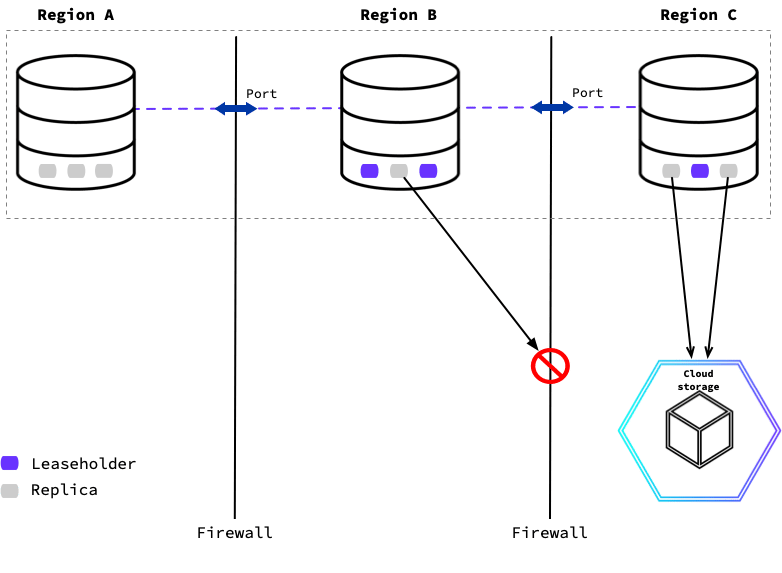 To execute the backup only on nodes in the same region as the cloud storage location, you can specify locality filters that a node must match to take part in the backup job's execution.
For example, you can pin the execution of the backup job to `us-west-1`:
```sql theme={"theme":{"light":"catppuccin-mocha","dark":"catppuccin-mocha"}}
BACKUP DATABASE {database} INTO 'external://backup_storage_uswest' WITH EXECUTION LOCALITY = 'region=us-west-1', DETACHED;
```
To restore the most recent locality-restricted backup:
```sql theme={"theme":{"light":"catppuccin-mocha","dark":"catppuccin-mocha"}}
RESTORE FROM LATEST IN 'external://backup_storage_uswest' WITH EXECUTION LOCALITY = 'region=us-west-1', DETACHED;
```
Refer to the `BACKUP` and `RESTORE` pages for further detail on other parameters and options.
### Create a non-primary region for backup jobs
Sometimes the execution of backup jobs can consume considerable resources when running frequent full and incremental backups simultaneously. One approach to minimize the impact of running background jobs on foreground application traffic is to restrict the execution of backup jobs to a designated subset of nodes that are not also serving application traffic.
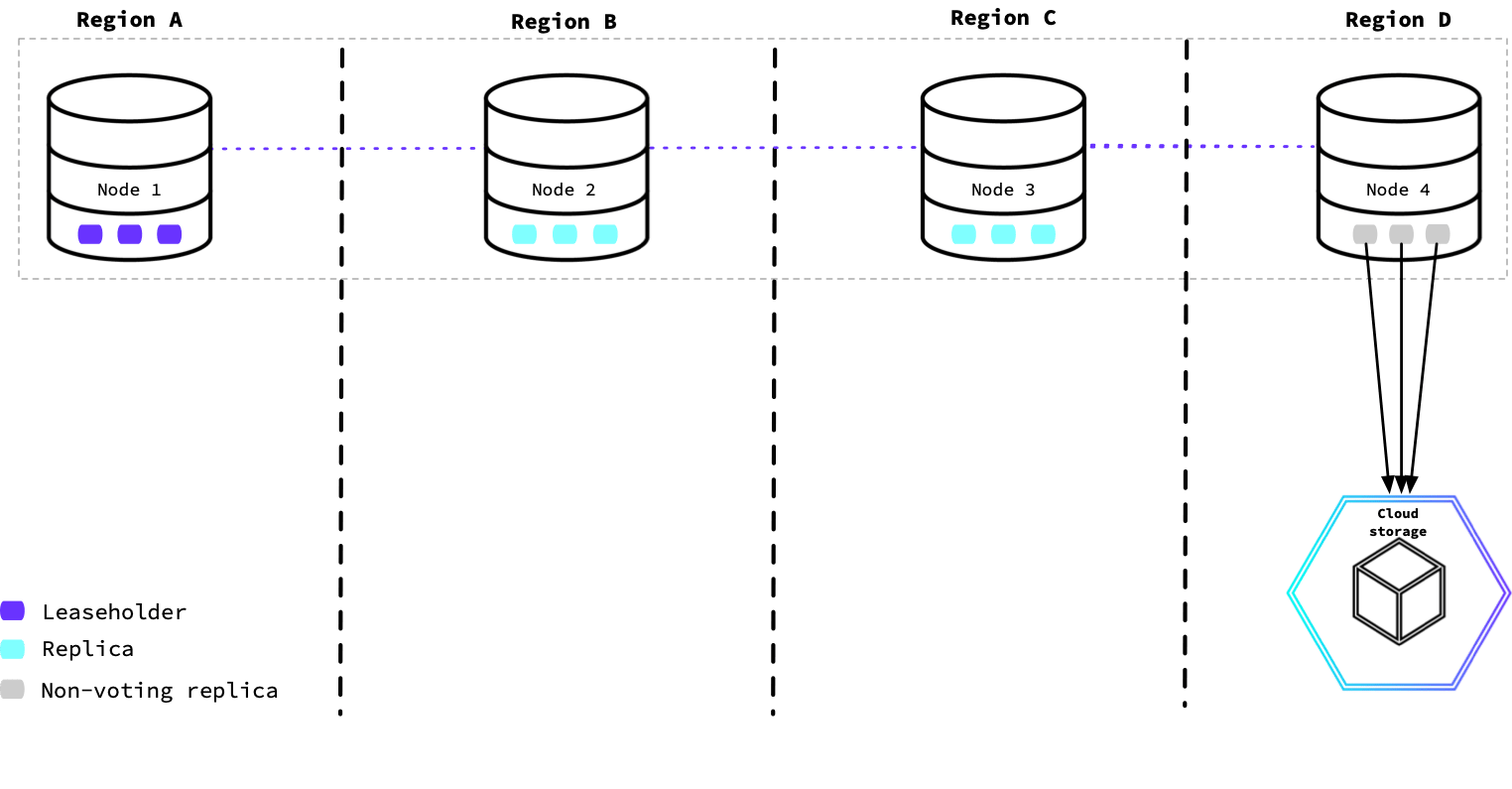
This diagram shows a CockroachDB cluster in four regions. The node used to run the backup job was configured with non-voting replicas to provide low-latency reads. The node in this region will complete the backup job coordination and data export to cloud storage.
To execute the backup only on nodes in the same region as the cloud storage location, you can specify locality filters that a node must match to take part in the backup job's execution.
For example, you can pin the execution of the backup job to `us-west-1`:
```sql theme={"theme":{"light":"catppuccin-mocha","dark":"catppuccin-mocha"}}
BACKUP DATABASE {database} INTO 'external://backup_storage_uswest' WITH EXECUTION LOCALITY = 'region=us-west-1', DETACHED;
```
To restore the most recent locality-restricted backup:
```sql theme={"theme":{"light":"catppuccin-mocha","dark":"catppuccin-mocha"}}
RESTORE FROM LATEST IN 'external://backup_storage_uswest' WITH EXECUTION LOCALITY = 'region=us-west-1', DETACHED;
```
Refer to the `BACKUP` and `RESTORE` pages for further detail on other parameters and options.
### Create a non-primary region for backup jobs
Sometimes the execution of backup jobs can consume considerable resources when running frequent full and incremental backups simultaneously. One approach to minimize the impact of running background jobs on foreground application traffic is to restrict the execution of backup jobs to a designated subset of nodes that are not also serving application traffic.
This diagram shows a CockroachDB cluster in four regions. The node used to run the backup job was configured with non-voting replicas to provide low-latency reads. The node in this region will complete the backup job coordination and data export to cloud storage.
 For details, refer to:
* The `--locality` flag to specify the locality tiers that describe the location of a node.
* The `num_voters` and `voter_constraints` variables on the Replication Controls page to configure non-voting replicas via zone configurations.
After configuring the nodes in a specific region to use non-voting replicas, you can create the backup job and define its locality requirement for the nodes:
```sql theme={"theme":{"light":"catppuccin-mocha","dark":"catppuccin-mocha"}}
BACKUP DATABASE {database} INTO 'external://backup_storage' WITH EXECUTION LOCALITY = 'region={region},dc={datacenter}', DETACHED;
```
## See also
* Backup and Restore Overview
* Backup Architecture
* `BACKUP`
* `RESTORE`
For details, refer to:
* The `--locality` flag to specify the locality tiers that describe the location of a node.
* The `num_voters` and `voter_constraints` variables on the Replication Controls page to configure non-voting replicas via zone configurations.
After configuring the nodes in a specific region to use non-voting replicas, you can create the backup job and define its locality requirement for the nodes:
```sql theme={"theme":{"light":"catppuccin-mocha","dark":"catppuccin-mocha"}}
BACKUP DATABASE {database} INTO 'external://backup_storage' WITH EXECUTION LOCALITY = 'region={region},dc={datacenter}', DETACHED;
```
## See also
* Backup and Restore Overview
* Backup Architecture
* `BACKUP`
* `RESTORE`