> ## Documentation Index
> Fetch the complete documentation index at: https://cockroachlabs.mintlify.site/llms.txt
> Use this file to discover all available pages before exploring further.
# Serializable Transactions
export const InternalLink = ({version, path = "", children, ...props}) => {
let detectedVersion = version || "stable";
if (typeof window !== 'undefined' && !version) {
const match = window.location.pathname.match(/\/docs\/([^/]+)/);
if (match) {
detectedVersion = match[1];
}
}
const normalizedPath = path.startsWith("/") ? path.slice(1) : path;
return
{children}
;
};
In contrast to most databases, CockroachDB offers `SERIALIZABLE` isolation by default, which is the strongest of the four [transaction isolation levels](https://wikipedia.org/wiki/Isolation_\(database_systems\)) defined by the SQL standard and is stronger than the `SNAPSHOT` isolation level developed later. `SERIALIZABLE` isolation guarantees that even though transactions may execute in parallel, the result is the same as if they had executed one at a time, without any concurrency. This ensures data correctness by preventing all "anomalies" allowed by weaker isolation levels.
In this tutorial, you'll work through a hypothetical scenario that demonstrates the effectiveness of `SERIALIZABLE` isolation for maintaining data correctness.
1. You'll start by reviewing the scenario and its schema.
2. You'll finish by executing the scenario at `SERIALIZABLE` isolation, observing how it guarantees correctness. You'll use CockroachDB for this portion.
For a deeper discussion of transaction isolation and the write skew anomaly, see the [Real Transactions are Serializable](https://www.cockroachlabs.com/blog/acid-rain) and [What Write Skew Looks Like](https://www.cockroachlabs.com/blog/what-write-skew-looks-like) blog posts.
## Overview
### Scenario
* A hospital has an application for doctors to manage their on-call shifts.
* The hospital has a rule that at least one doctor must be on call at any one time.
* Two doctors are on-call for a particular shift, and both of them try to request leave for the shift at approximately the same time.
* In PostgreSQL, with the default `READ COMMITTED` isolation level, the [write skew](#write-skew) anomaly results in both doctors successfully booking leave and the hospital having no doctors on call for that particular shift.
* In CockroachDB, with the `SERIALIZABLE` isolation level, write skew is prevented, one doctor is allowed to book leave and the other is left on-call, and lives are saved.
#### Write skew
When write skew happens, a transaction reads something, makes a decision based on the value it saw, and writes the decision to the database. However, by the time the write is made, the premise of the decision is no longer true. Only `SERIALIZABLE` and some implementations of `REPEATABLE READ` isolation prevent this anomaly.
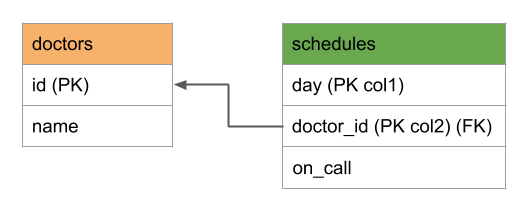
### Schema
 ## Step 1. Set up the scenario on PostgreSQL
1. If you haven't already, install PostgreSQL locally. On Mac, you can use [Homebrew](https://brew.sh/):
```shell theme={"theme":{"light":"catppuccin-mocha","dark":"catppuccin-mocha"}}
$ brew install postgres
```
2. [Start PostgreSQL](https://www.postgresql.org/docs/10/static/server-start):
```shell theme={"theme":{"light":"catppuccin-mocha","dark":"catppuccin-mocha"}}
$ postgres -D /usr/local/var/postgres &
```
3. Open a SQL connection to PostgreSQL:
```shell theme={"theme":{"light":"catppuccin-mocha","dark":"catppuccin-mocha"}}
$ psql
```
4. Create the `doctors` table:
```sql theme={"theme":{"light":"catppuccin-mocha","dark":"catppuccin-mocha"}}
> CREATE TABLE doctors (
id INT PRIMARY KEY,
name TEXT
);
```
5. Create the `schedules` table:
```sql theme={"theme":{"light":"catppuccin-mocha","dark":"catppuccin-mocha"}}
> CREATE TABLE schedules (
day DATE,
doctor_id INT REFERENCES doctors (id),
on_call BOOL,
PRIMARY KEY (day, doctor_id)
);
```
6. Add two doctors to the `doctors` table:
```sql theme={"theme":{"light":"catppuccin-mocha","dark":"catppuccin-mocha"}}
> INSERT INTO doctors VALUES
(1, 'Abe'),
(2, 'Betty');
```
7. Insert one week's worth of data into the `schedules` table:
```sql theme={"theme":{"light":"catppuccin-mocha","dark":"catppuccin-mocha"}}
> INSERT INTO schedules VALUES
('2024-10-01', 1, true),
('2024-10-01', 2, true),
('2024-10-02', 1, true),
('2024-10-02', 2, true),
('2024-10-03', 1, true),
('2024-10-03', 2, true),
('2024-10-04', 1, true),
('2024-10-04', 2, true),
('2024-10-05', 1, true),
('2024-10-05', 2, true),
('2024-10-06', 1, true),
('2024-10-06', 2, true),
('2024-10-07', 1, true),
('2024-10-07', 2, true);
```
8. Confirm that at least one doctor is on call each day of the week:
```sql theme={"theme":{"light":"catppuccin-mocha","dark":"catppuccin-mocha"}}
> SELECT day, count(*) AS doctors_on_call FROM schedules
WHERE on_call = true
GROUP BY day
ORDER BY day;
```
```text theme={"theme":{"light":"catppuccin-mocha","dark":"catppuccin-mocha"}}
day | doctors_on_call
------------+-----------------
2024-10-01 | 2
2024-10-02 | 2
2024-10-03 | 2
2024-10-04 | 2
2024-10-05 | 2
2024-10-06 | 2
2024-10-07 | 2
(7 rows)
```
## Step 2. Run the scenario on PostgreSQL
1. Doctor 1, Abe, starts to request leave for 10/5/18 using the hospital's schedule management application. The application starts a transaction:
```sql theme={"theme":{"light":"catppuccin-mocha","dark":"catppuccin-mocha"}}
> BEGIN;
```
2. The application checks to make sure at least one other doctor is on call for the requested date:
```sql theme={"theme":{"light":"catppuccin-mocha","dark":"catppuccin-mocha"}}
> SELECT count(*) FROM schedules
WHERE on_call = true
AND day = '2024-10-05'
AND doctor_id != 1;
```
```text theme={"theme":{"light":"catppuccin-mocha","dark":"catppuccin-mocha"}}
count
-------
1
(1 row)
```
3. Around the same time, doctor 2, Betty, starts to request leave for the same day using the hospital's schedule management application. In a new terminal, start a second SQL session:
```shell theme={"theme":{"light":"catppuccin-mocha","dark":"catppuccin-mocha"}}
$ psql
```
4. The application starts a transaction:
```sql theme={"theme":{"light":"catppuccin-mocha","dark":"catppuccin-mocha"}}
> BEGIN;
```
5. The application checks to make sure at least one other doctor is on call for the requested date:
```sql theme={"theme":{"light":"catppuccin-mocha","dark":"catppuccin-mocha"}}
> SELECT count(*) FROM schedules
WHERE on_call = true
AND day = '2024-10-05'
AND doctor_id != 2;
```
```text theme={"theme":{"light":"catppuccin-mocha","dark":"catppuccin-mocha"}}
count
-------
1
(1 row)
```
6. In the terminal for doctor 1, since the previous check confirmed that another doctor is on call for 10/5/18, the application tries to update doctor 1's schedule:
```sql theme={"theme":{"light":"catppuccin-mocha","dark":"catppuccin-mocha"}}
> UPDATE schedules SET on_call = false
WHERE day = '2024-10-05'
AND doctor_id = 1;
```
7. In the terminal for doctor 2, since the previous check confirmed the same thing, the application tries to update doctor 2's schedule:
```sql theme={"theme":{"light":"catppuccin-mocha","dark":"catppuccin-mocha"}}
> UPDATE schedules SET on_call = false
WHERE day = '2024-10-05'
AND doctor_id = 2;
```
8. In the terminal for doctor 1, the application commits the transaction, despite the fact that the previous check (the `SELECT` query) is no longer true:
```sql theme={"theme":{"light":"catppuccin-mocha","dark":"catppuccin-mocha"}}
> COMMIT;
```
9. In the terminal for doctor 2, the application commits the transaction, despite the fact that the previous check (the `SELECT` query) is no longer true:
```sql theme={"theme":{"light":"catppuccin-mocha","dark":"catppuccin-mocha"}}
> COMMIT;
```
## Step 3. Check data correctness on PostgreSQL
So what just happened? Each transaction started by reading a value that, before the end of the transaction, became incorrect. Despite that fact, each transaction was allowed to commit. This is known as write skew, and the result is that 0 doctors are scheduled to be on call on 10/5/18.
To check this, in either terminal, run:
```sql theme={"theme":{"light":"catppuccin-mocha","dark":"catppuccin-mocha"}}
> SELECT * FROM schedules WHERE day = '2024-10-05';
```
```text theme={"theme":{"light":"catppuccin-mocha","dark":"catppuccin-mocha"}}
day | doctor_id | on_call
------------+-----------+---------
2024-10-05 | 1 | f
2024-10-05 | 2 | f
(2 rows)
```
Again, this anomaly is the result of PostgreSQL's default isolation level of `READ COMMITTED`, but note that this would happen with any isolation level except `SERIALIZABLE` and some implementations of `REPEATABLE READ`:
```sql theme={"theme":{"light":"catppuccin-mocha","dark":"catppuccin-mocha"}}
> SHOW TRANSACTION_ISOLATION;
```
```text theme={"theme":{"light":"catppuccin-mocha","dark":"catppuccin-mocha"}}
transaction_isolation
-----------------------
read committed
(1 row)
```
Exit each SQL shell with `\q` and then stop the PostgreSQL server:
```shell theme={"theme":{"light":"catppuccin-mocha","dark":"catppuccin-mocha"}}
$ pkill -9 postgres
```
## Step 4. Set up the scenario on CockroachDB
When you repeat the scenario on CockroachDB, you'll see that the anomaly is prevented by CockroachDB's `SERIALIZABLE` transaction isolation.
1. If you haven't already, install CockroachDB locally.
2. Use the `cockroach start-single-node` command to start a one-node CockroachDB cluster in insecure mode:
```shell theme={"theme":{"light":"catppuccin-mocha","dark":"catppuccin-mocha"}}
$ cockroach start-single-node \
--insecure \
--store=serializable-demo \
--listen-addr=localhost
```
3. In a new terminal window, open the built-in SQL client and connect to `localhost`:
```shell theme={"theme":{"light":"catppuccin-mocha","dark":"catppuccin-mocha"}}
$ cockroach sql --insecure --host=localhost
```
4. Create the `doctors` table:
```sql theme={"theme":{"light":"catppuccin-mocha","dark":"catppuccin-mocha"}}
> CREATE TABLE doctors (
id INT PRIMARY KEY,
name TEXT
);
```
5. Create the `schedules` table:
```sql theme={"theme":{"light":"catppuccin-mocha","dark":"catppuccin-mocha"}}
> CREATE TABLE schedules (
day DATE,
doctor_id INT REFERENCES doctors (id),
on_call BOOL,
PRIMARY KEY (day, doctor_id)
);
```
6. Add two doctors to the `doctors` table:
```sql theme={"theme":{"light":"catppuccin-mocha","dark":"catppuccin-mocha"}}
> INSERT INTO doctors VALUES
(1, 'Abe'),
(2, 'Betty');
```
7. Insert one week's worth of data into the `schedules` table:
```sql theme={"theme":{"light":"catppuccin-mocha","dark":"catppuccin-mocha"}}
> INSERT INTO schedules VALUES
('2024-10-01', 1, true),
('2024-10-01', 2, true),
('2024-10-02', 1, true),
('2024-10-02', 2, true),
('2024-10-03', 1, true),
('2024-10-03', 2, true),
('2024-10-04', 1, true),
('2024-10-04', 2, true),
('2024-10-05', 1, true),
('2024-10-05', 2, true),
('2024-10-06', 1, true),
('2024-10-06', 2, true),
('2024-10-07', 1, true),
('2024-10-07', 2, true);
```
8. Confirm that at least one doctor is on call each day of the week:
```sql theme={"theme":{"light":"catppuccin-mocha","dark":"catppuccin-mocha"}}
> SELECT day, count(*) AS on_call FROM schedules
WHERE on_call = true
GROUP BY day
ORDER BY day;
```
```text theme={"theme":{"light":"catppuccin-mocha","dark":"catppuccin-mocha"}}
day | on_call
-------------+----------
2024-10-01 | 2
2024-10-02 | 2
2024-10-03 | 2
2024-10-04 | 2
2024-10-05 | 2
2024-10-06 | 2
2024-10-07 | 2
(7 rows)
```
## Step 5. Run the scenario on CockroachDB
1. Doctor 1, Abe, starts to request leave for 10/5/18 using the hospital's schedule management application. The application starts a transaction:
```sql theme={"theme":{"light":"catppuccin-mocha","dark":"catppuccin-mocha"}}
> BEGIN;
```
2. The application checks to make sure at least one other doctor is on call for the requested date:
```sql theme={"theme":{"light":"catppuccin-mocha","dark":"catppuccin-mocha"}}
> SELECT count(*) FROM schedules
WHERE on_call = true
AND day = '2024-10-05'
AND doctor_id != 1;
```
```text theme={"theme":{"light":"catppuccin-mocha","dark":"catppuccin-mocha"}}
count
---------
1
(1 row)
```
3. Around the same time, doctor 2, Betty, starts to request leave for the same day using the hospital's schedule management application. In a new terminal, start a second SQL session:
```shell theme={"theme":{"light":"catppuccin-mocha","dark":"catppuccin-mocha"}}
$ cockroach sql --insecure --host=localhost
```
4. The application starts a transaction:
```sql theme={"theme":{"light":"catppuccin-mocha","dark":"catppuccin-mocha"}}
> BEGIN;
```
5. The application checks to make sure at least one other doctor is on call for the requested date:
```sql theme={"theme":{"light":"catppuccin-mocha","dark":"catppuccin-mocha"}}
> SELECT count(*) FROM schedules
WHERE on_call = true
AND day = '2024-10-05'
AND doctor_id != 2;
```
```text theme={"theme":{"light":"catppuccin-mocha","dark":"catppuccin-mocha"}}
count
---------
1
(1 row)
```
6. In the terminal for doctor 1, since the previous check confirmed that another doctor is on call for 10/5/18, the application tries to update doctor 1's schedule:
```sql theme={"theme":{"light":"catppuccin-mocha","dark":"catppuccin-mocha"}}
> UPDATE schedules SET on_call = false
WHERE day = '2024-10-05'
AND doctor_id = 1;
```
7. In the terminal for doctor 2, since the previous check confirmed the same thing, the application tries to update doctor 2's schedule:
```sql theme={"theme":{"light":"catppuccin-mocha","dark":"catppuccin-mocha"}}
> UPDATE schedules SET on_call = false
WHERE day = '2024-10-05'
AND doctor_id = 2;
```
8. In the terminal for doctor 1, the application tries to commit the transaction:
```sql theme={"theme":{"light":"catppuccin-mocha","dark":"catppuccin-mocha"}}
> COMMIT;
```
The transaction for doctor 1 is committed.
9. In the terminal for doctor 2, the application tries to commit the transaction:
```sql theme={"theme":{"light":"catppuccin-mocha","dark":"catppuccin-mocha"}}
> COMMIT;
```
Since CockroachDB uses `SERIALIZABLE` isolation, the database detects that the previous check (the `SELECT` query) is no longer true due to a concurrent transaction. It therefore prevents the transaction from committing, returning a retry error that indicates that the transaction must be attempted again.
```text theme={"theme":{"light":"catppuccin-mocha","dark":"catppuccin-mocha"}}
ERROR: restart transaction: TransactionRetryWithProtoRefreshError: TransactionRetryError: retry txn (RETRY_SERIALIZABLE - failed preemptive refresh due to encountered recently written committed value /Table/105/1/20001/1/0 @1700513356.063385000,2): "sql txn" meta={id=10f4abbc key=/Table/105/1/20001/2/0 iso=Serializable pri=0.00167708 epo=0 ts=1700513366.194063000,2 min=1700513327.262632000,0 seq=1} lock=true stat=PENDING rts=1700513327.262632000,0 wto=false gul=1700513327.762632000,0
SQLSTATE: 40001
HINT: See: https://www.cockroachlabs.com/docs/v24.1/transaction-retry-error-reference.html#retry_serializable
```
For this kind of error, CockroachDB recommends a client-side transaction retry loop that would transparently observe that the one doctor cannot take time off because the other doctor already succeeded in asking for it. You can find generic transaction retry functions for various languages in our Build an App tutorials.
For more information about the error message for the `RETRY_SERIALIZABLE` error type, see the Transaction Retry Error Reference.
## Step 6. Check data correctness on CockroachDB
1. In either terminal, confirm that one doctor is still on call for 10/5/18:
```sql theme={"theme":{"light":"catppuccin-mocha","dark":"catppuccin-mocha"}}
> SELECT * FROM schedules WHERE day = '2024-10-05';
```
```text theme={"theme":{"light":"catppuccin-mocha","dark":"catppuccin-mocha"}}
day | doctor_id | on_call
-------------+-----------+----------
2024-10-05 | 1 | f
2024-10-05 | 2 | t
(2 rows)
```
2. Again, the write skew anomaly was prevented by CockroachDB using the `SERIALIZABLE` isolation level:
```sql theme={"theme":{"light":"catppuccin-mocha","dark":"catppuccin-mocha"}}
> SHOW TRANSACTION_ISOLATION;
```
```text theme={"theme":{"light":"catppuccin-mocha","dark":"catppuccin-mocha"}}
transaction_isolation
-------------------------
serializable
(1 row)
```
3. Exit the SQL shell in each terminal:
```sql theme={"theme":{"light":"catppuccin-mocha","dark":"catppuccin-mocha"}}
> \q
```
4. Exit each SQL shell with `\q` and then stop the node:
Get the process ID of the node:
```shell theme={"theme":{"light":"catppuccin-mocha","dark":"catppuccin-mocha"}}
ps -ef | grep cockroach | grep -v grep
```
```text theme={"theme":{"light":"catppuccin-mocha","dark":"catppuccin-mocha"}}
501 21691 1 0 6:19PM ttys001 0:01.15 cockroach start-single-node --insecure --store=serializable-demo --listen-addr=localhost
```
Gracefully shut down the node, specifying its process ID:
```shell theme={"theme":{"light":"catppuccin-mocha","dark":"catppuccin-mocha"}}
kill -TERM 21691
```
```text theme={"theme":{"light":"catppuccin-mocha","dark":"catppuccin-mocha"}}
initiating graceful shutdown of server
server drained and shutdown completed
```
If you do not plan to restart the cluster, you may want to remove the node's data store:
```shell theme={"theme":{"light":"catppuccin-mocha","dark":"catppuccin-mocha"}}
$ rm -rf serializable-demo
```
## What's next?
Explore other CockroachDB benefits and features:
* Replication & Rebalancing
* Fault Tolerance & Recovery
* Low Latency Multi-Region Deployment
* Serializable Transactions
* Cross-Cloud Migration
* Orchestration
* JSON Support
You might also want to learn more about how transactions work in CockroachDB and in general:
* Transactions Overview
* [What Write Skew Looks Like](https://www.cockroachlabs.com/blog/what-write-skew-looks-like)
* Read Committed Transactions
## Step 1. Set up the scenario on PostgreSQL
1. If you haven't already, install PostgreSQL locally. On Mac, you can use [Homebrew](https://brew.sh/):
```shell theme={"theme":{"light":"catppuccin-mocha","dark":"catppuccin-mocha"}}
$ brew install postgres
```
2. [Start PostgreSQL](https://www.postgresql.org/docs/10/static/server-start):
```shell theme={"theme":{"light":"catppuccin-mocha","dark":"catppuccin-mocha"}}
$ postgres -D /usr/local/var/postgres &
```
3. Open a SQL connection to PostgreSQL:
```shell theme={"theme":{"light":"catppuccin-mocha","dark":"catppuccin-mocha"}}
$ psql
```
4. Create the `doctors` table:
```sql theme={"theme":{"light":"catppuccin-mocha","dark":"catppuccin-mocha"}}
> CREATE TABLE doctors (
id INT PRIMARY KEY,
name TEXT
);
```
5. Create the `schedules` table:
```sql theme={"theme":{"light":"catppuccin-mocha","dark":"catppuccin-mocha"}}
> CREATE TABLE schedules (
day DATE,
doctor_id INT REFERENCES doctors (id),
on_call BOOL,
PRIMARY KEY (day, doctor_id)
);
```
6. Add two doctors to the `doctors` table:
```sql theme={"theme":{"light":"catppuccin-mocha","dark":"catppuccin-mocha"}}
> INSERT INTO doctors VALUES
(1, 'Abe'),
(2, 'Betty');
```
7. Insert one week's worth of data into the `schedules` table:
```sql theme={"theme":{"light":"catppuccin-mocha","dark":"catppuccin-mocha"}}
> INSERT INTO schedules VALUES
('2024-10-01', 1, true),
('2024-10-01', 2, true),
('2024-10-02', 1, true),
('2024-10-02', 2, true),
('2024-10-03', 1, true),
('2024-10-03', 2, true),
('2024-10-04', 1, true),
('2024-10-04', 2, true),
('2024-10-05', 1, true),
('2024-10-05', 2, true),
('2024-10-06', 1, true),
('2024-10-06', 2, true),
('2024-10-07', 1, true),
('2024-10-07', 2, true);
```
8. Confirm that at least one doctor is on call each day of the week:
```sql theme={"theme":{"light":"catppuccin-mocha","dark":"catppuccin-mocha"}}
> SELECT day, count(*) AS doctors_on_call FROM schedules
WHERE on_call = true
GROUP BY day
ORDER BY day;
```
```text theme={"theme":{"light":"catppuccin-mocha","dark":"catppuccin-mocha"}}
day | doctors_on_call
------------+-----------------
2024-10-01 | 2
2024-10-02 | 2
2024-10-03 | 2
2024-10-04 | 2
2024-10-05 | 2
2024-10-06 | 2
2024-10-07 | 2
(7 rows)
```
## Step 2. Run the scenario on PostgreSQL
1. Doctor 1, Abe, starts to request leave for 10/5/18 using the hospital's schedule management application. The application starts a transaction:
```sql theme={"theme":{"light":"catppuccin-mocha","dark":"catppuccin-mocha"}}
> BEGIN;
```
2. The application checks to make sure at least one other doctor is on call for the requested date:
```sql theme={"theme":{"light":"catppuccin-mocha","dark":"catppuccin-mocha"}}
> SELECT count(*) FROM schedules
WHERE on_call = true
AND day = '2024-10-05'
AND doctor_id != 1;
```
```text theme={"theme":{"light":"catppuccin-mocha","dark":"catppuccin-mocha"}}
count
-------
1
(1 row)
```
3. Around the same time, doctor 2, Betty, starts to request leave for the same day using the hospital's schedule management application. In a new terminal, start a second SQL session:
```shell theme={"theme":{"light":"catppuccin-mocha","dark":"catppuccin-mocha"}}
$ psql
```
4. The application starts a transaction:
```sql theme={"theme":{"light":"catppuccin-mocha","dark":"catppuccin-mocha"}}
> BEGIN;
```
5. The application checks to make sure at least one other doctor is on call for the requested date:
```sql theme={"theme":{"light":"catppuccin-mocha","dark":"catppuccin-mocha"}}
> SELECT count(*) FROM schedules
WHERE on_call = true
AND day = '2024-10-05'
AND doctor_id != 2;
```
```text theme={"theme":{"light":"catppuccin-mocha","dark":"catppuccin-mocha"}}
count
-------
1
(1 row)
```
6. In the terminal for doctor 1, since the previous check confirmed that another doctor is on call for 10/5/18, the application tries to update doctor 1's schedule:
```sql theme={"theme":{"light":"catppuccin-mocha","dark":"catppuccin-mocha"}}
> UPDATE schedules SET on_call = false
WHERE day = '2024-10-05'
AND doctor_id = 1;
```
7. In the terminal for doctor 2, since the previous check confirmed the same thing, the application tries to update doctor 2's schedule:
```sql theme={"theme":{"light":"catppuccin-mocha","dark":"catppuccin-mocha"}}
> UPDATE schedules SET on_call = false
WHERE day = '2024-10-05'
AND doctor_id = 2;
```
8. In the terminal for doctor 1, the application commits the transaction, despite the fact that the previous check (the `SELECT` query) is no longer true:
```sql theme={"theme":{"light":"catppuccin-mocha","dark":"catppuccin-mocha"}}
> COMMIT;
```
9. In the terminal for doctor 2, the application commits the transaction, despite the fact that the previous check (the `SELECT` query) is no longer true:
```sql theme={"theme":{"light":"catppuccin-mocha","dark":"catppuccin-mocha"}}
> COMMIT;
```
## Step 3. Check data correctness on PostgreSQL
So what just happened? Each transaction started by reading a value that, before the end of the transaction, became incorrect. Despite that fact, each transaction was allowed to commit. This is known as write skew, and the result is that 0 doctors are scheduled to be on call on 10/5/18.
To check this, in either terminal, run:
```sql theme={"theme":{"light":"catppuccin-mocha","dark":"catppuccin-mocha"}}
> SELECT * FROM schedules WHERE day = '2024-10-05';
```
```text theme={"theme":{"light":"catppuccin-mocha","dark":"catppuccin-mocha"}}
day | doctor_id | on_call
------------+-----------+---------
2024-10-05 | 1 | f
2024-10-05 | 2 | f
(2 rows)
```
Again, this anomaly is the result of PostgreSQL's default isolation level of `READ COMMITTED`, but note that this would happen with any isolation level except `SERIALIZABLE` and some implementations of `REPEATABLE READ`:
```sql theme={"theme":{"light":"catppuccin-mocha","dark":"catppuccin-mocha"}}
> SHOW TRANSACTION_ISOLATION;
```
```text theme={"theme":{"light":"catppuccin-mocha","dark":"catppuccin-mocha"}}
transaction_isolation
-----------------------
read committed
(1 row)
```
Exit each SQL shell with `\q` and then stop the PostgreSQL server:
```shell theme={"theme":{"light":"catppuccin-mocha","dark":"catppuccin-mocha"}}
$ pkill -9 postgres
```
## Step 4. Set up the scenario on CockroachDB
When you repeat the scenario on CockroachDB, you'll see that the anomaly is prevented by CockroachDB's `SERIALIZABLE` transaction isolation.
1. If you haven't already, install CockroachDB locally.
2. Use the `cockroach start-single-node` command to start a one-node CockroachDB cluster in insecure mode:
```shell theme={"theme":{"light":"catppuccin-mocha","dark":"catppuccin-mocha"}}
$ cockroach start-single-node \
--insecure \
--store=serializable-demo \
--listen-addr=localhost
```
3. In a new terminal window, open the built-in SQL client and connect to `localhost`:
```shell theme={"theme":{"light":"catppuccin-mocha","dark":"catppuccin-mocha"}}
$ cockroach sql --insecure --host=localhost
```
4. Create the `doctors` table:
```sql theme={"theme":{"light":"catppuccin-mocha","dark":"catppuccin-mocha"}}
> CREATE TABLE doctors (
id INT PRIMARY KEY,
name TEXT
);
```
5. Create the `schedules` table:
```sql theme={"theme":{"light":"catppuccin-mocha","dark":"catppuccin-mocha"}}
> CREATE TABLE schedules (
day DATE,
doctor_id INT REFERENCES doctors (id),
on_call BOOL,
PRIMARY KEY (day, doctor_id)
);
```
6. Add two doctors to the `doctors` table:
```sql theme={"theme":{"light":"catppuccin-mocha","dark":"catppuccin-mocha"}}
> INSERT INTO doctors VALUES
(1, 'Abe'),
(2, 'Betty');
```
7. Insert one week's worth of data into the `schedules` table:
```sql theme={"theme":{"light":"catppuccin-mocha","dark":"catppuccin-mocha"}}
> INSERT INTO schedules VALUES
('2024-10-01', 1, true),
('2024-10-01', 2, true),
('2024-10-02', 1, true),
('2024-10-02', 2, true),
('2024-10-03', 1, true),
('2024-10-03', 2, true),
('2024-10-04', 1, true),
('2024-10-04', 2, true),
('2024-10-05', 1, true),
('2024-10-05', 2, true),
('2024-10-06', 1, true),
('2024-10-06', 2, true),
('2024-10-07', 1, true),
('2024-10-07', 2, true);
```
8. Confirm that at least one doctor is on call each day of the week:
```sql theme={"theme":{"light":"catppuccin-mocha","dark":"catppuccin-mocha"}}
> SELECT day, count(*) AS on_call FROM schedules
WHERE on_call = true
GROUP BY day
ORDER BY day;
```
```text theme={"theme":{"light":"catppuccin-mocha","dark":"catppuccin-mocha"}}
day | on_call
-------------+----------
2024-10-01 | 2
2024-10-02 | 2
2024-10-03 | 2
2024-10-04 | 2
2024-10-05 | 2
2024-10-06 | 2
2024-10-07 | 2
(7 rows)
```
## Step 5. Run the scenario on CockroachDB
1. Doctor 1, Abe, starts to request leave for 10/5/18 using the hospital's schedule management application. The application starts a transaction:
```sql theme={"theme":{"light":"catppuccin-mocha","dark":"catppuccin-mocha"}}
> BEGIN;
```
2. The application checks to make sure at least one other doctor is on call for the requested date:
```sql theme={"theme":{"light":"catppuccin-mocha","dark":"catppuccin-mocha"}}
> SELECT count(*) FROM schedules
WHERE on_call = true
AND day = '2024-10-05'
AND doctor_id != 1;
```
```text theme={"theme":{"light":"catppuccin-mocha","dark":"catppuccin-mocha"}}
count
---------
1
(1 row)
```
3. Around the same time, doctor 2, Betty, starts to request leave for the same day using the hospital's schedule management application. In a new terminal, start a second SQL session:
```shell theme={"theme":{"light":"catppuccin-mocha","dark":"catppuccin-mocha"}}
$ cockroach sql --insecure --host=localhost
```
4. The application starts a transaction:
```sql theme={"theme":{"light":"catppuccin-mocha","dark":"catppuccin-mocha"}}
> BEGIN;
```
5. The application checks to make sure at least one other doctor is on call for the requested date:
```sql theme={"theme":{"light":"catppuccin-mocha","dark":"catppuccin-mocha"}}
> SELECT count(*) FROM schedules
WHERE on_call = true
AND day = '2024-10-05'
AND doctor_id != 2;
```
```text theme={"theme":{"light":"catppuccin-mocha","dark":"catppuccin-mocha"}}
count
---------
1
(1 row)
```
6. In the terminal for doctor 1, since the previous check confirmed that another doctor is on call for 10/5/18, the application tries to update doctor 1's schedule:
```sql theme={"theme":{"light":"catppuccin-mocha","dark":"catppuccin-mocha"}}
> UPDATE schedules SET on_call = false
WHERE day = '2024-10-05'
AND doctor_id = 1;
```
7. In the terminal for doctor 2, since the previous check confirmed the same thing, the application tries to update doctor 2's schedule:
```sql theme={"theme":{"light":"catppuccin-mocha","dark":"catppuccin-mocha"}}
> UPDATE schedules SET on_call = false
WHERE day = '2024-10-05'
AND doctor_id = 2;
```
8. In the terminal for doctor 1, the application tries to commit the transaction:
```sql theme={"theme":{"light":"catppuccin-mocha","dark":"catppuccin-mocha"}}
> COMMIT;
```
The transaction for doctor 1 is committed.
9. In the terminal for doctor 2, the application tries to commit the transaction:
```sql theme={"theme":{"light":"catppuccin-mocha","dark":"catppuccin-mocha"}}
> COMMIT;
```
Since CockroachDB uses `SERIALIZABLE` isolation, the database detects that the previous check (the `SELECT` query) is no longer true due to a concurrent transaction. It therefore prevents the transaction from committing, returning a retry error that indicates that the transaction must be attempted again.
```text theme={"theme":{"light":"catppuccin-mocha","dark":"catppuccin-mocha"}}
ERROR: restart transaction: TransactionRetryWithProtoRefreshError: TransactionRetryError: retry txn (RETRY_SERIALIZABLE - failed preemptive refresh due to encountered recently written committed value /Table/105/1/20001/1/0 @1700513356.063385000,2): "sql txn" meta={id=10f4abbc key=/Table/105/1/20001/2/0 iso=Serializable pri=0.00167708 epo=0 ts=1700513366.194063000,2 min=1700513327.262632000,0 seq=1} lock=true stat=PENDING rts=1700513327.262632000,0 wto=false gul=1700513327.762632000,0
SQLSTATE: 40001
HINT: See: https://www.cockroachlabs.com/docs/v24.1/transaction-retry-error-reference.html#retry_serializable
```
For this kind of error, CockroachDB recommends a client-side transaction retry loop that would transparently observe that the one doctor cannot take time off because the other doctor already succeeded in asking for it. You can find generic transaction retry functions for various languages in our Build an App tutorials.
For more information about the error message for the `RETRY_SERIALIZABLE` error type, see the Transaction Retry Error Reference.
## Step 6. Check data correctness on CockroachDB
1. In either terminal, confirm that one doctor is still on call for 10/5/18:
```sql theme={"theme":{"light":"catppuccin-mocha","dark":"catppuccin-mocha"}}
> SELECT * FROM schedules WHERE day = '2024-10-05';
```
```text theme={"theme":{"light":"catppuccin-mocha","dark":"catppuccin-mocha"}}
day | doctor_id | on_call
-------------+-----------+----------
2024-10-05 | 1 | f
2024-10-05 | 2 | t
(2 rows)
```
2. Again, the write skew anomaly was prevented by CockroachDB using the `SERIALIZABLE` isolation level:
```sql theme={"theme":{"light":"catppuccin-mocha","dark":"catppuccin-mocha"}}
> SHOW TRANSACTION_ISOLATION;
```
```text theme={"theme":{"light":"catppuccin-mocha","dark":"catppuccin-mocha"}}
transaction_isolation
-------------------------
serializable
(1 row)
```
3. Exit the SQL shell in each terminal:
```sql theme={"theme":{"light":"catppuccin-mocha","dark":"catppuccin-mocha"}}
> \q
```
4. Exit each SQL shell with `\q` and then stop the node:
Get the process ID of the node:
```shell theme={"theme":{"light":"catppuccin-mocha","dark":"catppuccin-mocha"}}
ps -ef | grep cockroach | grep -v grep
```
```text theme={"theme":{"light":"catppuccin-mocha","dark":"catppuccin-mocha"}}
501 21691 1 0 6:19PM ttys001 0:01.15 cockroach start-single-node --insecure --store=serializable-demo --listen-addr=localhost
```
Gracefully shut down the node, specifying its process ID:
```shell theme={"theme":{"light":"catppuccin-mocha","dark":"catppuccin-mocha"}}
kill -TERM 21691
```
```text theme={"theme":{"light":"catppuccin-mocha","dark":"catppuccin-mocha"}}
initiating graceful shutdown of server
server drained and shutdown completed
```
If you do not plan to restart the cluster, you may want to remove the node's data store:
```shell theme={"theme":{"light":"catppuccin-mocha","dark":"catppuccin-mocha"}}
$ rm -rf serializable-demo
```
## What's next?
Explore other CockroachDB benefits and features:
* Replication & Rebalancing
* Fault Tolerance & Recovery
* Low Latency Multi-Region Deployment
* Serializable Transactions
* Cross-Cloud Migration
* Orchestration
* JSON Support
You might also want to learn more about how transactions work in CockroachDB and in general:
* Transactions Overview
* [What Write Skew Looks Like](https://www.cockroachlabs.com/blog/what-write-skew-looks-like)
* Read Committed Transactions