> ## Documentation Index
> Fetch the complete documentation index at: https://cockroachlabs.mintlify.site/llms.txt
> Use this file to discover all available pages before exploring further.
# Follower Reads Topology
export const InternalLink = ({version, path = "", children, ...props}) => {
let detectedVersion = version || "stable";
if (typeof window !== 'undefined' && !version) {
const match = window.location.pathname.match(/\/docs\/([^/]+)/);
if (match) {
detectedVersion = match[1];
}
}
const normalizedPath = path.startsWith("/") ? path.slice(1) : path;
return
{children}
;
};
In a multi-region deployment, follower reads are a good choice for tables with the following requirements:
* Read latency must be low, but write latency can be higher.
* Reads can be historical.
* Rows in the table, and all latency-sensitive queries, **cannot** be tied to specific geographies (e.g., a reference table).
* Table data must remain available during a region failure.
If reads can use stale data, use stale follower reads. If reads must be exactly up-to-date, use global tables to achieve strong follower reads. Up-to-date reads are required by tables referenced by foreign keys, for example.
## Before you begin
### Fundamentals
* Multi-region topology patterns are almost always table-specific. If you haven't already, review the full range of patterns to ensure you choose the right one for each of your tables.
* Review how data is replicated and distributed across a cluster, and how this affects performance. It is especially important to understand the concept of the "leaseholder". For a summary, see Reads and Writes in CockroachDB. For a deeper dive, see the CockroachDB Architecture Overview.
* Review the concept of locality, which CockroachDB uses to place and balance data based on how you define replication controls.
* Review the recommendations and requirements in our Production Checklist.
* This topology doesn't account for hardware specifications, so be sure to follow our hardware recommendations and perform a POC to size hardware for your use case. For optimal cluster performance, Cockroach Labs recommends that all nodes use the same hardware and operating system.
* Adopt relevant SQL Best Practices to ensure optimal performance.
### Cluster setup
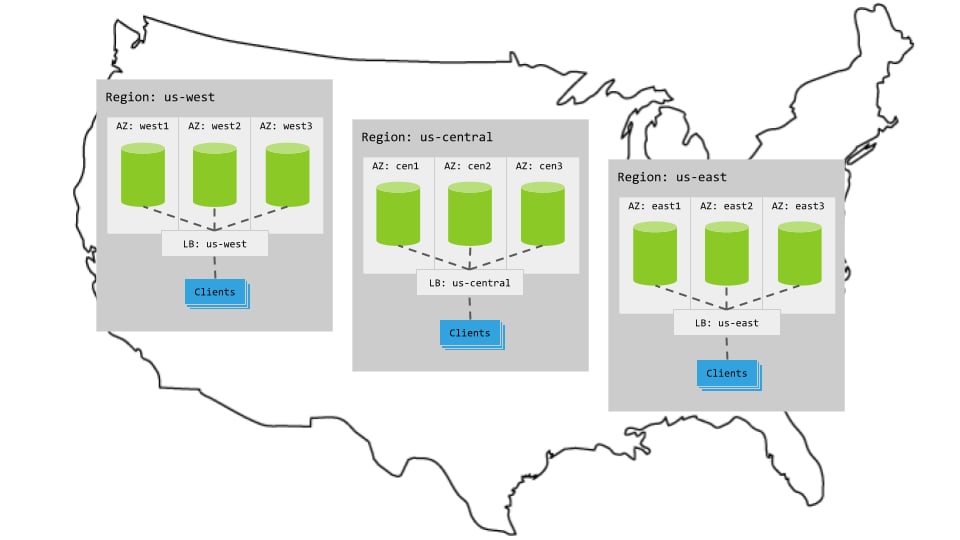
Each multi-region pattern assumes the following setup:
 #### Hardware
* 3 regions
* Per region, 3+ AZs with 3+ VMs evenly distributed across them
* Region-specific app instances and load balancers
* Each load balancer redirects to CockroachDB nodes in its region.
* When CockroachDB nodes are unavailable in a region, the load balancer redirects to nodes in other regions.
#### Cluster startup
Start each node with the `--locality` flag specifying its region and AZ combination. For example, the following command starts a node in the `west1` AZ of the `us-west` region:
```shell theme={"theme":{"light":"catppuccin-mocha","dark":"catppuccin-mocha"}}
$ cockroach start \
--locality=region=us-west,zone=west1 \
--certs-dir=certs \
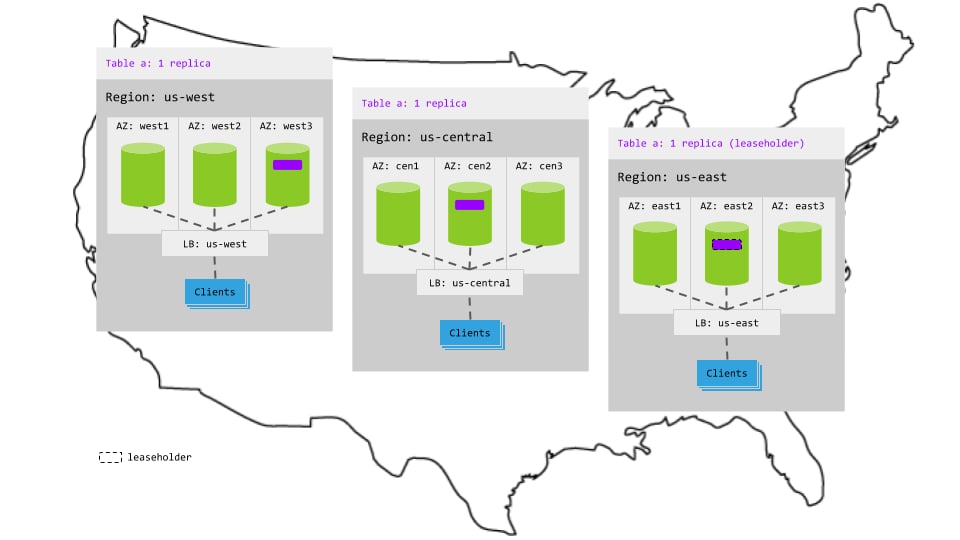
--advertise-addr=`--locality` flag specifying its region and zone combination, CockroachDB will balance the replicas for a table across the three regions:
#### Hardware
* 3 regions
* Per region, 3+ AZs with 3+ VMs evenly distributed across them
* Region-specific app instances and load balancers
* Each load balancer redirects to CockroachDB nodes in its region.
* When CockroachDB nodes are unavailable in a region, the load balancer redirects to nodes in other regions.
#### Cluster startup
Start each node with the `--locality` flag specifying its region and AZ combination. For example, the following command starts a node in the `west1` AZ of the `us-west` region:
```shell theme={"theme":{"light":"catppuccin-mocha","dark":"catppuccin-mocha"}}
$ cockroach start \
--locality=region=us-west,zone=west1 \
--certs-dir=certs \
--advertise-addr=`--locality` flag specifying its region and zone combination, CockroachDB will balance the replicas for a table across the three regions:
 ### Summary
You configure your application to use follower reads by adding an `AS OF SYSTEM TIME` clause when reading from the table. With this clause CockroachDB reads slightly historical data from the closest replica so as to avoid being routed to the leaseholder, which may be in an entirely different region. Writes, however, will still leave the region to get consensus for the table.
### Steps
1. Create the `postal_codes` table:
```sql theme={"theme":{"light":"catppuccin-mocha","dark":"catppuccin-mocha"}}
> CREATE TABLE postal_codes (
id INT PRIMARY KEY,
code STRING
);
```
2. Insert data into the `postal_codes` table:
```sql theme={"theme":{"light":"catppuccin-mocha","dark":"catppuccin-mocha"}}
> INSERT INTO postal_codes (ID, code) VALUES (1, '10001'), (2, '10002'), (3, '10003'), (4,'60601'), (5,'60602'), (6,'60603'), (7,'90001'), (8,'90002'), (9,'90003');
```
3. Decide which type of follower read to perform: exact staleness or bounded staleness. For more information about when to use each type of read, see when to use exact staleness reads and when to use bounded staleness reads.
* To use exact staleness follower reads, configure your app to use `AS OF SYSTEM TIME` with the `follower_read_timestamp()` function whenever reading from the table:
```sql theme={"theme":{"light":"catppuccin-mocha","dark":"catppuccin-mocha"}}
> SELECT code FROM postal_codes
AS OF SYSTEM TIME follower_read_timestamp()
WHERE id = 5;
```
You can also set the `AS OF SYSTEM TIME` value for all operations in a read-only transaction:
```sql theme={"theme":{"light":"catppuccin-mocha","dark":"catppuccin-mocha"}}
> BEGIN;
SET TRANSACTION AS OF SYSTEM TIME follower_read_timestamp();
SELECT code FROM postal_codes
WHERE id = 5;
SELECT code FROM postal_codes
WHERE id = 6;
COMMIT;
```
Using the `SET TRANSACTION` statement as shown in the preceding example will make it easier to use exact staleness follower reads from drivers and ORMs.
* To use bounded staleness follower reads, configure your app to use `AS OF SYSTEM TIME` with the `with_min_timestamp()` or `with_max_staleness()` function whenever reading from the table. Note that only single-row point reads in single-statement (implicit) transactions are supported.
```sql theme={"theme":{"light":"catppuccin-mocha","dark":"catppuccin-mocha"}}
SELECT code FROM postal_codes AS OF SYSTEM TIME with_max_staleness('10s') where id = 5;
```
## Characteristics
### Latency
#### Reads
Reads retrieve historical data from the closest replica and, therefore, never leave the region. This makes read latency very low but slightly stale.
For example, in the following diagram:
1. The read request in `us-central` reaches the regional load balancer.
2. The load balancer routes the request to a gateway node.
3. The gateway node routes the request to the closest replica for the table. In this case, the replica is *not* the leaseholder.
4. The replica retrieves the results as of your preferred staleness interval in the past and returns to the gateway node.
5. The gateway node returns the results to the client.
### Summary
You configure your application to use follower reads by adding an `AS OF SYSTEM TIME` clause when reading from the table. With this clause CockroachDB reads slightly historical data from the closest replica so as to avoid being routed to the leaseholder, which may be in an entirely different region. Writes, however, will still leave the region to get consensus for the table.
### Steps
1. Create the `postal_codes` table:
```sql theme={"theme":{"light":"catppuccin-mocha","dark":"catppuccin-mocha"}}
> CREATE TABLE postal_codes (
id INT PRIMARY KEY,
code STRING
);
```
2. Insert data into the `postal_codes` table:
```sql theme={"theme":{"light":"catppuccin-mocha","dark":"catppuccin-mocha"}}
> INSERT INTO postal_codes (ID, code) VALUES (1, '10001'), (2, '10002'), (3, '10003'), (4,'60601'), (5,'60602'), (6,'60603'), (7,'90001'), (8,'90002'), (9,'90003');
```
3. Decide which type of follower read to perform: exact staleness or bounded staleness. For more information about when to use each type of read, see when to use exact staleness reads and when to use bounded staleness reads.
* To use exact staleness follower reads, configure your app to use `AS OF SYSTEM TIME` with the `follower_read_timestamp()` function whenever reading from the table:
```sql theme={"theme":{"light":"catppuccin-mocha","dark":"catppuccin-mocha"}}
> SELECT code FROM postal_codes
AS OF SYSTEM TIME follower_read_timestamp()
WHERE id = 5;
```
You can also set the `AS OF SYSTEM TIME` value for all operations in a read-only transaction:
```sql theme={"theme":{"light":"catppuccin-mocha","dark":"catppuccin-mocha"}}
> BEGIN;
SET TRANSACTION AS OF SYSTEM TIME follower_read_timestamp();
SELECT code FROM postal_codes
WHERE id = 5;
SELECT code FROM postal_codes
WHERE id = 6;
COMMIT;
```
Using the `SET TRANSACTION` statement as shown in the preceding example will make it easier to use exact staleness follower reads from drivers and ORMs.
* To use bounded staleness follower reads, configure your app to use `AS OF SYSTEM TIME` with the `with_min_timestamp()` or `with_max_staleness()` function whenever reading from the table. Note that only single-row point reads in single-statement (implicit) transactions are supported.
```sql theme={"theme":{"light":"catppuccin-mocha","dark":"catppuccin-mocha"}}
SELECT code FROM postal_codes AS OF SYSTEM TIME with_max_staleness('10s') where id = 5;
```
## Characteristics
### Latency
#### Reads
Reads retrieve historical data from the closest replica and, therefore, never leave the region. This makes read latency very low but slightly stale.
For example, in the following diagram:
1. The read request in `us-central` reaches the regional load balancer.
2. The load balancer routes the request to a gateway node.
3. The gateway node routes the request to the closest replica for the table. In this case, the replica is *not* the leaseholder.
4. The replica retrieves the results as of your preferred staleness interval in the past and returns to the gateway node.
5. The gateway node returns the results to the client.
 #### Writes
The replicas for the table are spread across all 3 regions, so writes involve multiple network hops across regions to achieve consensus. This increases write latency significantly.
For example, in the following animation:
1. The write request in `us-central` reaches the regional load balancer.
2. The load balancer routes the request to a gateway node.
3. The gateway node routes the request to the leaseholder replica for the table in `us-east`.
4. Once the leaseholder has appended the write to its Raft log, it notifies its follower replicas.
5. As soon as one follower has appended the write to its Raft log (and thus a majority of replicas agree based on identical Raft logs), it notifies the leaseholder and the write is committed on the agreeing replicas.
6. The leaseholder then returns acknowledgement of the commit to the gateway node.
7. The gateway node returns the acknowledgement to the client.
#### Writes
The replicas for the table are spread across all 3 regions, so writes involve multiple network hops across regions to achieve consensus. This increases write latency significantly.
For example, in the following animation:
1. The write request in `us-central` reaches the regional load balancer.
2. The load balancer routes the request to a gateway node.
3. The gateway node routes the request to the leaseholder replica for the table in `us-east`.
4. Once the leaseholder has appended the write to its Raft log, it notifies its follower replicas.
5. As soon as one follower has appended the write to its Raft log (and thus a majority of replicas agree based on identical Raft logs), it notifies the leaseholder and the write is committed on the agreeing replicas.
6. The leaseholder then returns acknowledgement of the commit to the gateway node.
7. The gateway node returns the acknowledgement to the client.
 ### Resiliency
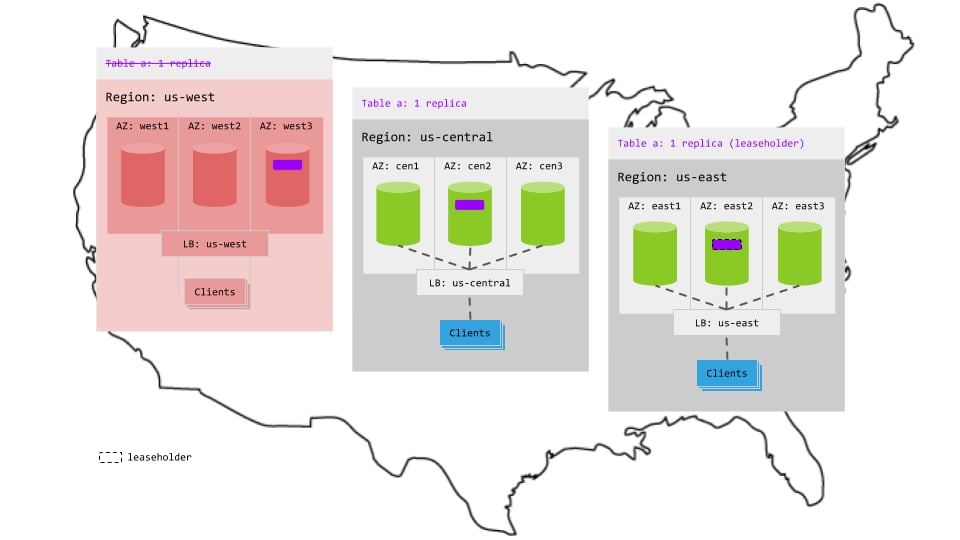
Because this pattern balances the replicas for the table across regions, one entire region can fail without interrupting access to the table:
### Resiliency
Because this pattern balances the replicas for the table across regions, one entire region can fail without interrupting access to the table:
 ## See also
* Multi-Region Capabilities Overview
* How to Choose a Multi-Region Configuration
* When to Use `ZONE` vs. `REGION` Survival Goals
* When to Use `REGIONAL` vs. `GLOBAL` Tables
* Low Latency Reads and Writes in a Multi-Region Cluster
* Migrate to Multi-Region SQL
* Secondary regions
* `ALTER DATABASE... SET SECONDARY REGION`
* `ALTER DATABASE... DROP SECONDARY REGION`
* Topology Patterns Overview
* Single-region patterns
* Development
* Basic Production
* Multi-region patterns
* `REGIONAL` Tables
* `GLOBAL` Tables
* Follower Reads
* Follow-the-Workload
## See also
* Multi-Region Capabilities Overview
* How to Choose a Multi-Region Configuration
* When to Use `ZONE` vs. `REGION` Survival Goals
* When to Use `REGIONAL` vs. `GLOBAL` Tables
* Low Latency Reads and Writes in a Multi-Region Cluster
* Migrate to Multi-Region SQL
* Secondary regions
* `ALTER DATABASE... SET SECONDARY REGION`
* `ALTER DATABASE... DROP SECONDARY REGION`
* Topology Patterns Overview
* Single-region patterns
* Development
* Basic Production
* Multi-region patterns
* `REGIONAL` Tables
* `GLOBAL` Tables
* Follower Reads
* Follow-the-Workload