> ## Documentation Index
> Fetch the complete documentation index at: https://cockroachlabs.mintlify.site/llms.txt
> Use this file to discover all available pages before exploring further.
# Low Latency Reads and Writes in a Multi-Region Cluster
export const InternalLink = ({version, path = "", children, ...props}) => {
let detectedVersion = version || "stable";
if (typeof window !== 'undefined' && !version) {
const match = window.location.pathname.match(/\/docs\/([^/]+)/);
if (match) {
detectedVersion = match[1];
}
}
const normalizedPath = path.startsWith("/") ? path.slice(1) : path;
return
{children}
;
};
CockroachDB multi-region capabilities make it easier to run global applications. For an overview of these capabilities, see Multi-Region Capabilities Overview.
In multi-region clusters, the distribution of data becomes a performance consideration. This makes it important to think about the survival goals of each database. Then, for each table in the database, use the right table locality to locate data for optimal performance.
In this tutorial, you will:
1. Simulate a multi-region CockroachDB cluster on your local machine.
2. Run a workload on the cluster using our fictional vehicle-sharing application called MovR.
3. See the effects of network latency on SQL query performance in the default (non-multi-region) configuration.
4. Configure the cluster for good multi-region performance by issuing SQL statements that choose the right survival goals and table localities.
## Considerations
This page describes a demo cluster; it does not show best practices for a production deployment. For more information about production deployments of multi-region applications, see Orchestrate CockroachDB Across Multiple Kubernetes Clusters and the Production Checklist.
Because the instructions on this page describe how to simulate a multi-region cluster on a single machine, the absolute performance numbers described below are not reflective of the performance you can expect of single-point reads and writes against CockroachDB in a production setting. Instead, the instructions are designed with the following goals:
* To show the *relative* magnitude of the performance improvements to expect when you configure a multi-region cluster correctly.
* To be as easy to try as possible with minimal configuration and setup.
## Before you begin
Make sure you have:
* [A basic understanding of the MovR application](#a-basic-understanding-of-the-movr-application)
* [Docker](https://www.docker.com/) installed on the local machine
### A basic understanding of the MovR application
The workload you'll run against the cluster is our open-source, fictional, peer-to-peer vehicle-sharing app, MovR. Each instance represents users in a specific region:
* `europe-west1`, covering the cities of Amsterdam, Paris, and Rome.
* `us-east1`, covering the cities of New York, Boston, and Washington, D.C.
* `us-west1`, covering the cities of Los Angeles, San Francisco, and Seattle.
#### The MovR schema
The six tables in the `movr` database store user, vehicle, and ride data for MovR:
| Table | Description |
| ------------------------------ | ----------------------------------------------- |
| `users` | People registered for the service. |
| `vehicles` | The pool of vehicles available for the service. |
| `rides` | When and where users have rented a vehicle. |
| `promo\_codes` | Promotional codes for users. |
| `user\_promo\_codes` | Promotional codes in use by users. |
| `vehicle\_location\_histories` | Vehicle location history. |
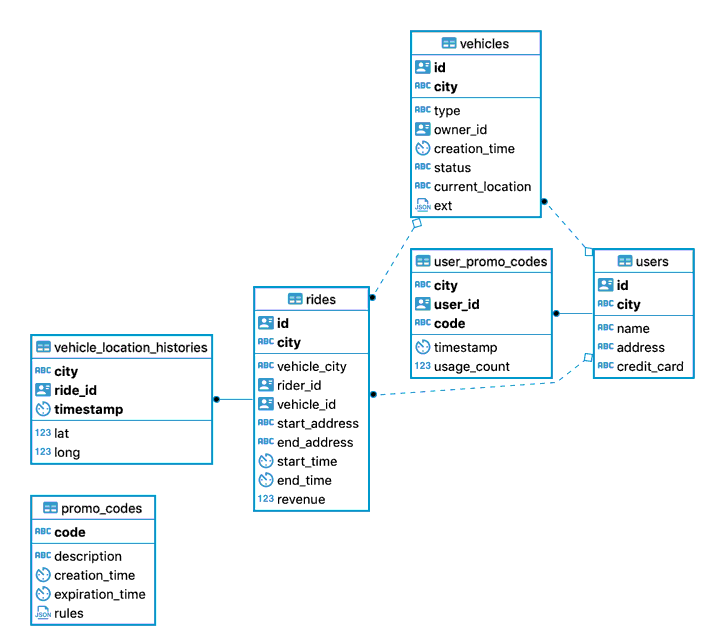 All of the tables except `promo_codes` have a composite primary key of `city` and `id`, in that order. This means that the rows in these tables are ordered by their geography. These tables are read from and written to very frequently. To keep read and write latency low, you'll use the `REGIONAL BY ROW` table locality pattern for these tables.
The data in the `promo_codes` table is different: it is not tied to geography, and it is rarely updated. This type of table is often referred to as a "reference table" or "lookup table". In this case, you'll use the Global table locality pattern to keep read latencies low.
For a description of the sequence of SQL statements issued by the MovR application in response to user actions, see How the MovR application works.
## Step 1. Simulate a multi-region cluster
Use the following `cockroach demo` command to start the cluster. This particular combination of flags results in a demo cluster of 9 nodes, with 3 nodes in each region. It sets the appropriate node localities and also simulates the network latency that would occur between nodes in these localities. For more information about each flag, see the `cockroach demo` documentation, especially for `--global`.
```shell theme={"theme":{"light":"catppuccin-mocha","dark":"catppuccin-mocha"}}
$ cockroach demo --global --nodes 9 --no-example-database --insecure
```
When the cluster starts, you'll see a message like the one shown below, followed by a SQL prompt. Note the URLs for:
* Viewing the DB Console: `http://127.0.0.1:8080`.
* Connecting to the database from a SQL shell or a programming language: `postgres://root@127.0.0.1:26257?sslmode=disable`.
```text theme={"theme":{"light":"catppuccin-mocha","dark":"catppuccin-mocha"}}
#
# Welcome to the CockroachDB demo database!
#
# You are connected to a temporary, in-memory CockroachDB cluster of 9 nodes.
#
# This demo session will attempt to enable enterprise features
# by acquiring a temporary license from Cockroach Labs in the background.
# To disable this behavior, set the environment variable
# COCKROACH_SKIP_ENABLING_DIAGNOSTIC_REPORTING=true.
#
# Reminder: your changes to data stored in the demo session will not be saved!
#
# Connection parameters:
# (webui) http://127.0.0.1:8080/demologin?password=demo76950&username=demo
# (sql) postgres://demo:demo76950@127.0.0.1:26257?sslmode=require
# (sql/unix) postgres://demo:demo76950@?host=%2Fvar%2Ffolders%2Fc8%2Fb_q93vjj0ybfz0fz0z8vy9zc0000gp%2FT%2Fdemo070856957&port=26257
#
# To display connection parameters for other nodes, use \demo ls.
#
# The user "demo" with password "demo76950" has been created. Use it to access the Web UI!
#
# Server version: CockroachDB CCL v21.1.2 (x86_64-apple-darwin19, built 2021/06/07 18:13:04, go1.15.11) (same version as client)
# Cluster ID: bfd9fc91-69bd-4417-a2f7-66e556bf2cfd
# Organization: Cockroach Demo
#
# Enter \? for a brief introduction.
#
```
To verify that the simulated latencies are working as expected, check the Network Latency Page in the DB Console. Round trip times between `us-west1` and `europe-west1` should be in the 150 ms range.
## Step 2. Determine node locations
To determine which nodes are in which regions, you will need to refer to two (2) things:
1. The output of the `\demo ls` from the SQL shell, which shows the TCP ports on the local machine that we will connect to from the MovR application.
2. The node IDs shown on the **Network Latency Page**.
Here is the output of `\demo ls` from the SQL shell.
```text theme={"theme":{"light":"catppuccin-mocha","dark":"catppuccin-mocha"}}
> \demo ls
```
```text theme={"theme":{"light":"catppuccin-mocha","dark":"catppuccin-mocha"}}
node 1:
(webui) http://127.0.0.1:8080/demologin?password=demo76950&username=demo
(sql) postgres://demo:demo76950@127.0.0.1:26257?sslmode=require
(sql/unix) postgres://demo:demo76950@?host=%2Fvar%2Ffolders%2Fc8%2Fb_q93vjj0ybfz0fz0z8vy9zc0000gp%2FT%2Fdemo070856957&port=26257
node 2:
(webui) http://127.0.0.1:8081/demologin?password=demo76950&username=demo
(sql) postgres://demo:demo76950@127.0.0.1:26258?sslmode=require
(sql/unix) postgres://demo:demo76950@?host=%2Fvar%2Ffolders%2Fc8%2Fb_q93vjj0ybfz0fz0z8vy9zc0000gp%2FT%2Fdemo070856957&port=26258
node 3:
(webui) http://127.0.0.1:8082/demologin?password=demo76950&username=demo
(sql) postgres://demo:demo76950@127.0.0.1:26259?sslmode=require
(sql/unix) postgres://demo:demo76950@?host=%2Fvar%2Ffolders%2Fc8%2Fb_q93vjj0ybfz0fz0z8vy9zc0000gp%2FT%2Fdemo070856957&port=26259
node 4:
(webui) http://127.0.0.1:8083/demologin?password=demo76950&username=demo
(sql) postgres://demo:demo76950@127.0.0.1:26260?sslmode=require
(sql/unix) postgres://demo:demo76950@?host=%2Fvar%2Ffolders%2Fc8%2Fb_q93vjj0ybfz0fz0z8vy9zc0000gp%2FT%2Fdemo070856957&port=26260
node 5:
(webui) http://127.0.0.1:8084/demologin?password=demo76950&username=demo
(sql) postgres://demo:demo76950@127.0.0.1:26261?sslmode=require
(sql/unix) postgres://demo:demo76950@?host=%2Fvar%2Ffolders%2Fc8%2Fb_q93vjj0ybfz0fz0z8vy9zc0000gp%2FT%2Fdemo070856957&port=26261
node 6:
(webui) http://127.0.0.1:8085/demologin?password=demo76950&username=demo
(sql) postgres://demo:demo76950@127.0.0.1:26262?sslmode=require
(sql/unix) postgres://demo:demo76950@?host=%2Fvar%2Ffolders%2Fc8%2Fb_q93vjj0ybfz0fz0z8vy9zc0000gp%2FT%2Fdemo070856957&port=26262
node 7:
(webui) http://127.0.0.1:8086/demologin?password=demo76950&username=demo
(sql) postgres://demo:demo76950@127.0.0.1:26263?sslmode=require
(sql/unix) postgres://demo:demo76950@?host=%2Fvar%2Ffolders%2Fc8%2Fb_q93vjj0ybfz0fz0z8vy9zc0000gp%2FT%2Fdemo070856957&port=26263
node 8:
(webui) http://127.0.0.1:8087/demologin?password=demo76950&username=demo
(sql) postgres://demo:demo76950@127.0.0.1:26264?sslmode=require
(sql/unix) postgres://demo:demo76950@?host=%2Fvar%2Ffolders%2Fc8%2Fb_q93vjj0ybfz0fz0z8vy9zc0000gp%2FT%2Fdemo070856957&port=26264
node 9:
(webui) http://127.0.0.1:8088/demologin?password=demo76950&username=demo
(sql) postgres://demo:demo76950@127.0.0.1:26265?sslmode=require
(sql/unix) postgres://demo:demo76950@?host=%2Fvar%2Ffolders%2Fc8%2Fb_q93vjj0ybfz0fz0z8vy9zc0000gp%2FT%2Fdemo070856957&port=26265
```
And here is the view on the **Network Latency Page**, which shows which nodes are in which cluster regions:
All of the tables except `promo_codes` have a composite primary key of `city` and `id`, in that order. This means that the rows in these tables are ordered by their geography. These tables are read from and written to very frequently. To keep read and write latency low, you'll use the `REGIONAL BY ROW` table locality pattern for these tables.
The data in the `promo_codes` table is different: it is not tied to geography, and it is rarely updated. This type of table is often referred to as a "reference table" or "lookup table". In this case, you'll use the Global table locality pattern to keep read latencies low.
For a description of the sequence of SQL statements issued by the MovR application in response to user actions, see How the MovR application works.
## Step 1. Simulate a multi-region cluster
Use the following `cockroach demo` command to start the cluster. This particular combination of flags results in a demo cluster of 9 nodes, with 3 nodes in each region. It sets the appropriate node localities and also simulates the network latency that would occur between nodes in these localities. For more information about each flag, see the `cockroach demo` documentation, especially for `--global`.
```shell theme={"theme":{"light":"catppuccin-mocha","dark":"catppuccin-mocha"}}
$ cockroach demo --global --nodes 9 --no-example-database --insecure
```
When the cluster starts, you'll see a message like the one shown below, followed by a SQL prompt. Note the URLs for:
* Viewing the DB Console: `http://127.0.0.1:8080`.
* Connecting to the database from a SQL shell or a programming language: `postgres://root@127.0.0.1:26257?sslmode=disable`.
```text theme={"theme":{"light":"catppuccin-mocha","dark":"catppuccin-mocha"}}
#
# Welcome to the CockroachDB demo database!
#
# You are connected to a temporary, in-memory CockroachDB cluster of 9 nodes.
#
# This demo session will attempt to enable enterprise features
# by acquiring a temporary license from Cockroach Labs in the background.
# To disable this behavior, set the environment variable
# COCKROACH_SKIP_ENABLING_DIAGNOSTIC_REPORTING=true.
#
# Reminder: your changes to data stored in the demo session will not be saved!
#
# Connection parameters:
# (webui) http://127.0.0.1:8080/demologin?password=demo76950&username=demo
# (sql) postgres://demo:demo76950@127.0.0.1:26257?sslmode=require
# (sql/unix) postgres://demo:demo76950@?host=%2Fvar%2Ffolders%2Fc8%2Fb_q93vjj0ybfz0fz0z8vy9zc0000gp%2FT%2Fdemo070856957&port=26257
#
# To display connection parameters for other nodes, use \demo ls.
#
# The user "demo" with password "demo76950" has been created. Use it to access the Web UI!
#
# Server version: CockroachDB CCL v21.1.2 (x86_64-apple-darwin19, built 2021/06/07 18:13:04, go1.15.11) (same version as client)
# Cluster ID: bfd9fc91-69bd-4417-a2f7-66e556bf2cfd
# Organization: Cockroach Demo
#
# Enter \? for a brief introduction.
#
```
To verify that the simulated latencies are working as expected, check the Network Latency Page in the DB Console. Round trip times between `us-west1` and `europe-west1` should be in the 150 ms range.
## Step 2. Determine node locations
To determine which nodes are in which regions, you will need to refer to two (2) things:
1. The output of the `\demo ls` from the SQL shell, which shows the TCP ports on the local machine that we will connect to from the MovR application.
2. The node IDs shown on the **Network Latency Page**.
Here is the output of `\demo ls` from the SQL shell.
```text theme={"theme":{"light":"catppuccin-mocha","dark":"catppuccin-mocha"}}
> \demo ls
```
```text theme={"theme":{"light":"catppuccin-mocha","dark":"catppuccin-mocha"}}
node 1:
(webui) http://127.0.0.1:8080/demologin?password=demo76950&username=demo
(sql) postgres://demo:demo76950@127.0.0.1:26257?sslmode=require
(sql/unix) postgres://demo:demo76950@?host=%2Fvar%2Ffolders%2Fc8%2Fb_q93vjj0ybfz0fz0z8vy9zc0000gp%2FT%2Fdemo070856957&port=26257
node 2:
(webui) http://127.0.0.1:8081/demologin?password=demo76950&username=demo
(sql) postgres://demo:demo76950@127.0.0.1:26258?sslmode=require
(sql/unix) postgres://demo:demo76950@?host=%2Fvar%2Ffolders%2Fc8%2Fb_q93vjj0ybfz0fz0z8vy9zc0000gp%2FT%2Fdemo070856957&port=26258
node 3:
(webui) http://127.0.0.1:8082/demologin?password=demo76950&username=demo
(sql) postgres://demo:demo76950@127.0.0.1:26259?sslmode=require
(sql/unix) postgres://demo:demo76950@?host=%2Fvar%2Ffolders%2Fc8%2Fb_q93vjj0ybfz0fz0z8vy9zc0000gp%2FT%2Fdemo070856957&port=26259
node 4:
(webui) http://127.0.0.1:8083/demologin?password=demo76950&username=demo
(sql) postgres://demo:demo76950@127.0.0.1:26260?sslmode=require
(sql/unix) postgres://demo:demo76950@?host=%2Fvar%2Ffolders%2Fc8%2Fb_q93vjj0ybfz0fz0z8vy9zc0000gp%2FT%2Fdemo070856957&port=26260
node 5:
(webui) http://127.0.0.1:8084/demologin?password=demo76950&username=demo
(sql) postgres://demo:demo76950@127.0.0.1:26261?sslmode=require
(sql/unix) postgres://demo:demo76950@?host=%2Fvar%2Ffolders%2Fc8%2Fb_q93vjj0ybfz0fz0z8vy9zc0000gp%2FT%2Fdemo070856957&port=26261
node 6:
(webui) http://127.0.0.1:8085/demologin?password=demo76950&username=demo
(sql) postgres://demo:demo76950@127.0.0.1:26262?sslmode=require
(sql/unix) postgres://demo:demo76950@?host=%2Fvar%2Ffolders%2Fc8%2Fb_q93vjj0ybfz0fz0z8vy9zc0000gp%2FT%2Fdemo070856957&port=26262
node 7:
(webui) http://127.0.0.1:8086/demologin?password=demo76950&username=demo
(sql) postgres://demo:demo76950@127.0.0.1:26263?sslmode=require
(sql/unix) postgres://demo:demo76950@?host=%2Fvar%2Ffolders%2Fc8%2Fb_q93vjj0ybfz0fz0z8vy9zc0000gp%2FT%2Fdemo070856957&port=26263
node 8:
(webui) http://127.0.0.1:8087/demologin?password=demo76950&username=demo
(sql) postgres://demo:demo76950@127.0.0.1:26264?sslmode=require
(sql/unix) postgres://demo:demo76950@?host=%2Fvar%2Ffolders%2Fc8%2Fb_q93vjj0ybfz0fz0z8vy9zc0000gp%2FT%2Fdemo070856957&port=26264
node 9:
(webui) http://127.0.0.1:8088/demologin?password=demo76950&username=demo
(sql) postgres://demo:demo76950@127.0.0.1:26265?sslmode=require
(sql/unix) postgres://demo:demo76950@?host=%2Fvar%2Ffolders%2Fc8%2Fb_q93vjj0ybfz0fz0z8vy9zc0000gp%2FT%2Fdemo070856957&port=26265
```
And here is the view on the **Network Latency Page**, which shows which nodes are in which cluster regions:
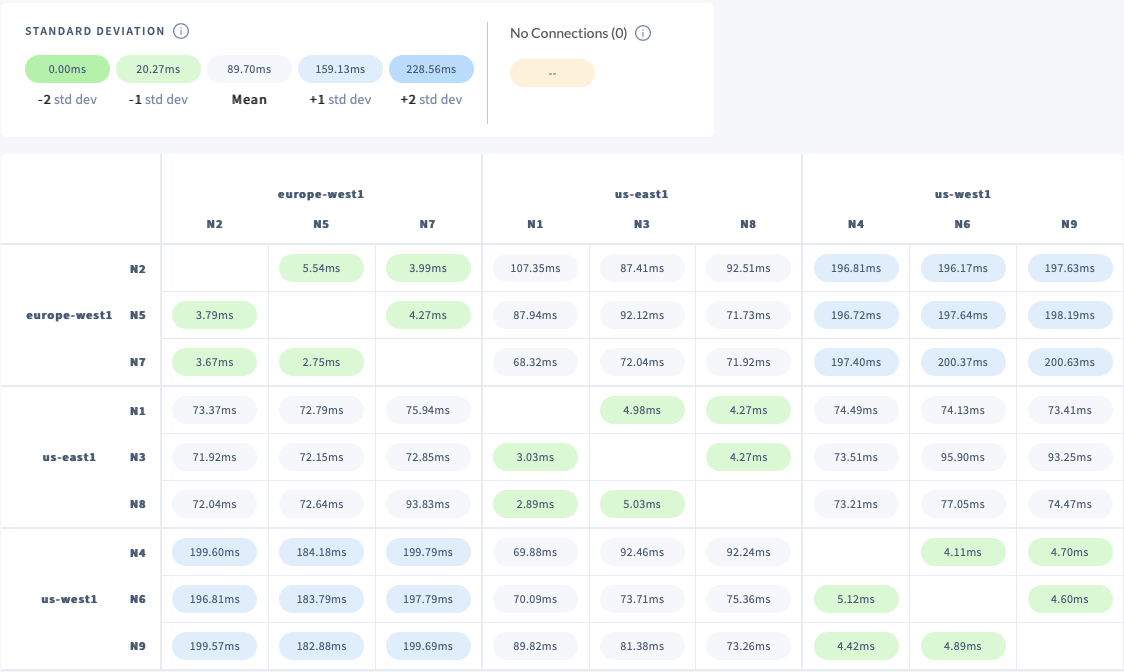 You can see by referring back and forth between `\demo ls` and the **Network Latency Page** that the cluster has the following region/node/port correspondences, which we can use to determine how to connect MovR from various regions:
| Node ID | Region | Port on localhost |
| ------- | ------------ | ----------------- |
| N2 | europe-west1 | 26263 |
| N5 | europe-west1 | 26264 |
| N7 | europe-west1 | 26265 |
| N4 | us-west1 | 26262 |
| N6 | us-west1 | 26260 |
| N9 | us-west1 | 26261 |
| N1 | us-east1 | 26257 |
| N3 | us-east1 | 26259 |
| N8 | us-east1 | 26258 |
## Step 3. Load and run MovR
Follow these steps to start 3 instances of MovR. Each instance is pointed at a node in a different region. This will simulate load from that region.
1. In the SQL shell, create the `movr` database:
```sql theme={"theme":{"light":"catppuccin-mocha","dark":"catppuccin-mocha"}}
CREATE DATABASE IF NOT EXISTS movr;
```
2. Open a second terminal and run the command below to populate the MovR data set. The options are mostly self-explanatory. We limit the application to 1 thread because using multiple threads quickly overloads this small demo cluster's ability to ingest data. As a result, loading the data takes about 90 seconds on a fast laptop.
```shell theme={"theme":{"light":"catppuccin-mocha","dark":"catppuccin-mocha"}}
docker run -it --rm cockroachdb/movr:20.11.1 \
--app-name "movr-load" \
--url "postgres://root@docker.for.mac.localhost:26257/movr?sslmode=disable" \
--num-threads 1 \
load \
--num-users 100 \
--num-rides 100 \
--num-vehicles 10 \
--city "boston" \
--city "new york" \
--city "washington dc" \
--city="amsterdam" \
--city="paris" \
--city="rome" \
--city="los angeles" \
--city="san francisco" \
--city="seattle"
```
```text theme={"theme":{"light":"catppuccin-mocha","dark":"catppuccin-mocha"}}
[INFO] (MainThread) connected to movr database @ postgres://root@docker.for.mac.localhost:26257/movr?sslmode=disable
[INFO] (MainThread) Loading single region MovR
[INFO] (MainThread) initializing tables
[INFO] (MainThread) loading cities ['boston', 'new york', 'washington dc', 'amsterdam', 'paris', 'rome', 'los angeles', 'san francisco', 'seattle']
[INFO] (MainThread) loading movr data with ~100 users, ~10 vehicles, ~100 rides, ~1000 histories, and ~1000 promo codes
[INFO] (Thread-1 ) Generating user data for boston...
... output snipped ...
[INFO] (Thread-1 ) Generating 1000 promo codes...
[INFO] (MainThread) populated 9 cities in 86.986230 seconds
```
3. In the same terminal window, run the following command:
```shell theme={"theme":{"light":"catppuccin-mocha","dark":"catppuccin-mocha"}}
docker run -it --rm cockroachdb/movr:20.11.1 \
--app-name "movr-us-east" \
--url "postgres://root@docker.for.mac.localhost:26257/movr?sslmode=disable" \
run \
--city="boston" \
--city="new york" \
--city="washington dc"
```
```text theme={"theme":{"light":"catppuccin-mocha","dark":"catppuccin-mocha"}}
[INFO] (MainThread) connected to movr database @ postgres://root@docker.for.mac.localhost:26257/movr?sslmode=disable
[INFO] (MainThread) simulating movr load for cities ['boston', 'new york', 'washington dc']
[INFO] (MainThread) warming up....
[INFO] (MainThread) running single region queries...
...
```
4. Open a third terminal and run the following command:
```shell theme={"theme":{"light":"catppuccin-mocha","dark":"catppuccin-mocha"}}
docker run -it --rm cockroachdb/movr:20.11.1 \
--app-name "movr-us-west" \
--url "postgres://root@docker.for.mac.localhost:26260/movr?sslmode=disable" \
run \
--city="los angeles" \
--city="san francisco" \
--city="seattle"
```
```text theme={"theme":{"light":"catppuccin-mocha","dark":"catppuccin-mocha"}}
[INFO] (MainThread) connected to movr database @ postgres://root@docker.for.mac.localhost:26260/movr?sslmode=disable
[INFO] (MainThread) simulating movr load for cities ['los angeles', 'san francisco', 'seattle']
[INFO] (MainThread) warming up....
[INFO] (MainThread) running single region queries...
```
5. Open a fourth terminal and run the following command:
```shell theme={"theme":{"light":"catppuccin-mocha","dark":"catppuccin-mocha"}}
docker run -it --rm cockroachdb/movr:20.11.1 \
--app-name "movr-eu-west" \
--url "postgres://root@docker.for.mac.localhost:26264/movr?sslmode=disable" \
run \
--city="amsterdam" \
--city="paris" \
--city="rome"
```
```text theme={"theme":{"light":"catppuccin-mocha","dark":"catppuccin-mocha"}}
[INFO] (MainThread) connected to movr database @ postgres://root@docker.for.mac.localhost:26264/movr?sslmode=disable
[INFO] (MainThread) simulating movr load for cities ['amsterdam', 'paris', 'rome']
[INFO] (MainThread) warming up....
[INFO] (MainThread) running single region queries...
...
```
## Step 4. Check service latency
Now that you have load hitting the cluster from different regions, check how the service latencies look before you do any multi-region configuration from SQL. This is the "before" case in the "before and after".
In the DB Console at [http://127.0.0.1:8080](http://127.0.0.1:8080/), click **Metrics** on the left and hover over the **Service Latency: SQL, 99th percentile** timeseries graph. You should see the effects of network latency on this workload.
You can see by referring back and forth between `\demo ls` and the **Network Latency Page** that the cluster has the following region/node/port correspondences, which we can use to determine how to connect MovR from various regions:
| Node ID | Region | Port on localhost |
| ------- | ------------ | ----------------- |
| N2 | europe-west1 | 26263 |
| N5 | europe-west1 | 26264 |
| N7 | europe-west1 | 26265 |
| N4 | us-west1 | 26262 |
| N6 | us-west1 | 26260 |
| N9 | us-west1 | 26261 |
| N1 | us-east1 | 26257 |
| N3 | us-east1 | 26259 |
| N8 | us-east1 | 26258 |
## Step 3. Load and run MovR
Follow these steps to start 3 instances of MovR. Each instance is pointed at a node in a different region. This will simulate load from that region.
1. In the SQL shell, create the `movr` database:
```sql theme={"theme":{"light":"catppuccin-mocha","dark":"catppuccin-mocha"}}
CREATE DATABASE IF NOT EXISTS movr;
```
2. Open a second terminal and run the command below to populate the MovR data set. The options are mostly self-explanatory. We limit the application to 1 thread because using multiple threads quickly overloads this small demo cluster's ability to ingest data. As a result, loading the data takes about 90 seconds on a fast laptop.
```shell theme={"theme":{"light":"catppuccin-mocha","dark":"catppuccin-mocha"}}
docker run -it --rm cockroachdb/movr:20.11.1 \
--app-name "movr-load" \
--url "postgres://root@docker.for.mac.localhost:26257/movr?sslmode=disable" \
--num-threads 1 \
load \
--num-users 100 \
--num-rides 100 \
--num-vehicles 10 \
--city "boston" \
--city "new york" \
--city "washington dc" \
--city="amsterdam" \
--city="paris" \
--city="rome" \
--city="los angeles" \
--city="san francisco" \
--city="seattle"
```
```text theme={"theme":{"light":"catppuccin-mocha","dark":"catppuccin-mocha"}}
[INFO] (MainThread) connected to movr database @ postgres://root@docker.for.mac.localhost:26257/movr?sslmode=disable
[INFO] (MainThread) Loading single region MovR
[INFO] (MainThread) initializing tables
[INFO] (MainThread) loading cities ['boston', 'new york', 'washington dc', 'amsterdam', 'paris', 'rome', 'los angeles', 'san francisco', 'seattle']
[INFO] (MainThread) loading movr data with ~100 users, ~10 vehicles, ~100 rides, ~1000 histories, and ~1000 promo codes
[INFO] (Thread-1 ) Generating user data for boston...
... output snipped ...
[INFO] (Thread-1 ) Generating 1000 promo codes...
[INFO] (MainThread) populated 9 cities in 86.986230 seconds
```
3. In the same terminal window, run the following command:
```shell theme={"theme":{"light":"catppuccin-mocha","dark":"catppuccin-mocha"}}
docker run -it --rm cockroachdb/movr:20.11.1 \
--app-name "movr-us-east" \
--url "postgres://root@docker.for.mac.localhost:26257/movr?sslmode=disable" \
run \
--city="boston" \
--city="new york" \
--city="washington dc"
```
```text theme={"theme":{"light":"catppuccin-mocha","dark":"catppuccin-mocha"}}
[INFO] (MainThread) connected to movr database @ postgres://root@docker.for.mac.localhost:26257/movr?sslmode=disable
[INFO] (MainThread) simulating movr load for cities ['boston', 'new york', 'washington dc']
[INFO] (MainThread) warming up....
[INFO] (MainThread) running single region queries...
...
```
4. Open a third terminal and run the following command:
```shell theme={"theme":{"light":"catppuccin-mocha","dark":"catppuccin-mocha"}}
docker run -it --rm cockroachdb/movr:20.11.1 \
--app-name "movr-us-west" \
--url "postgres://root@docker.for.mac.localhost:26260/movr?sslmode=disable" \
run \
--city="los angeles" \
--city="san francisco" \
--city="seattle"
```
```text theme={"theme":{"light":"catppuccin-mocha","dark":"catppuccin-mocha"}}
[INFO] (MainThread) connected to movr database @ postgres://root@docker.for.mac.localhost:26260/movr?sslmode=disable
[INFO] (MainThread) simulating movr load for cities ['los angeles', 'san francisco', 'seattle']
[INFO] (MainThread) warming up....
[INFO] (MainThread) running single region queries...
```
5. Open a fourth terminal and run the following command:
```shell theme={"theme":{"light":"catppuccin-mocha","dark":"catppuccin-mocha"}}
docker run -it --rm cockroachdb/movr:20.11.1 \
--app-name "movr-eu-west" \
--url "postgres://root@docker.for.mac.localhost:26264/movr?sslmode=disable" \
run \
--city="amsterdam" \
--city="paris" \
--city="rome"
```
```text theme={"theme":{"light":"catppuccin-mocha","dark":"catppuccin-mocha"}}
[INFO] (MainThread) connected to movr database @ postgres://root@docker.for.mac.localhost:26264/movr?sslmode=disable
[INFO] (MainThread) simulating movr load for cities ['amsterdam', 'paris', 'rome']
[INFO] (MainThread) warming up....
[INFO] (MainThread) running single region queries...
...
```
## Step 4. Check service latency
Now that you have load hitting the cluster from different regions, check how the service latencies look before you do any multi-region configuration from SQL. This is the "before" case in the "before and after".
In the DB Console at [http://127.0.0.1:8080](http://127.0.0.1:8080/), click **Metrics** on the left and hover over the **Service Latency: SQL, 99th percentile** timeseries graph. You should see the effects of network latency on this workload.
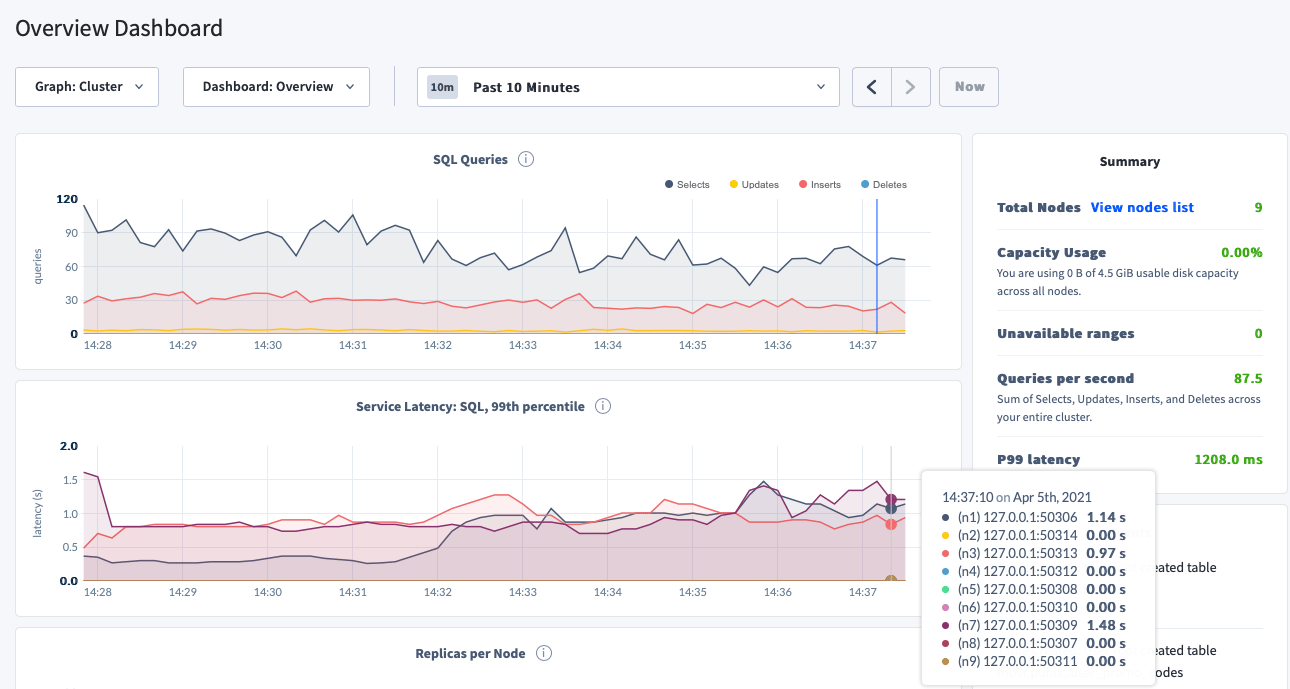 For each of the 3 nodes that you are pointing the movr workload at, the max latency of 99% of queries are in the 1-2 seconds range. The SQL latency is high because of the network latency between regions.
To see the network latency between any two nodes in the cluster, click **Network Latency** in the left-hand navigation.
Within a single region, round-trip latency is under 6 ms (milliseconds). Across regions, round-trip latency is significantly higher.
For example:
* Round-trip latency between **N2** in `europe-west1` and **N3** in `us-east1` is 87 ms.
* Round-trip latency between **N2** in `europe-west1` and **N4** in `us-west1` is 196 ms.
## Step 5. Execute multi-region SQL statements
The following SQL statements will configure:
* [The database's available regions](#configure-database-regions).
* [Which data should be optimized for access from which region](#configure-table-localities).
This information is necessary so that CockroachDB can move data around to optimize access to particular data from particular regions. The main focus is reducing latency in a global deployment. For more information about how this works at a high level, see the Multi-Region Capabilities Overview.
The following `ALTER` statements will take some seconds to run, since the cluster is under load.
### Configure database regions
Back in the SQL shell, switch to the `movr` database:
```sql theme={"theme":{"light":"catppuccin-mocha","dark":"catppuccin-mocha"}}
USE movr;
```
Execute the following statements. They will tell CockroachDB about the database's regions. This information is necessary so that CockroachDB can later move data around to optimize access to particular data from particular regions. For more information about how this works at a high level, see Database Regions.
```sql theme={"theme":{"light":"catppuccin-mocha","dark":"catppuccin-mocha"}}
ALTER DATABASE movr PRIMARY REGION "us-east1";
ALTER DATABASE movr ADD REGION "europe-west1";
ALTER DATABASE movr ADD REGION "us-west1";
```
### Configure table localities
#### Configure GLOBAL tables
As mentioned earlier, all of the tables except `promo_codes` are geographically specific.
Because the data in `promo_codes` is not updated frequently (a.k.a., "read-mostly"), and needs to be available from any region, the right table locality is `GLOBAL`.
```sql theme={"theme":{"light":"catppuccin-mocha","dark":"catppuccin-mocha"}}
ALTER TABLE promo_codes SET locality GLOBAL;
```
Next, alter the `user_promo_codes` table to have a foreign key into the global `promo_codes` table. This will enable fast reads of the `promo_codes.code` column from any region in the cluster.
```sql theme={"theme":{"light":"catppuccin-mocha","dark":"catppuccin-mocha"}}
ALTER TABLE user_promo_codes
ADD CONSTRAINT user_promo_codes_code_fk
FOREIGN KEY (code)
REFERENCES promo_codes (code)
ON UPDATE CASCADE;
```
#### Configure REGIONAL BY ROW tables
All of the tables except `promo_codes` contain rows which are partitioned by region, and updated very frequently. For these tables, the right table locality for optimizing access to their data is `REGIONAL BY ROW`.
Apply this table locality to the remaining tables. These statements use a `CASE` statement to put data for a given city in the right region and can take around 1 minute to complete for each table.
* `rides`
```sql theme={"theme":{"light":"catppuccin-mocha","dark":"catppuccin-mocha"}}
ALTER TABLE rides ADD COLUMN region crdb_internal_region AS (
CASE WHEN city = 'amsterdam' THEN 'europe-west1'
WHEN city = 'paris' THEN 'europe-west1'
WHEN city = 'rome' THEN 'europe-west1'
WHEN city = 'new york' THEN 'us-east1'
WHEN city = 'boston' THEN 'us-east1'
WHEN city = 'washington dc' THEN 'us-east1'
WHEN city = 'san francisco' THEN 'us-west1'
WHEN city = 'seattle' THEN 'us-west1'
WHEN city = 'los angeles' THEN 'us-west1'
END
) STORED;
ALTER TABLE rides ALTER COLUMN REGION SET NOT NULL;
ALTER TABLE rides SET LOCALITY REGIONAL BY ROW AS "region";
```
* `user_promo_codes`
```sql theme={"theme":{"light":"catppuccin-mocha","dark":"catppuccin-mocha"}}
ALTER TABLE user_promo_codes ADD COLUMN region crdb_internal_region AS (
CASE WHEN city = 'amsterdam' THEN 'europe-west1'
WHEN city = 'paris' THEN 'europe-west1'
WHEN city = 'rome' THEN 'europe-west1'
WHEN city = 'new york' THEN 'us-east1'
WHEN city = 'boston' THEN 'us-east1'
WHEN city = 'washington dc' THEN 'us-east1'
WHEN city = 'san francisco' THEN 'us-west1'
WHEN city = 'seattle' THEN 'us-west1'
WHEN city = 'los angeles' THEN 'us-west1'
END
) STORED;
ALTER TABLE user_promo_codes ALTER COLUMN REGION SET NOT NULL;
ALTER TABLE user_promo_codes SET LOCALITY REGIONAL BY ROW AS "region";
```
* `users`
```sql theme={"theme":{"light":"catppuccin-mocha","dark":"catppuccin-mocha"}}
ALTER TABLE users ADD COLUMN region crdb_internal_region AS (
CASE WHEN city = 'amsterdam' THEN 'europe-west1'
WHEN city = 'paris' THEN 'europe-west1'
WHEN city = 'rome' THEN 'europe-west1'
WHEN city = 'new york' THEN 'us-east1'
WHEN city = 'boston' THEN 'us-east1'
WHEN city = 'washington dc' THEN 'us-east1'
WHEN city = 'san francisco' THEN 'us-west1'
WHEN city = 'seattle' THEN 'us-west1'
WHEN city = 'los angeles' THEN 'us-west1'
END
) STORED;
ALTER TABLE users ALTER COLUMN REGION SET NOT NULL;
ALTER TABLE users SET LOCALITY REGIONAL BY ROW AS "region";
```
* `vehicle_location_histories`
```sql theme={"theme":{"light":"catppuccin-mocha","dark":"catppuccin-mocha"}}
ALTER TABLE vehicle_location_histories ADD COLUMN region crdb_internal_region AS (
CASE WHEN city = 'amsterdam' THEN 'europe-west1'
WHEN city = 'paris' THEN 'europe-west1'
WHEN city = 'rome' THEN 'europe-west1'
WHEN city = 'new york' THEN 'us-east1'
WHEN city = 'boston' THEN 'us-east1'
WHEN city = 'washington dc' THEN 'us-east1'
WHEN city = 'san francisco' THEN 'us-west1'
WHEN city = 'seattle' THEN 'us-west1'
WHEN city = 'los angeles' THEN 'us-west1'
END
) STORED;
ALTER TABLE vehicle_location_histories ALTER COLUMN REGION SET NOT NULL;
ALTER TABLE vehicle_location_histories SET LOCALITY REGIONAL BY ROW AS "region";
```
* `vehicles`
```sql theme={"theme":{"light":"catppuccin-mocha","dark":"catppuccin-mocha"}}
ALTER TABLE vehicles ADD COLUMN region crdb_internal_region AS (
CASE WHEN city = 'amsterdam' THEN 'europe-west1'
WHEN city = 'paris' THEN 'europe-west1'
WHEN city = 'rome' THEN 'europe-west1'
WHEN city = 'new york' THEN 'us-east1'
WHEN city = 'boston' THEN 'us-east1'
WHEN city = 'washington dc' THEN 'us-east1'
WHEN city = 'san francisco' THEN 'us-west1'
WHEN city = 'seattle' THEN 'us-west1'
WHEN city = 'los angeles' THEN 'us-west1'
END
) STORED;
ALTER TABLE vehicles ALTER COLUMN REGION SET NOT NULL;
ALTER TABLE vehicles SET LOCALITY REGIONAL BY ROW AS "region";
```
## Step 6. Re-check service latency
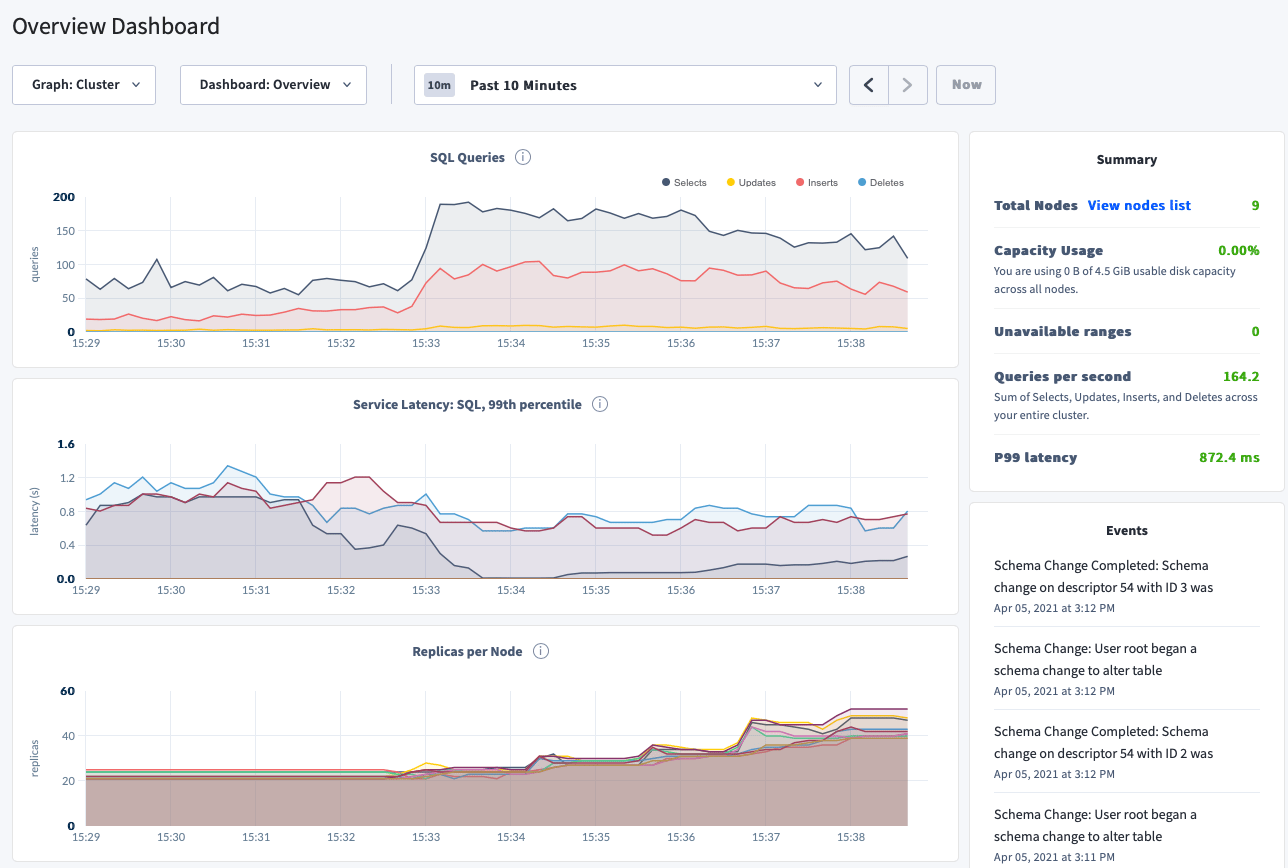
As the multi-region schema changes complete, you should see changes to the following metrics:
* **SQL Queries**: This number should go up, since the cluster can service more load due to better performance (due to better data locality and lower latency). In this particular run, **the QPS has almost doubled, from 87 to 164**.
* **Service Latency: SQL, 99th percentile**: In general, even on a small demo cluster like this, the P99 latency should drop and also get less spiky over time, as schema changes finish and data is moved around. For this particular run, **the P99 latency has dropped from \~1200 ms to \~870 ms, an over 25% improvement**.
* **Replicas per Node**: This will increase, since the data needs to be spread across more nodes in order to service the multi-region workload appropriately. There is nothing you need to do about this, except to note that it happens, and is required for CockroachDB's improved multi-region performance features to work.
The small demo cluster used in this example is essentially in a state of overload from the start. The performance numbers shown here only reflect the direction of the performance improvements. You should expect to see much better absolute performance numbers than those described here in a production deployment.
For each of the 3 nodes that you are pointing the movr workload at, the max latency of 99% of queries are in the 1-2 seconds range. The SQL latency is high because of the network latency between regions.
To see the network latency between any two nodes in the cluster, click **Network Latency** in the left-hand navigation.
Within a single region, round-trip latency is under 6 ms (milliseconds). Across regions, round-trip latency is significantly higher.
For example:
* Round-trip latency between **N2** in `europe-west1` and **N3** in `us-east1` is 87 ms.
* Round-trip latency between **N2** in `europe-west1` and **N4** in `us-west1` is 196 ms.
## Step 5. Execute multi-region SQL statements
The following SQL statements will configure:
* [The database's available regions](#configure-database-regions).
* [Which data should be optimized for access from which region](#configure-table-localities).
This information is necessary so that CockroachDB can move data around to optimize access to particular data from particular regions. The main focus is reducing latency in a global deployment. For more information about how this works at a high level, see the Multi-Region Capabilities Overview.
The following `ALTER` statements will take some seconds to run, since the cluster is under load.
### Configure database regions
Back in the SQL shell, switch to the `movr` database:
```sql theme={"theme":{"light":"catppuccin-mocha","dark":"catppuccin-mocha"}}
USE movr;
```
Execute the following statements. They will tell CockroachDB about the database's regions. This information is necessary so that CockroachDB can later move data around to optimize access to particular data from particular regions. For more information about how this works at a high level, see Database Regions.
```sql theme={"theme":{"light":"catppuccin-mocha","dark":"catppuccin-mocha"}}
ALTER DATABASE movr PRIMARY REGION "us-east1";
ALTER DATABASE movr ADD REGION "europe-west1";
ALTER DATABASE movr ADD REGION "us-west1";
```
### Configure table localities
#### Configure GLOBAL tables
As mentioned earlier, all of the tables except `promo_codes` are geographically specific.
Because the data in `promo_codes` is not updated frequently (a.k.a., "read-mostly"), and needs to be available from any region, the right table locality is `GLOBAL`.
```sql theme={"theme":{"light":"catppuccin-mocha","dark":"catppuccin-mocha"}}
ALTER TABLE promo_codes SET locality GLOBAL;
```
Next, alter the `user_promo_codes` table to have a foreign key into the global `promo_codes` table. This will enable fast reads of the `promo_codes.code` column from any region in the cluster.
```sql theme={"theme":{"light":"catppuccin-mocha","dark":"catppuccin-mocha"}}
ALTER TABLE user_promo_codes
ADD CONSTRAINT user_promo_codes_code_fk
FOREIGN KEY (code)
REFERENCES promo_codes (code)
ON UPDATE CASCADE;
```
#### Configure REGIONAL BY ROW tables
All of the tables except `promo_codes` contain rows which are partitioned by region, and updated very frequently. For these tables, the right table locality for optimizing access to their data is `REGIONAL BY ROW`.
Apply this table locality to the remaining tables. These statements use a `CASE` statement to put data for a given city in the right region and can take around 1 minute to complete for each table.
* `rides`
```sql theme={"theme":{"light":"catppuccin-mocha","dark":"catppuccin-mocha"}}
ALTER TABLE rides ADD COLUMN region crdb_internal_region AS (
CASE WHEN city = 'amsterdam' THEN 'europe-west1'
WHEN city = 'paris' THEN 'europe-west1'
WHEN city = 'rome' THEN 'europe-west1'
WHEN city = 'new york' THEN 'us-east1'
WHEN city = 'boston' THEN 'us-east1'
WHEN city = 'washington dc' THEN 'us-east1'
WHEN city = 'san francisco' THEN 'us-west1'
WHEN city = 'seattle' THEN 'us-west1'
WHEN city = 'los angeles' THEN 'us-west1'
END
) STORED;
ALTER TABLE rides ALTER COLUMN REGION SET NOT NULL;
ALTER TABLE rides SET LOCALITY REGIONAL BY ROW AS "region";
```
* `user_promo_codes`
```sql theme={"theme":{"light":"catppuccin-mocha","dark":"catppuccin-mocha"}}
ALTER TABLE user_promo_codes ADD COLUMN region crdb_internal_region AS (
CASE WHEN city = 'amsterdam' THEN 'europe-west1'
WHEN city = 'paris' THEN 'europe-west1'
WHEN city = 'rome' THEN 'europe-west1'
WHEN city = 'new york' THEN 'us-east1'
WHEN city = 'boston' THEN 'us-east1'
WHEN city = 'washington dc' THEN 'us-east1'
WHEN city = 'san francisco' THEN 'us-west1'
WHEN city = 'seattle' THEN 'us-west1'
WHEN city = 'los angeles' THEN 'us-west1'
END
) STORED;
ALTER TABLE user_promo_codes ALTER COLUMN REGION SET NOT NULL;
ALTER TABLE user_promo_codes SET LOCALITY REGIONAL BY ROW AS "region";
```
* `users`
```sql theme={"theme":{"light":"catppuccin-mocha","dark":"catppuccin-mocha"}}
ALTER TABLE users ADD COLUMN region crdb_internal_region AS (
CASE WHEN city = 'amsterdam' THEN 'europe-west1'
WHEN city = 'paris' THEN 'europe-west1'
WHEN city = 'rome' THEN 'europe-west1'
WHEN city = 'new york' THEN 'us-east1'
WHEN city = 'boston' THEN 'us-east1'
WHEN city = 'washington dc' THEN 'us-east1'
WHEN city = 'san francisco' THEN 'us-west1'
WHEN city = 'seattle' THEN 'us-west1'
WHEN city = 'los angeles' THEN 'us-west1'
END
) STORED;
ALTER TABLE users ALTER COLUMN REGION SET NOT NULL;
ALTER TABLE users SET LOCALITY REGIONAL BY ROW AS "region";
```
* `vehicle_location_histories`
```sql theme={"theme":{"light":"catppuccin-mocha","dark":"catppuccin-mocha"}}
ALTER TABLE vehicle_location_histories ADD COLUMN region crdb_internal_region AS (
CASE WHEN city = 'amsterdam' THEN 'europe-west1'
WHEN city = 'paris' THEN 'europe-west1'
WHEN city = 'rome' THEN 'europe-west1'
WHEN city = 'new york' THEN 'us-east1'
WHEN city = 'boston' THEN 'us-east1'
WHEN city = 'washington dc' THEN 'us-east1'
WHEN city = 'san francisco' THEN 'us-west1'
WHEN city = 'seattle' THEN 'us-west1'
WHEN city = 'los angeles' THEN 'us-west1'
END
) STORED;
ALTER TABLE vehicle_location_histories ALTER COLUMN REGION SET NOT NULL;
ALTER TABLE vehicle_location_histories SET LOCALITY REGIONAL BY ROW AS "region";
```
* `vehicles`
```sql theme={"theme":{"light":"catppuccin-mocha","dark":"catppuccin-mocha"}}
ALTER TABLE vehicles ADD COLUMN region crdb_internal_region AS (
CASE WHEN city = 'amsterdam' THEN 'europe-west1'
WHEN city = 'paris' THEN 'europe-west1'
WHEN city = 'rome' THEN 'europe-west1'
WHEN city = 'new york' THEN 'us-east1'
WHEN city = 'boston' THEN 'us-east1'
WHEN city = 'washington dc' THEN 'us-east1'
WHEN city = 'san francisco' THEN 'us-west1'
WHEN city = 'seattle' THEN 'us-west1'
WHEN city = 'los angeles' THEN 'us-west1'
END
) STORED;
ALTER TABLE vehicles ALTER COLUMN REGION SET NOT NULL;
ALTER TABLE vehicles SET LOCALITY REGIONAL BY ROW AS "region";
```
## Step 6. Re-check service latency
As the multi-region schema changes complete, you should see changes to the following metrics:
* **SQL Queries**: This number should go up, since the cluster can service more load due to better performance (due to better data locality and lower latency). In this particular run, **the QPS has almost doubled, from 87 to 164**.
* **Service Latency: SQL, 99th percentile**: In general, even on a small demo cluster like this, the P99 latency should drop and also get less spiky over time, as schema changes finish and data is moved around. For this particular run, **the P99 latency has dropped from \~1200 ms to \~870 ms, an over 25% improvement**.
* **Replicas per Node**: This will increase, since the data needs to be spread across more nodes in order to service the multi-region workload appropriately. There is nothing you need to do about this, except to note that it happens, and is required for CockroachDB's improved multi-region performance features to work.
The small demo cluster used in this example is essentially in a state of overload from the start. The performance numbers shown here only reflect the direction of the performance improvements. You should expect to see much better absolute performance numbers than those described here in a production deployment.
 ## See also
* Multi-Region Capabilities Overview
* How to Choose a Multi-Region Configuration
* When to Use `ZONE` vs. `REGION` Survival Goals
* When to Use `REGIONAL` vs. `GLOBAL` Tables
* Migrate to Multi-Region SQL
* Secondary regions
* `SET SECONDARY REGION`
* `DROP SECONDARY REGION`
* Reads and Writes in CockroachDB
* Install CockroachDB
## See also
* Multi-Region Capabilities Overview
* How to Choose a Multi-Region Configuration
* When to Use `ZONE` vs. `REGION` Survival Goals
* When to Use `REGIONAL` vs. `GLOBAL` Tables
* Migrate to Multi-Region SQL
* Secondary regions
* `SET SECONDARY REGION`
* `DROP SECONDARY REGION`
* Reads and Writes in CockroachDB
* Install CockroachDB