> ## Documentation Index
> Fetch the complete documentation index at: https://cockroachlabs.mintlify.site/llms.txt
> Use this file to discover all available pages before exploring further.
# Network Latency Page
export const InternalLink = ({version, path = "", children, ...props}) => {
let detectedVersion = version || "stable";
if (typeof window !== 'undefined' && !version) {
const match = window.location.pathname.match(/\/docs\/([^/]+)/);
if (match) {
detectedVersion = match[1];
}
}
const normalizedPath = path.startsWith("/") ? path.slice(1) : path;
return
{children}
;
};
The **Network Latency** page displays round-trip latencies between all nodes in your cluster. Latency is the time required to transmit a packet across a network, and is highly dependent on your network topology. Use this page to determine whether your latency is appropriate for your topology pattern, or to identify nodes with unexpected latencies.
To view this page, access the DB Console and click **Network Latency** in the left-hand navigation.
## Sort and filter network latency
Use the **Sort By** menu to arrange the latency matrix by locality (e.g., cloud, region, availability zone, datacenter).
Use the **Filter** menu to select specific nodes or localities to view.
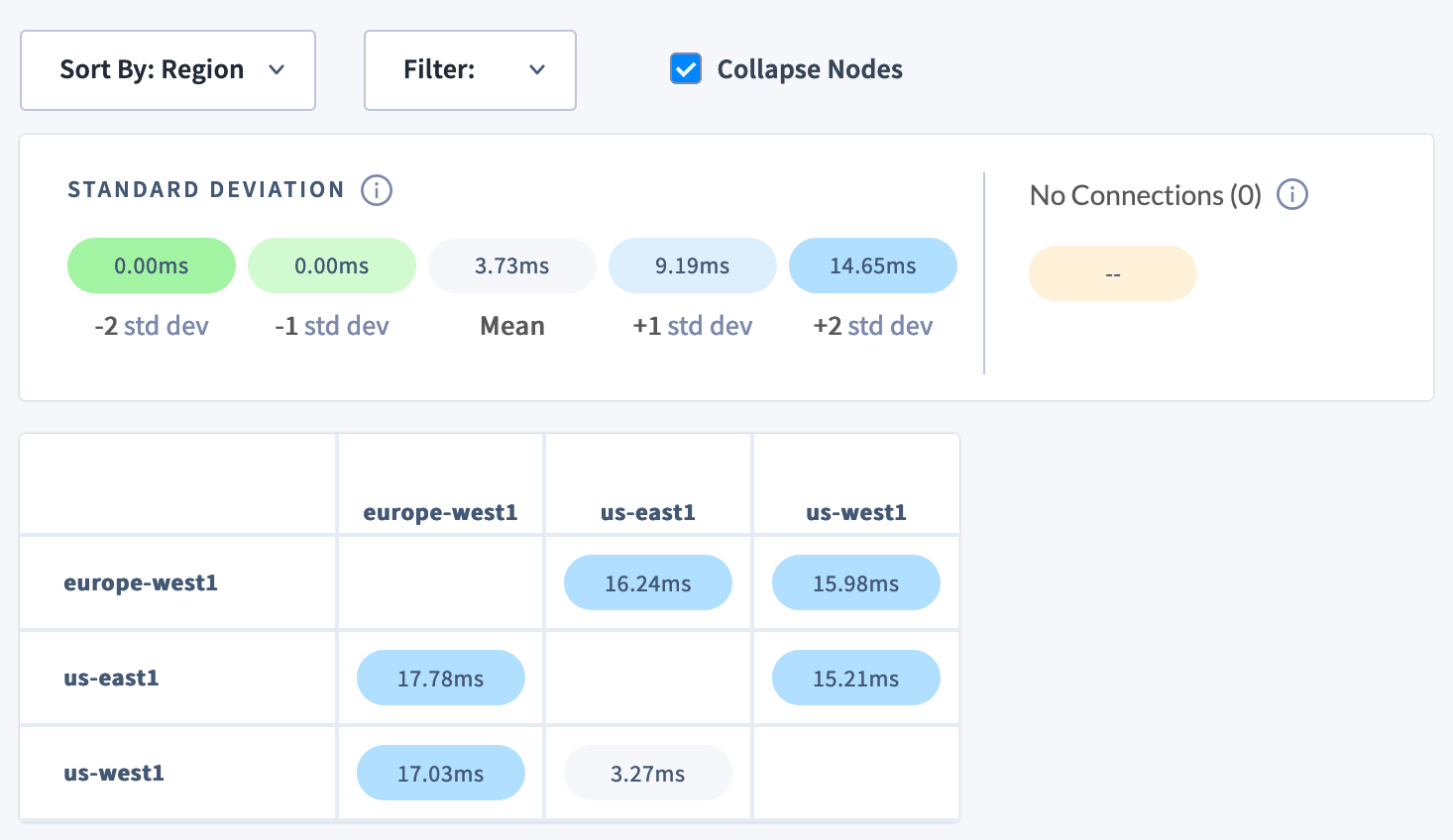
Select **Collapse Nodes** to display the mean latencies of each locality, depending on how the matrix is sorted. This is a way to quickly assess cross-regional or cross-cloud latency.
## Understanding the Network Latency matrix
Each cell in the matrix displays the round-trip latency in milliseconds between two nodes in your cluster. Round-trip latency includes the return time of a packet. Latencies are color-coded by their standard deviation from the mean latency on the network: green for lower values, and blue for higher.
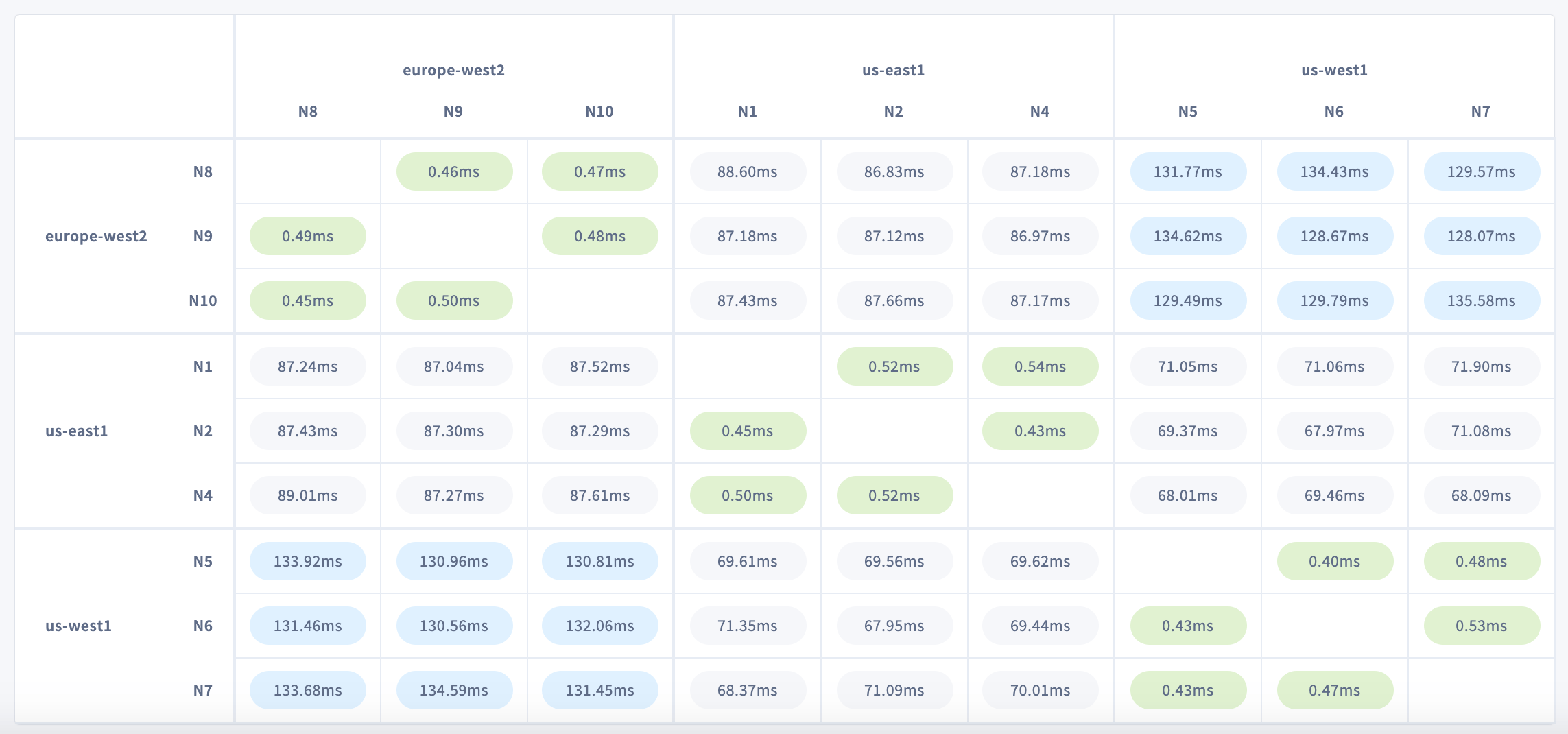 Rows represent origin nodes, and columns represent destination nodes. Hover over a cell to see round-trip latency and locality metadata for origin and destination nodes.
On a typical multi-region cluster, you can expect much lower latencies between nodes in the same region/availability zone. Nodes in different regions/availability zones, meanwhile, will experience higher latencies that reflect their geographical distribution.
For instance, the cluster shown above has nodes in `us-west1`, `us-east1`, and `europe-west2`. Latencies are highest between nodes in `us-west1` and `europe-west2`, which span the greatest distance. This is especially clear when sorting by region or availability zone and collapsing nodes:
Rows represent origin nodes, and columns represent destination nodes. Hover over a cell to see round-trip latency and locality metadata for origin and destination nodes.
On a typical multi-region cluster, you can expect much lower latencies between nodes in the same region/availability zone. Nodes in different regions/availability zones, meanwhile, will experience higher latencies that reflect their geographical distribution.
For instance, the cluster shown above has nodes in `us-west1`, `us-east1`, and `europe-west2`. Latencies are highest between nodes in `us-west1` and `europe-west2`, which span the greatest distance. This is especially clear when sorting by region or availability zone and collapsing nodes:
 ### No connections
Nodes that have lost a connection are displayed in a separate color. This can help you locate a network partition in your cluster.
A network partition occurs when two or more nodes are prevented from communicating with each other in one or both directions. A network partition can be caused by a network outage or a configuration problem with the network, such as when allowlisted IP addresses or hostnames change after a node is drained and restarted.
In a **symmetric** partition, node communication is disrupted in both directions. In an **asymmetric** partition, nodes can communicate in one direction but not the other.
CockroachDB protects against asymmetric partitions by converting all asymmetric (uni-directional) network partitions into symmetric (bi-directional) network partitions. This increases cluster resiliency by reducing the number of partition-related failures that can occur. Many temporary symmetric partitions can be recovered from automatically without operator intervention.
The effect of a network partition depends on which nodes are partitioned, where the ranges are located, and to a large extent, whether localities or zone configurations are defined. A partition that cuts off at least `(n-1)/2` replicas from a range will cause range unavailability which will cause some data unavailability. If there are no localities or other constraints on where replicas are placed, then a partition of any (`num_replicas` / 2) nodes will likely cause unavailability.
Click the **NO CONNECTIONS** link to see lost connections between nodes or localities, if any are defined.
## Topology fundamentals
* Multi-region topology patterns are almost always table-specific. If you haven't already, review the full range of patterns to ensure you choose the right one for each of your tables.
* Review how data is replicated and distributed across a cluster, and how this affects performance. It is especially important to understand the concept of the "leaseholder". For a summary, see Reads and Writes in CockroachDB. For a deeper dive, see the CockroachDB Architecture Overview.
* Review the concept of locality, which CockroachDB uses to place and balance data based on how you define replication controls.
* Review the recommendations and requirements in our Production Checklist.
* This topology doesn't account for hardware specifications, so be sure to follow our hardware recommendations and perform a POC to size hardware for your use case. For optimal cluster performance, Cockroach Labs recommends that all nodes use the same hardware and operating system.
* Adopt relevant SQL Best Practices to ensure optimal performance.
Network latency limits the performance of individual operations. You can use the Statements page to see the latencies of SQL statements on gateway nodes.
## See also
* Topology Patterns
* CockroachDB Performance
* Performance Tuning
* Low Latency Reads and Writes in a Multi-Region Cluster
### No connections
Nodes that have lost a connection are displayed in a separate color. This can help you locate a network partition in your cluster.
A network partition occurs when two or more nodes are prevented from communicating with each other in one or both directions. A network partition can be caused by a network outage or a configuration problem with the network, such as when allowlisted IP addresses or hostnames change after a node is drained and restarted.
In a **symmetric** partition, node communication is disrupted in both directions. In an **asymmetric** partition, nodes can communicate in one direction but not the other.
CockroachDB protects against asymmetric partitions by converting all asymmetric (uni-directional) network partitions into symmetric (bi-directional) network partitions. This increases cluster resiliency by reducing the number of partition-related failures that can occur. Many temporary symmetric partitions can be recovered from automatically without operator intervention.
The effect of a network partition depends on which nodes are partitioned, where the ranges are located, and to a large extent, whether localities or zone configurations are defined. A partition that cuts off at least `(n-1)/2` replicas from a range will cause range unavailability which will cause some data unavailability. If there are no localities or other constraints on where replicas are placed, then a partition of any (`num_replicas` / 2) nodes will likely cause unavailability.
Click the **NO CONNECTIONS** link to see lost connections between nodes or localities, if any are defined.
## Topology fundamentals
* Multi-region topology patterns are almost always table-specific. If you haven't already, review the full range of patterns to ensure you choose the right one for each of your tables.
* Review how data is replicated and distributed across a cluster, and how this affects performance. It is especially important to understand the concept of the "leaseholder". For a summary, see Reads and Writes in CockroachDB. For a deeper dive, see the CockroachDB Architecture Overview.
* Review the concept of locality, which CockroachDB uses to place and balance data based on how you define replication controls.
* Review the recommendations and requirements in our Production Checklist.
* This topology doesn't account for hardware specifications, so be sure to follow our hardware recommendations and perform a POC to size hardware for your use case. For optimal cluster performance, Cockroach Labs recommends that all nodes use the same hardware and operating system.
* Adopt relevant SQL Best Practices to ensure optimal performance.
Network latency limits the performance of individual operations. You can use the Statements page to see the latencies of SQL statements on gateway nodes.
## See also
* Topology Patterns
* CockroachDB Performance
* Performance Tuning
* Low Latency Reads and Writes in a Multi-Region Cluster