> ## Documentation Index
> Fetch the complete documentation index at: https://cockroachlabs.mintlify.site/llms.txt
> Use this file to discover all available pages before exploring further.
# Enable the Node Map
export const InternalLink = ({version, path = "", children, ...props}) => {
let detectedVersion = version || "stable";
if (typeof window !== 'undefined' && !version) {
const match = window.location.pathname.match(/\/docs\/([^/]+)/);
if (match) {
detectedVersion = match[1];
}
}
const normalizedPath = path.startsWith("/") ? path.slice(1) : path;
return
{children}
;
};
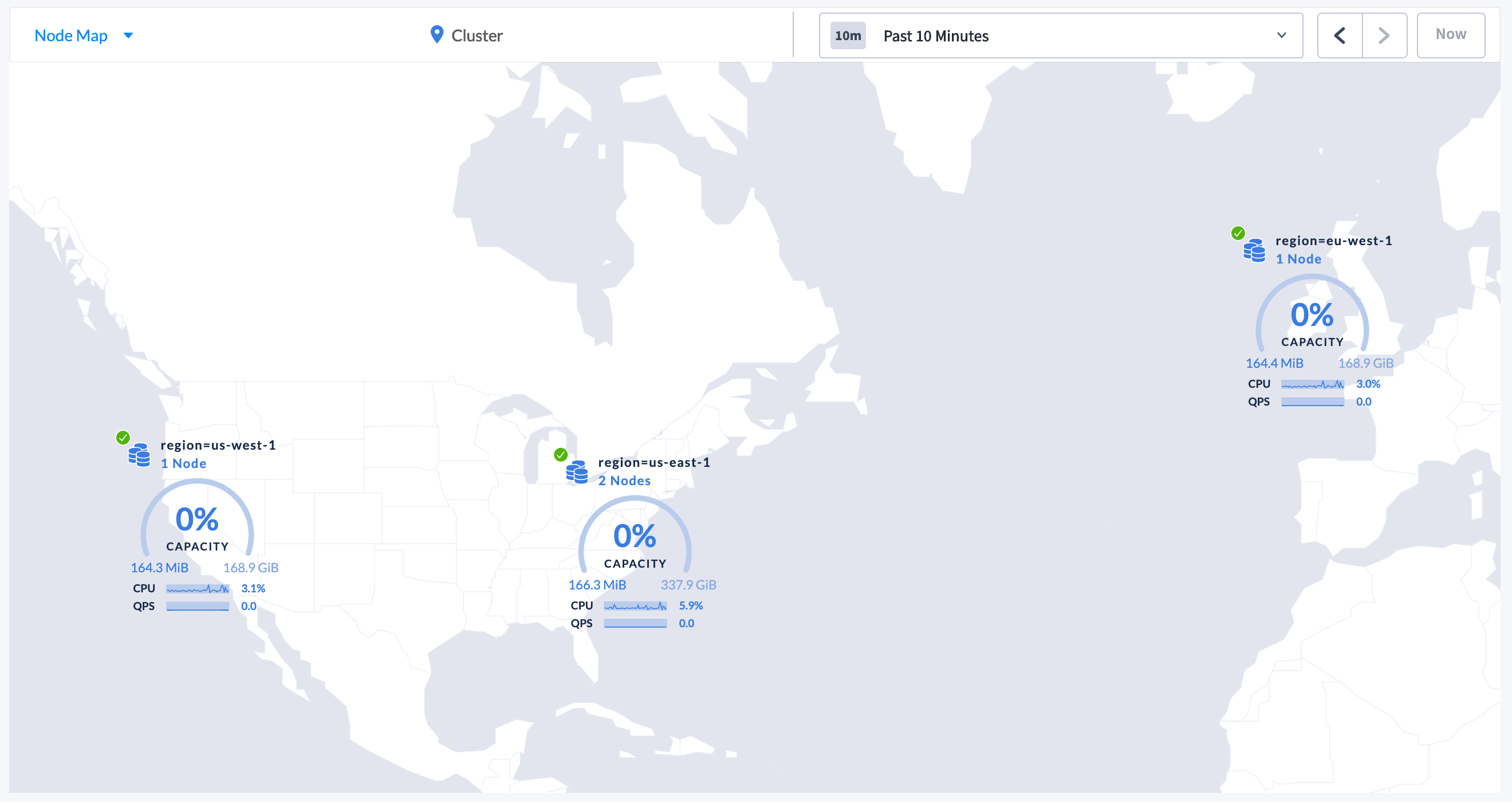
The **Node Map** is useful for:
* Visualizing the geographic configuration of a multi-region cluster on a world map.
* Viewing real-time cluster metrics.
* Drilling down to individual nodes for monitoring health and performance.
This page guides you through the process of setting up and enabling the Node Map.
 ## Set up and enable the Node Map
To enable the Node Map, you need to start the cluster with the correct `--locality` flags and assign the latitude and longitude for each locality.
The Node Map will not be displayed until *all* nodes are started with the correct `--locality` flags and all localities are assigned the corresponding latitude and longitude.
Consider a four-node geo-distributed cluster with the following configuration:
| Node | Region | Datacenter |
| ----- | --------- | ---------- |
| Node1 | us-east-1 | us-east-1a |
| Node2 | us-east-1 | us-east-1b |
| Node3 | us-west-1 | us-west-1a |
| Node4 | eu-west-1 | eu-west-1a |
### Step 1. Start the nodes with the correct `--locality` flags
To start a new cluster with the correct `--locality` flags:
1. Start Node 1:
```
$ cockroach start \
--insecure \
--locality=region=us-east-1,datacenter=us-east-1a \
--advertise-addr=`cockroach init` command to perform a one-time initialization of the cluster:
```shell theme={"theme":{"light":"catppuccin-mocha","dark":"catppuccin-mocha"}}
$ cockroach init --insecure --host=Access the DB Console.
7. If the node list displays, click the selector
## Set up and enable the Node Map
To enable the Node Map, you need to start the cluster with the correct `--locality` flags and assign the latitude and longitude for each locality.
The Node Map will not be displayed until *all* nodes are started with the correct `--locality` flags and all localities are assigned the corresponding latitude and longitude.
Consider a four-node geo-distributed cluster with the following configuration:
| Node | Region | Datacenter |
| ----- | --------- | ---------- |
| Node1 | us-east-1 | us-east-1a |
| Node2 | us-east-1 | us-east-1b |
| Node3 | us-west-1 | us-west-1a |
| Node4 | eu-west-1 | eu-west-1a |
### Step 1. Start the nodes with the correct `--locality` flags
To start a new cluster with the correct `--locality` flags:
1. Start Node 1:
```
$ cockroach start \
--insecure \
--locality=region=us-east-1,datacenter=us-east-1a \
--advertise-addr=`cockroach init` command to perform a one-time initialization of the cluster:
```shell theme={"theme":{"light":"catppuccin-mocha","dark":"catppuccin-mocha"}}
$ cockroach init --insecure --host=Access the DB Console.
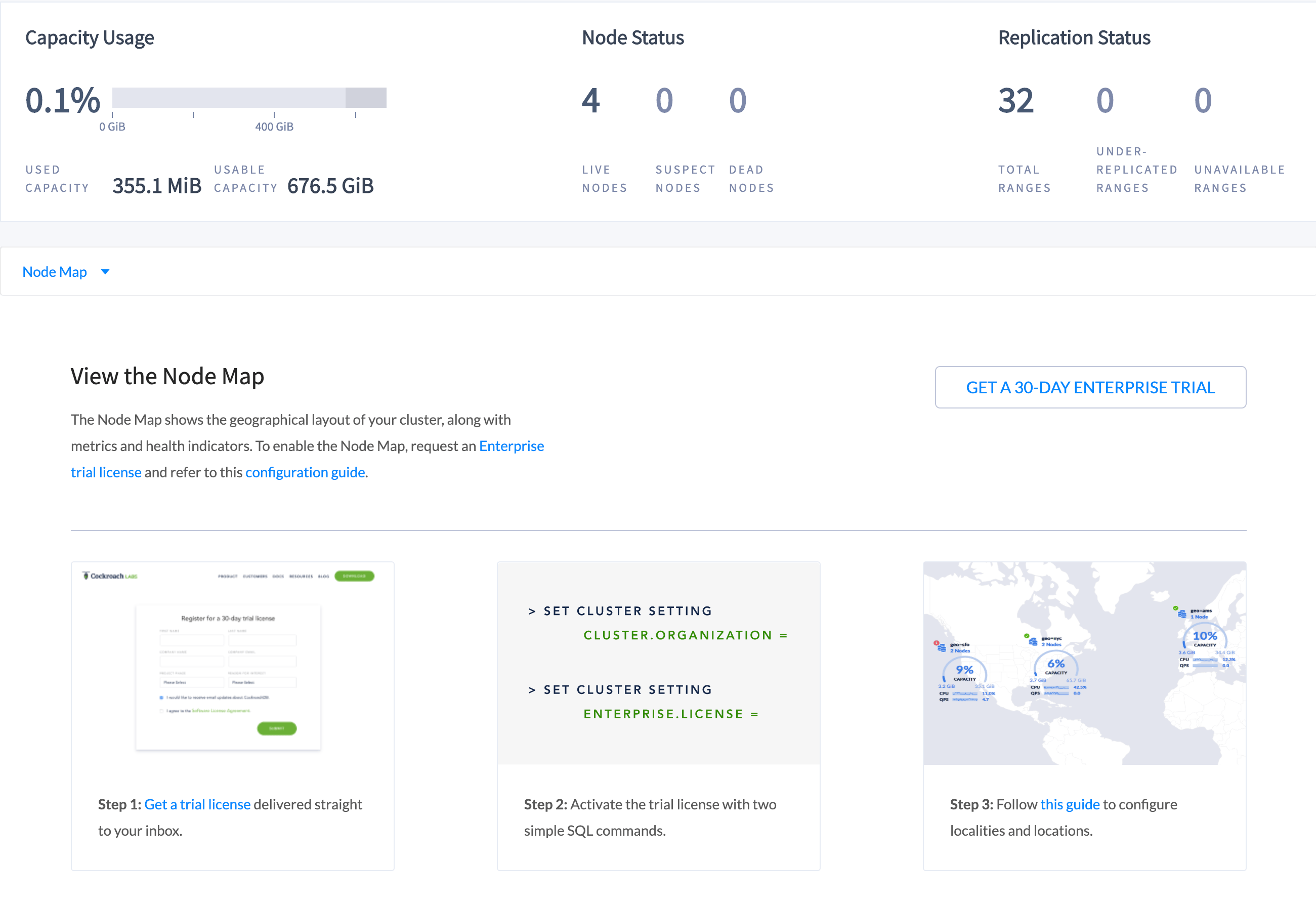
7. If the node list displays, click the selector  and select **Node Map**.
The following page is displayed:
and select **Node Map**.
The following page is displayed:
 ### Step 2. Set the Enterprise license and refresh the DB Console
The Node Map should now be displaying the highest-level localities you defined:
### Step 2. Set the Enterprise license and refresh the DB Console
The Node Map should now be displaying the highest-level localities you defined:
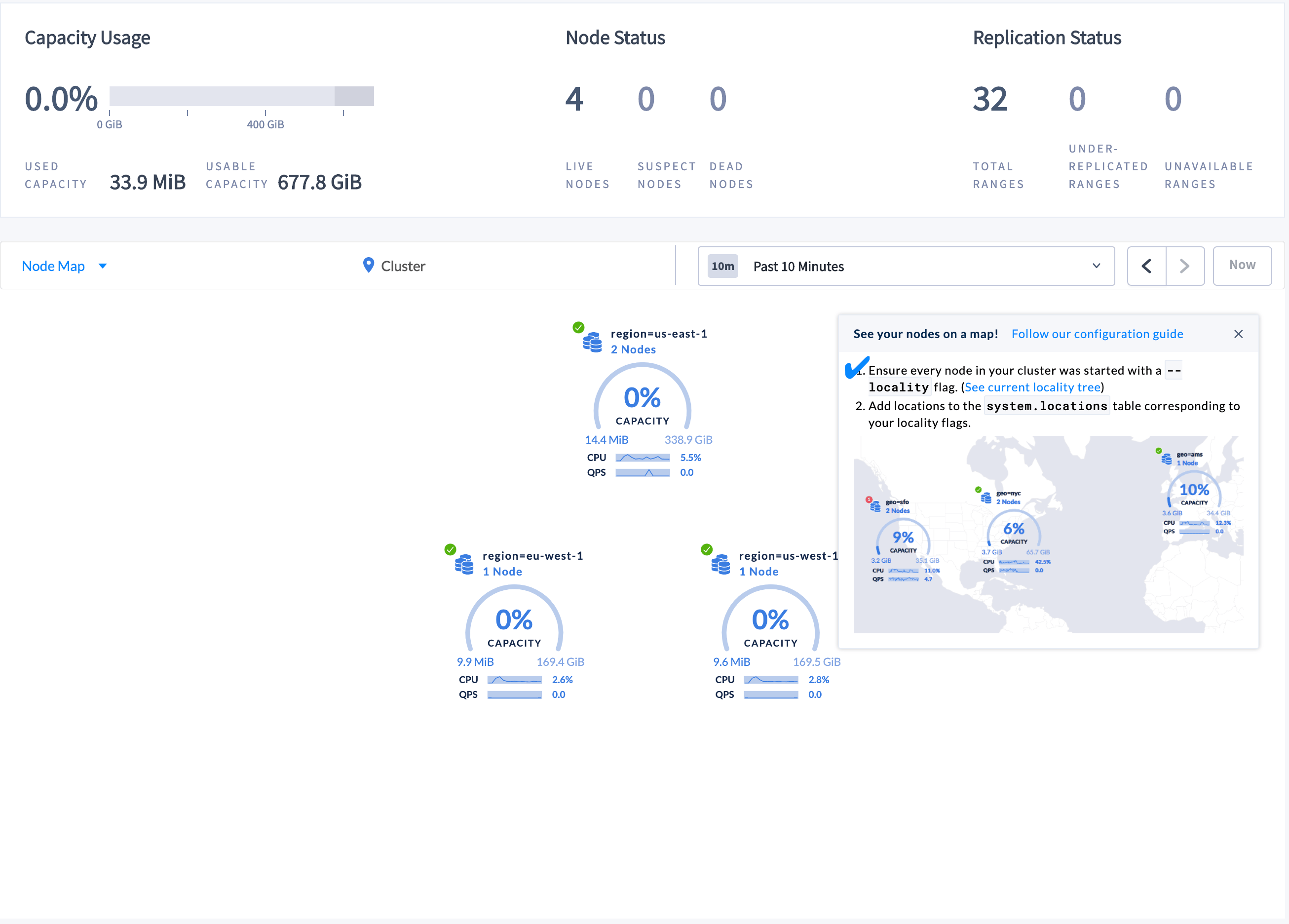 To be displayed on the world map, localities must be assigned a corresponding latitude and longitude.
### Step 3. Set the latitudes and longitudes for the localities
1. Launch the built-in SQL client:
```shell theme={"theme":{"light":"catppuccin-mocha","dark":"catppuccin-mocha"}}
$ cockroach sql --insecure --host= INSERT INTO system.locations VALUES
('region', 'us-east-1', 37.478397, -76.453077),
('region', 'us-west-1', 38.837522, -120.895824),
('region', 'eu-west-1', 53.142367, -7.692054);
```
For the latitudes and longitudes of AWS, Azure, and Google Cloud regions, see [Location Coordinates for Reference](#location-coordinates).
### Step 4. Refresh the Node Map
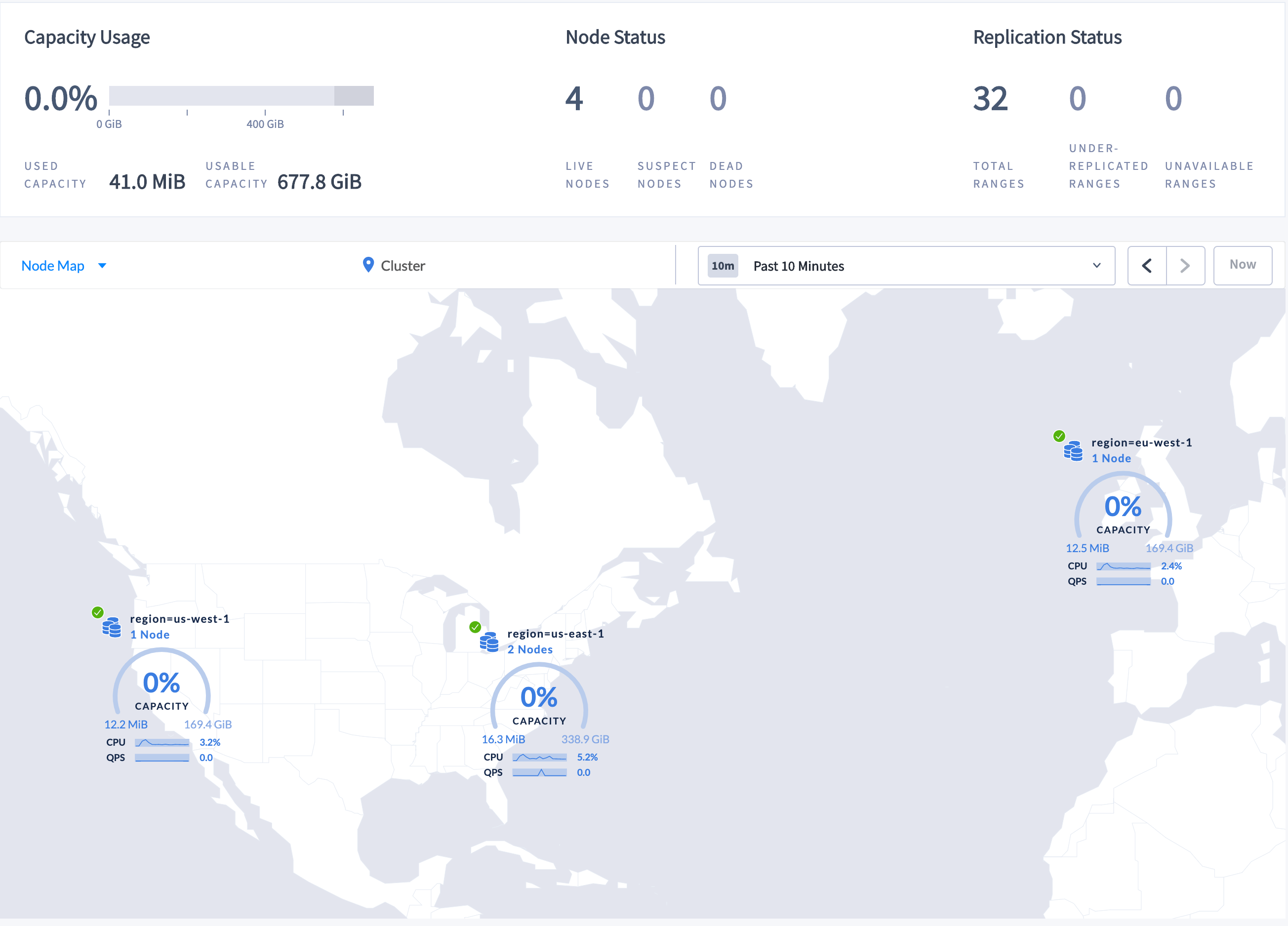
Refresh the DB Console to see the updated Node Map:
To be displayed on the world map, localities must be assigned a corresponding latitude and longitude.
### Step 3. Set the latitudes and longitudes for the localities
1. Launch the built-in SQL client:
```shell theme={"theme":{"light":"catppuccin-mocha","dark":"catppuccin-mocha"}}
$ cockroach sql --insecure --host= INSERT INTO system.locations VALUES
('region', 'us-east-1', 37.478397, -76.453077),
('region', 'us-west-1', 38.837522, -120.895824),
('region', 'eu-west-1', 53.142367, -7.692054);
```
For the latitudes and longitudes of AWS, Azure, and Google Cloud regions, see [Location Coordinates for Reference](#location-coordinates).
### Step 4. Refresh the Node Map
Refresh the DB Console to see the updated Node Map:
 ### Step 5. Navigate the Node Map
To navigate to Node 2, which is in datacenter `us-east-1a` in the `us-east-1` region:
1. Click the map component marked as **region=us-east-1** on the Node Map. The locality component for the datacenter is displayed.
### Step 5. Navigate the Node Map
To navigate to Node 2, which is in datacenter `us-east-1a` in the `us-east-1` region:
1. Click the map component marked as **region=us-east-1** on the Node Map. The locality component for the datacenter is displayed.
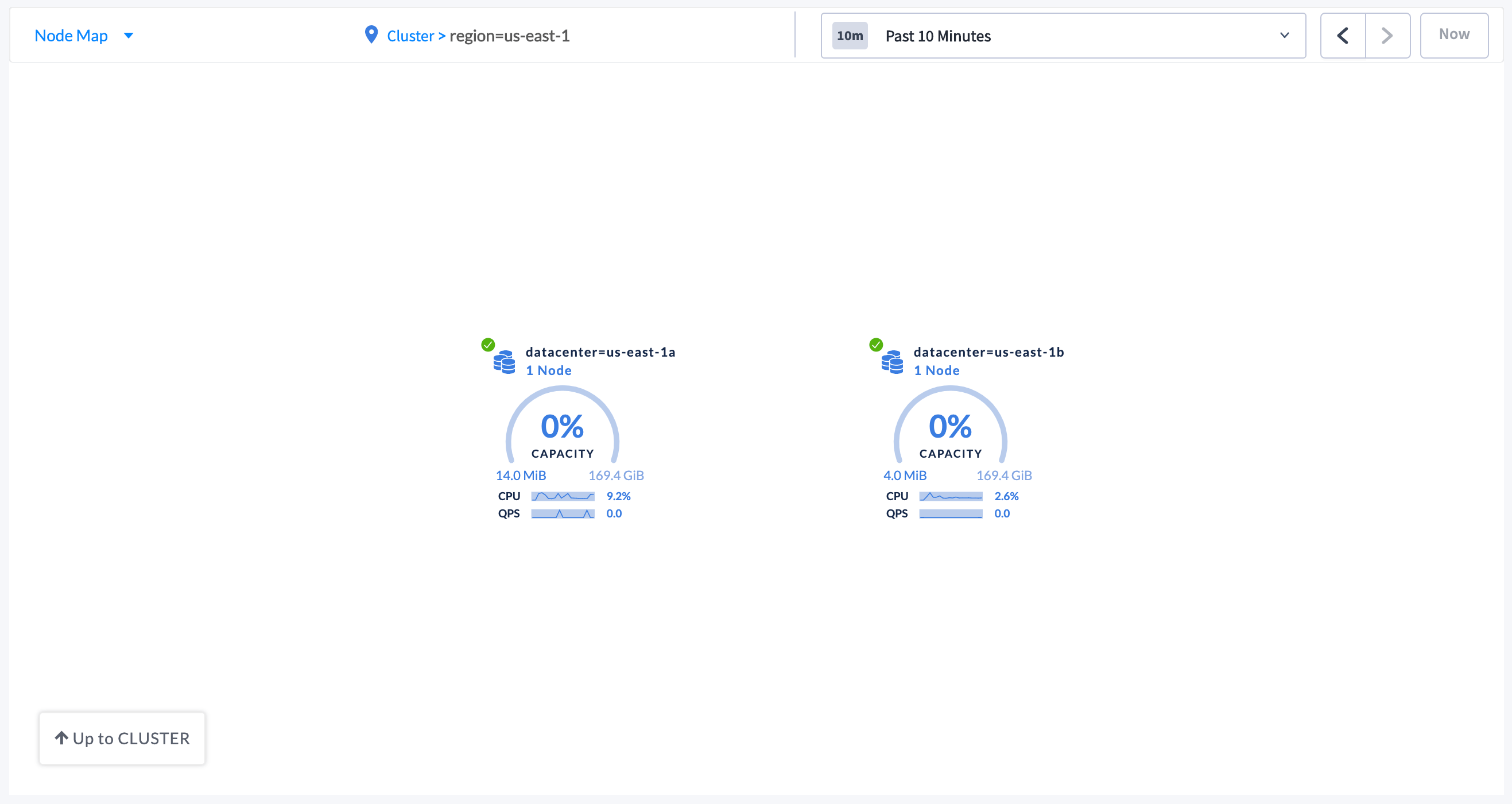 2. Click the datacenter component marked as **datacenter=us-east-1a**. The individual node components are displayed.
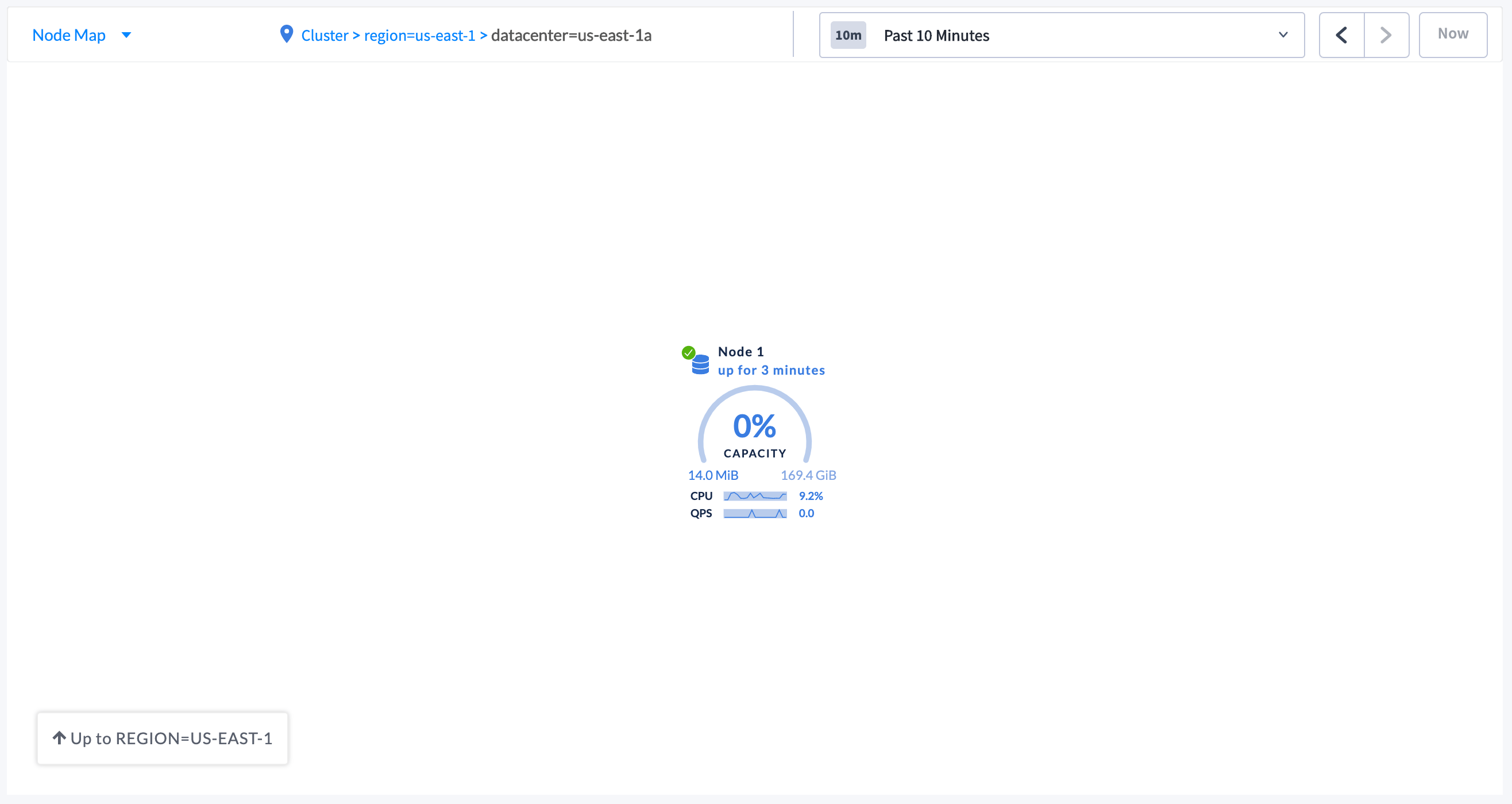 3. To navigate back to the cluster view, either click **Cluster** in the breadcrumb trail at the top of the Node Map, or click **Up to REGION=US-EAST-1** and then click **Up to CLUSTER** in the lower left-hand side of the Node Map.
## Troubleshoot the Node Map
### Node Map not displayed
* All nodes in the cluster must be assigned localities.
* Localities must be [assigned a corresponding latitude and longitude](#step-3-set-the-latitudes-and-longitudes-for-the-localities).
To verify all requirements, navigate to the **Localities** debug page in the DB Console.
3. To navigate back to the cluster view, either click **Cluster** in the breadcrumb trail at the top of the Node Map, or click **Up to REGION=US-EAST-1** and then click **Up to CLUSTER** in the lower left-hand side of the Node Map.
## Troubleshoot the Node Map
### Node Map not displayed
* All nodes in the cluster must be assigned localities.
* Localities must be [assigned a corresponding latitude and longitude](#step-3-set-the-latitudes-and-longitudes-for-the-localities).
To verify all requirements, navigate to the **Localities** debug page in the DB Console.
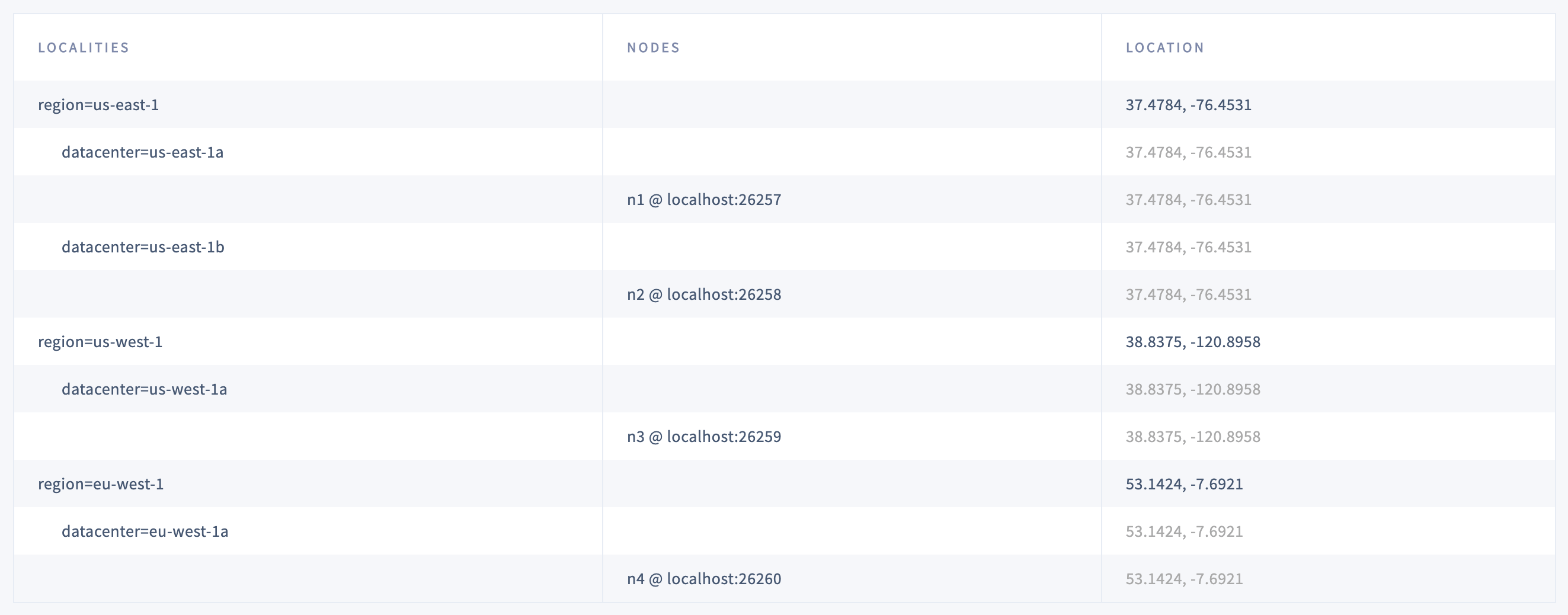 The **Localities** debug page displays the following:
* Localities configuration that you set up while starting the nodes with the `--locality` flags.
* Nodes corresponding to each locality.
* Latitude and longitude coordinates for each locality.
### World Map not displayed for all locality levels
The world map is displayed only when [localities are assigned latitude and longitude coordinates](#step-3-set-the-latitudes-and-longitudes-for-the-localities).
If a locality (e.g., region) is not assigned latitude and longitude coordinates, it is displayed using the latitude and longitude of any lower-level localities it contains (e.g., datacenter). If no coordinates are available, localities are plotted in a circular layout.
### Displayed Used Capacity value is more than configured Capacity
If you are testing your deployment locally with multiple CockroachDB nodes running on a single machine (this is not recommended in production), you must explicitly set the store size per node in order to display the correct capacity. Otherwise, the machine's actual disk capacity will be counted as a separate store for each node, thus inflating the computed capacity.
## Location coordinates
This section lists the latitudes and longitudes of AWS, Azure, and Google Cloud regions.
### AWS locations
| Location | SQL Statement |
| -------------------------- | ----------------------------------------------------------------------------------------- |
| US East (N. Virginia) | `INSERT into system.locations VALUES ('region', 'us-east-1', 37.478397, -76.453077)` |
| US East (Ohio) | `INSERT into system.locations VALUES ('region', 'us-east-2', 40.417287, -76.453077)` |
| US West (N. California) | `INSERT into system.locations VALUES ('region', 'us-west-1', 38.837522, -120.895824)` |
| US West (Oregon) | `INSERT into system.locations VALUES ('region', 'us-west-2', 43.804133, -120.554201)` |
| Canada (Central) | `INSERT into system.locations VALUES ('region', 'ca-central-1', 56.130366, -106.346771)` |
| EU (Frankfurt) | `INSERT into system.locations VALUES ('region', 'eu-central-1', 50.110922, 8.682127)` |
| EU (Ireland) | `INSERT into system.locations VALUES ('region', 'eu-west-1', 53.142367, -7.692054)` |
| EU (London) | `INSERT into system.locations VALUES ('region', 'eu-west-2', 51.507351, -0.127758)` |
| EU (Paris) | `INSERT into system.locations VALUES ('region', 'eu-west-3', 48.856614, 2.352222)` |
| Asia Pacific (Tokyo) | `INSERT into system.locations VALUES ('region', 'ap-northeast-1', 35.689487, 139.691706)` |
| Asia Pacific (Seoul) | `INSERT into system.locations VALUES ('region', 'ap-northeast-2', 37.566535, 126.977969)` |
| Asia Pacific (Osaka-Local) | `INSERT into system.locations VALUES ('region', 'ap-northeast-3', 34.693738, 135.502165)` |
| Asia Pacific (Singapore) | `INSERT into system.locations VALUES ('region', 'ap-southeast-1', 1.352083, 103.819836)` |
| Asia Pacific (Sydney) | `INSERT into system.locations VALUES ('region', 'ap-southeast-2', -33.86882, 151.209296)` |
| Asia Pacific (Mumbai) | `INSERT into system.locations VALUES ('region', 'ap-south-1', 19.075984, 72.877656)` |
| South America (São Paulo) | `INSERT into system.locations VALUES ('region', 'sa-east-1', -23.55052, -46.633309)` |
### Azure locations
| Location | SQL Statement |
| ---------------------------------------- | ------------------------------------------------------------------------------------------ |
| eastasia (East Asia) | `INSERT into system.locations VALUES ('region', 'eastasia', 22.267, 114.188)` |
| southeastasia (Southeast Asia) | `INSERT into system.locations VALUES ('region', 'southeastasia', 1.283, 103.833)` |
| centralus (Central US) | `INSERT into system.locations VALUES ('region', 'centralus', 41.5908, -93.6208)` |
| eastus (East US) | `INSERT into system.locations VALUES ('region', 'eastus', 37.3719, -79.8164)` |
| eastus2 (East US 2) | `INSERT into system.locations VALUES ('region', 'eastus2', 36.6681, -78.3889)` |
| westus (West US) | `INSERT into system.locations VALUES ('region', 'westus', 37.783, -122.417)` |
| northcentralus (North Central US) | `INSERT into system.locations VALUES ('region', 'northcentralus', 41.8819, -87.6278)` |
| southcentralus (South Central US) | `INSERT into system.locations VALUES ('region', 'southcentralus', 29.4167, -98.5)` |
| northeurope (North Europe) | `INSERT into system.locations VALUES ('region', 'northeurope', 53.3478, -6.2597)` |
| westeurope (West Europe) | `INSERT into system.locations VALUES ('region', 'westeurope', 52.3667, 4.9)` |
| japanwest (Japan West) | `INSERT into system.locations VALUES ('region', 'japanwest', 34.6939, 135.5022)` |
| japaneast (Japan East) | `INSERT into system.locations VALUES ('region', 'japaneast', 35.68, 139.77)` |
| australiaeast (Australia East) | `INSERT into system.locations VALUES ('region', 'australiaeast', -33.86, 151.2094)` |
| australiasoutheast (Australia Southeast) | `INSERT into system.locations VALUES ('region', 'australiasoutheast', -37.8136, 144.9631)` |
| southindia (South India) | `INSERT into system.locations VALUES ('region', 'southindia', 12.9822, 80.1636)` |
| centralindia (Central India) | `INSERT into system.locations VALUES ('region', 'centralindia', 18.5822, 73.9197)` |
| westindia (West India) | `INSERT into system.locations VALUES ('region', 'westindia', 19.088, 72.868)` |
| canadacentral (Canada Central) | `INSERT into system.locations VALUES ('region', 'canadacentral', 43.653, -79.383)` |
| canadaeast (Canada East) | `INSERT into system.locations VALUES ('region', 'canadaeast', 46.817, -71.217)` |
| uksouth (UK South) | `INSERT into system.locations VALUES ('region', 'uksouth', 50.941, -0.799)` |
| ukwest (UK West) | `INSERT into system.locations VALUES ('region', 'ukwest', 53.427, -3.084)` |
| westcentralus (West Central US) | `INSERT into system.locations VALUES ('region', 'westcentralus', 40.890, -110.234)` |
| westus2 (West US 2) | `INSERT into system.locations VALUES ('region', 'westus2', 47.233, -119.852)` |
| koreacentral (Korea Central) | `INSERT into system.locations VALUES ('region', 'koreacentral', 37.5665, 126.9780)` |
| koreasouth (Korea South) | `INSERT into system.locations VALUES ('region', 'koreasouth', 35.1796, 129.0756)` |
| francecentral (France Central) | `INSERT into system.locations VALUES ('region', 'francecentral', 46.3772, 2.3730)` |
| francesouth (France South) | `INSERT into system.locations VALUES ('region', 'francesouth', 43.8345, 2.1972)` |
### Google Cloud locations
| Location | SQL Statement |
| ---------------------------------- | --------------------------------------------------------------------------------------------------- |
| us-east1 (South Carolina) | `INSERT into system.locations VALUES ('region', 'us-east1', 33.836082, -81.163727)` |
| us-east4 (N. Virginia) | `INSERT into system.locations VALUES ('region', 'us-east4', 37.478397, -76.453077)` |
| us-central1 (Iowa) | `INSERT into system.locations VALUES ('region', 'us-central1', 42.032974, -93.581543)` |
| us-west1 (Oregon) | `INSERT into system.locations VALUES ('region', 'us-west1', 43.804133, -120.554201)` |
| northamerica-northeast1 (Montreal) | `INSERT into system.locations VALUES ('region', 'northamerica-northeast1', 56.130366, -106.346771)` |
| europe-west1 (Belgium) | `INSERT into system.locations VALUES ('region', 'europe-west1', 50.44816, 3.81886)` |
| europe-west2 (London) | `INSERT into system.locations VALUES ('region', 'europe-west2', 51.507351, -0.127758)` |
| europe-west3 (Frankfurt) | `INSERT into system.locations VALUES ('region', 'europe-west3', 50.110922, 8.682127)` |
| europe-west4 (Netherlands) | `INSERT into system.locations VALUES ('region', 'europe-west4', 53.4386, 6.8355)` |
| europe-west6 (Zürich) | `INSERT into system.locations VALUES ('region', 'europe-west6', 47.3769, 8.5417)` |
| asia-east1 (Taiwan) | `INSERT into system.locations VALUES ('region', 'asia-east1', 24.0717, 120.5624)` |
| asia-northeast1 (Tokyo) | `INSERT into system.locations VALUES ('region', 'asia-northeast1', 35.689487, 139.691706)` |
| asia-southeast1 (Singapore) | `INSERT into system.locations VALUES ('region', 'asia-southeast1', 1.352083, 103.819836)` |
| australia-southeast1 (Sydney) | `INSERT into system.locations VALUES ('region', 'australia-southeast1', -33.86882, 151.209296)` |
| asia-south1 (Mumbai) | `INSERT into system.locations VALUES ('region', 'asia-south1', 19.075984, 72.877656)` |
| southamerica-east1 (São Paulo) | `INSERT into system.locations VALUES ('region', 'southamerica-east1', -23.55052, -46.633309)` |
The **Localities** debug page displays the following:
* Localities configuration that you set up while starting the nodes with the `--locality` flags.
* Nodes corresponding to each locality.
* Latitude and longitude coordinates for each locality.
### World Map not displayed for all locality levels
The world map is displayed only when [localities are assigned latitude and longitude coordinates](#step-3-set-the-latitudes-and-longitudes-for-the-localities).
If a locality (e.g., region) is not assigned latitude and longitude coordinates, it is displayed using the latitude and longitude of any lower-level localities it contains (e.g., datacenter). If no coordinates are available, localities are plotted in a circular layout.
### Displayed Used Capacity value is more than configured Capacity
If you are testing your deployment locally with multiple CockroachDB nodes running on a single machine (this is not recommended in production), you must explicitly set the store size per node in order to display the correct capacity. Otherwise, the machine's actual disk capacity will be counted as a separate store for each node, thus inflating the computed capacity.
## Location coordinates
This section lists the latitudes and longitudes of AWS, Azure, and Google Cloud regions.
### AWS locations
| Location | SQL Statement |
| -------------------------- | ----------------------------------------------------------------------------------------- |
| US East (N. Virginia) | `INSERT into system.locations VALUES ('region', 'us-east-1', 37.478397, -76.453077)` |
| US East (Ohio) | `INSERT into system.locations VALUES ('region', 'us-east-2', 40.417287, -76.453077)` |
| US West (N. California) | `INSERT into system.locations VALUES ('region', 'us-west-1', 38.837522, -120.895824)` |
| US West (Oregon) | `INSERT into system.locations VALUES ('region', 'us-west-2', 43.804133, -120.554201)` |
| Canada (Central) | `INSERT into system.locations VALUES ('region', 'ca-central-1', 56.130366, -106.346771)` |
| EU (Frankfurt) | `INSERT into system.locations VALUES ('region', 'eu-central-1', 50.110922, 8.682127)` |
| EU (Ireland) | `INSERT into system.locations VALUES ('region', 'eu-west-1', 53.142367, -7.692054)` |
| EU (London) | `INSERT into system.locations VALUES ('region', 'eu-west-2', 51.507351, -0.127758)` |
| EU (Paris) | `INSERT into system.locations VALUES ('region', 'eu-west-3', 48.856614, 2.352222)` |
| Asia Pacific (Tokyo) | `INSERT into system.locations VALUES ('region', 'ap-northeast-1', 35.689487, 139.691706)` |
| Asia Pacific (Seoul) | `INSERT into system.locations VALUES ('region', 'ap-northeast-2', 37.566535, 126.977969)` |
| Asia Pacific (Osaka-Local) | `INSERT into system.locations VALUES ('region', 'ap-northeast-3', 34.693738, 135.502165)` |
| Asia Pacific (Singapore) | `INSERT into system.locations VALUES ('region', 'ap-southeast-1', 1.352083, 103.819836)` |
| Asia Pacific (Sydney) | `INSERT into system.locations VALUES ('region', 'ap-southeast-2', -33.86882, 151.209296)` |
| Asia Pacific (Mumbai) | `INSERT into system.locations VALUES ('region', 'ap-south-1', 19.075984, 72.877656)` |
| South America (São Paulo) | `INSERT into system.locations VALUES ('region', 'sa-east-1', -23.55052, -46.633309)` |
### Azure locations
| Location | SQL Statement |
| ---------------------------------------- | ------------------------------------------------------------------------------------------ |
| eastasia (East Asia) | `INSERT into system.locations VALUES ('region', 'eastasia', 22.267, 114.188)` |
| southeastasia (Southeast Asia) | `INSERT into system.locations VALUES ('region', 'southeastasia', 1.283, 103.833)` |
| centralus (Central US) | `INSERT into system.locations VALUES ('region', 'centralus', 41.5908, -93.6208)` |
| eastus (East US) | `INSERT into system.locations VALUES ('region', 'eastus', 37.3719, -79.8164)` |
| eastus2 (East US 2) | `INSERT into system.locations VALUES ('region', 'eastus2', 36.6681, -78.3889)` |
| westus (West US) | `INSERT into system.locations VALUES ('region', 'westus', 37.783, -122.417)` |
| northcentralus (North Central US) | `INSERT into system.locations VALUES ('region', 'northcentralus', 41.8819, -87.6278)` |
| southcentralus (South Central US) | `INSERT into system.locations VALUES ('region', 'southcentralus', 29.4167, -98.5)` |
| northeurope (North Europe) | `INSERT into system.locations VALUES ('region', 'northeurope', 53.3478, -6.2597)` |
| westeurope (West Europe) | `INSERT into system.locations VALUES ('region', 'westeurope', 52.3667, 4.9)` |
| japanwest (Japan West) | `INSERT into system.locations VALUES ('region', 'japanwest', 34.6939, 135.5022)` |
| japaneast (Japan East) | `INSERT into system.locations VALUES ('region', 'japaneast', 35.68, 139.77)` |
| australiaeast (Australia East) | `INSERT into system.locations VALUES ('region', 'australiaeast', -33.86, 151.2094)` |
| australiasoutheast (Australia Southeast) | `INSERT into system.locations VALUES ('region', 'australiasoutheast', -37.8136, 144.9631)` |
| southindia (South India) | `INSERT into system.locations VALUES ('region', 'southindia', 12.9822, 80.1636)` |
| centralindia (Central India) | `INSERT into system.locations VALUES ('region', 'centralindia', 18.5822, 73.9197)` |
| westindia (West India) | `INSERT into system.locations VALUES ('region', 'westindia', 19.088, 72.868)` |
| canadacentral (Canada Central) | `INSERT into system.locations VALUES ('region', 'canadacentral', 43.653, -79.383)` |
| canadaeast (Canada East) | `INSERT into system.locations VALUES ('region', 'canadaeast', 46.817, -71.217)` |
| uksouth (UK South) | `INSERT into system.locations VALUES ('region', 'uksouth', 50.941, -0.799)` |
| ukwest (UK West) | `INSERT into system.locations VALUES ('region', 'ukwest', 53.427, -3.084)` |
| westcentralus (West Central US) | `INSERT into system.locations VALUES ('region', 'westcentralus', 40.890, -110.234)` |
| westus2 (West US 2) | `INSERT into system.locations VALUES ('region', 'westus2', 47.233, -119.852)` |
| koreacentral (Korea Central) | `INSERT into system.locations VALUES ('region', 'koreacentral', 37.5665, 126.9780)` |
| koreasouth (Korea South) | `INSERT into system.locations VALUES ('region', 'koreasouth', 35.1796, 129.0756)` |
| francecentral (France Central) | `INSERT into system.locations VALUES ('region', 'francecentral', 46.3772, 2.3730)` |
| francesouth (France South) | `INSERT into system.locations VALUES ('region', 'francesouth', 43.8345, 2.1972)` |
### Google Cloud locations
| Location | SQL Statement |
| ---------------------------------- | --------------------------------------------------------------------------------------------------- |
| us-east1 (South Carolina) | `INSERT into system.locations VALUES ('region', 'us-east1', 33.836082, -81.163727)` |
| us-east4 (N. Virginia) | `INSERT into system.locations VALUES ('region', 'us-east4', 37.478397, -76.453077)` |
| us-central1 (Iowa) | `INSERT into system.locations VALUES ('region', 'us-central1', 42.032974, -93.581543)` |
| us-west1 (Oregon) | `INSERT into system.locations VALUES ('region', 'us-west1', 43.804133, -120.554201)` |
| northamerica-northeast1 (Montreal) | `INSERT into system.locations VALUES ('region', 'northamerica-northeast1', 56.130366, -106.346771)` |
| europe-west1 (Belgium) | `INSERT into system.locations VALUES ('region', 'europe-west1', 50.44816, 3.81886)` |
| europe-west2 (London) | `INSERT into system.locations VALUES ('region', 'europe-west2', 51.507351, -0.127758)` |
| europe-west3 (Frankfurt) | `INSERT into system.locations VALUES ('region', 'europe-west3', 50.110922, 8.682127)` |
| europe-west4 (Netherlands) | `INSERT into system.locations VALUES ('region', 'europe-west4', 53.4386, 6.8355)` |
| europe-west6 (Zürich) | `INSERT into system.locations VALUES ('region', 'europe-west6', 47.3769, 8.5417)` |
| asia-east1 (Taiwan) | `INSERT into system.locations VALUES ('region', 'asia-east1', 24.0717, 120.5624)` |
| asia-northeast1 (Tokyo) | `INSERT into system.locations VALUES ('region', 'asia-northeast1', 35.689487, 139.691706)` |
| asia-southeast1 (Singapore) | `INSERT into system.locations VALUES ('region', 'asia-southeast1', 1.352083, 103.819836)` |
| australia-southeast1 (Sydney) | `INSERT into system.locations VALUES ('region', 'australia-southeast1', -33.86882, 151.209296)` |
| asia-south1 (Mumbai) | `INSERT into system.locations VALUES ('region', 'asia-south1', 19.075984, 72.877656)` |
| southamerica-east1 (São Paulo) | `INSERT into system.locations VALUES ('region', 'southamerica-east1', -23.55052, -46.633309)` |